For fast, free speech lookups across dozens of languages, Google Translate is the most dependable general tool. iPhone owners should take advantage of Apple Translate for simple offline travel phrases, while DeepL Voice delivers superior phrasing nuance for business discussions. If you need two-way face-to-face dialogue where the phone rests between two people and automatically saves dual-language transcripts with AI summaries, Clawmium Translate, which is our app, is built specifically for that.
Voice translation apps convert spoken words from one language into another in real time, reading the translation aloud through your phone speaker or displaying it on screen. Google Translate remains the most widely accessible free option on Android and iPhone, supporting more than 70 spoken languages with automatic conversation detection. Apple Translate comes pre-installed on iOS devices, offering clean offline speech packs for about 20 major language pairs. Microsoft Translator provides a reliable split-screen mode with phrasebooks, while DeepL Voice focuses on business-grade phrasing precision.
Clawmium Translate specializes in face-to-face two-way conversations on Android and iPhone. It splits your screen into two facing halves so each person reads their own language naturally, while saving complete dual-language transcripts with automated AI summaries on your phone. Spoken translation requires an active internet connection. No mobile app replaces a certified human interpreter for legal hearings or formal medical consultations.
What makes a practical voice translator app (and where most fail)
Most translation tools were initially designed for written text. Translating a typed sentence is straightforward because the algorithm receives clean characters and punctuation. Spoken language introduces several real-world obstacles that expose weak apps immediately:
- Acoustic filtering in noisy environments: Crowded train stations, busy restaurant dining rooms, and windy street corners confuse basic speech recognition engines. A capable voice translator app must isolate human speech from ambient background chatter.
- Automatic language detection: Passing a phone back and forth while manually tapping a button for "Language A" and then "Language B" breaks the natural flow of conversation. The best tools detect which speaker is talking automatically.
- Latency and conversation tempo: A delay of three to four seconds feels like an eternity when someone is waiting for an answer. Modern voice apps use streaming speech models that translate as words are being spoken, reducing conversational hesitation.
- Natural voice synthesis: Robotic text-to-speech engines mispronounce questions and drop inflection. Modern engines apply natural prosody so listeners understand questions without straining.
- Persistent session records: The biggest drawback of standard tools is that words evaporate the moment you close the screen. If someone gave you train directions, medication instructions, or project feedback, you need a saved record of what was said.
Online vs. offline voice translation: the technical trade-off
Searchers frequently wonder whether a voice translator app can work completely offline without an internet connection. The short answer is yes, but with major trade-offs in vocabulary and natural phrasing.
Offline text dictionaries require only 50 to 100 megabytes of storage because typed vocabulary fits easily into compressed lookup tables. In contrast, spoken voice translation requires three distinct computational stages: automatic speech recognition, linguistic machine translation, and neural speech synthesis. Compressing all three models to run on mobile device processors without draining your battery requires drastic compromises.
Without cloud language models, offline speech translation engines often mishear regional accents, drop colloquial idioms, and struggle with sentences longer than six words. When your phone has an active Wi-Fi or cellular data connection, speech streams to large cloud models that understand context, slang, and technical terminology. For critical conversations, cloud-powered voice translation provides substantially higher accuracy.
Five voice translator apps compared
These five applications represent the most capable voice translation tools available on Android and iPhone today.
| App | Best For | Voice Input Mode | Offline Speech | Speaker Voices | Session History |
|---|---|---|---|---|---|
| Google Translate | Everyday general speech lookups | Auto-detect conversation & single mic | Yes (select languages on Pixel) | Single device voice | Discards full conversation history |
| Apple Translate | iPhone owners traveling abroad | Two-way conversation view | Yes (downloaded packs on iOS) | System Siri voices | Favorites only, no session logs |
| DeepL Voice | Nuanced professional dialogue | Single-speaker speech input | No (requires internet connection) | Natural neural voices | Text history only, no audio notes |
| Microsoft Translator | Offline travel phrases & split view | Two-way split screen & mic tap | Yes (downloadable packs) | Standard TTS voices | Recent queries without summaries |
| Clawmium Translate (ours) | Face-to-face dialogue & AI summaries | Continuous two-way split screen | No (cellular data or Wi-Fi) | Distinct voice per speaker | Dual transcripts with AI summaries |
Google Translate: the standard free baseline
Google Translate is the most recognized voice translation tool globally. It's completely free to download on Android and iPhone with no paywalls or advertising banners. For quick voice lookups, it supports more than 70 spoken languages.
Its conversation mode includes an automatic detection feature that listens for both selected languages simultaneously. When working properly, you don't need to touch the screen between turns. Google's speech recognition engine handles background chatter better than most competitors, and the app works smoothly alongside Google Assistant.
The primary frustration with Google Translate is conversation retention. Once you exit conversation mode, your spoken dialogue vanishes. The app doesn't save a dual-language transcript, nor does it summarize agreements or instructions. If you're discussing complex topics, you must take separate notes manually.
Apple Translate: clean built-in voice tool for iOS
If you use an iPhone running iOS 14 or later, Apple Translate is already installed on your device. Designed specifically for iPhone hardware, it offers a clutter-free interface and respects user privacy by default.
The app features a dedicated Conversation tab with a side-by-side or face-to-face view. One of Apple's biggest advantages is offline voice support. By downloading language packs in advance, you can translate spoken phrases in about 20 language pairs while hiking or flying without cellular connectivity. It also links smoothly with the Action button on recent iPhone models for rapid voice lookups.
However, Apple Translate remains exclusive to Apple hardware and supports far fewer languages than Google or Microsoft. Its speech engine can be impatient, sometimes cutting off speakers who pause to think mid-sentence. Like Google, it doesn't organize saved dialogues into structured visit summaries.
DeepL Voice: superior phrasing nuance
DeepL has long been considered the benchmark for written translation quality, outperforming general engines on complex syntax and tone. Its mobile application on iOS and Android brings that linguistic precision to voice translation.
When you speak into DeepL, the engine captures nuances, formal vs. informal distinctions, and industry terminology that other tools translate too literally. If you're negotiating terms with an overseas supplier or discussing technical specifications, DeepL provides the most natural translation phrasing available.
The limitation of DeepL is that its interface isn't built for rapid, fluid back-and-forth dialogue. It lacks an inverted split-screen mode for two people sitting across a table, and it requires an active internet connection. It operates primarily as a single-speaker dictation tool rather than an automated conversation partner.
Microsoft Translator: versatile split-screen and travel phrases
Microsoft Translator is a dependable utility available on both major mobile platforms. Microsoft Translator supports more than 70 languages and offers downloadable offline packs for text and basic voice queries.
The app includes an intuitive split-screen view where two microphones face opposite directions on a single phone. Each person taps their respective microphone icon to speak. It also features pre-built travel phrasebooks organized by category, such as lodging, dining, and emergencies, complete with native audio pronunciation guides.
On the downside, Microsoft's spoken voices tend to sound somewhat robotic compared to modern neural voice models. Microsoft also retired its multi-device group conversation feature (joining discussions via room codes) in version 26.7.1 on 30 June 2026, refocusing the app on single-device interactions.
Where Clawmium Translate fits
Clawmium Translate is our app, so evaluate this section with that context in mind. We developed Clawmium Translate specifically to overcome the awkward friction of face-to-face spoken conversations between people who don't share a common language, running natively on Android and iPhone.
When you open conversation mode in Clawmium Translate, the screen splits into two dedicated viewports. You place your smartphone flat on a table or counter between you and your conversation partner. The top half of the screen inverts 180 degrees to face the other person, while the bottom half faces you. Each participant reads their own language in large, clear type without craning their neck or taking the phone from your hands.
The app listens continuously and detects which of your two chosen languages is being spoken automatically. Translations can be read aloud through your device speaker, with distinct natural voices assigned to each speaker so you can tell who said what. During spoken output, the microphone mutes automatically to prevent feedback loops.
The defining strength of Clawmium Translate is what happens after the conversation ends. Standard voice tools discard your dialogue the moment you close the app. Clawmium Translate automatically saves every session in History on your device. You receive a complete, dual-language transcript alongside an automated AI summary that highlights key decisions, agreed dates, dosage instructions, and follow-up items.
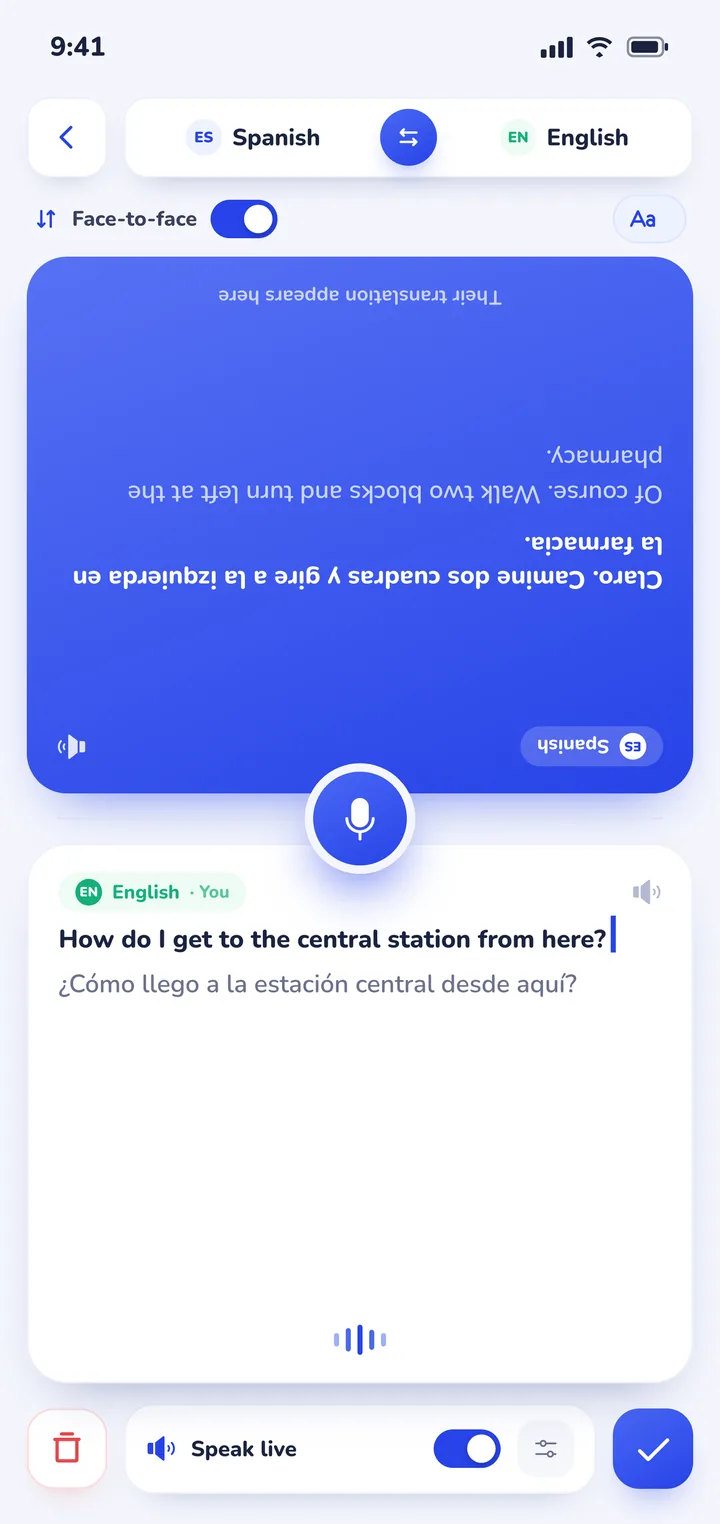
The app also includes a cloud camera translation feature that photographs printed menus, transit schedules, and advisories, overlaying English translations directly over the photo. For camera advice, read our complete guide on how to translate a menu with your camera. Clawmium Translate supports more than 60 languages, including Spanish, French, German, Italian, Japanese, Korean, Chinese, and Thai.
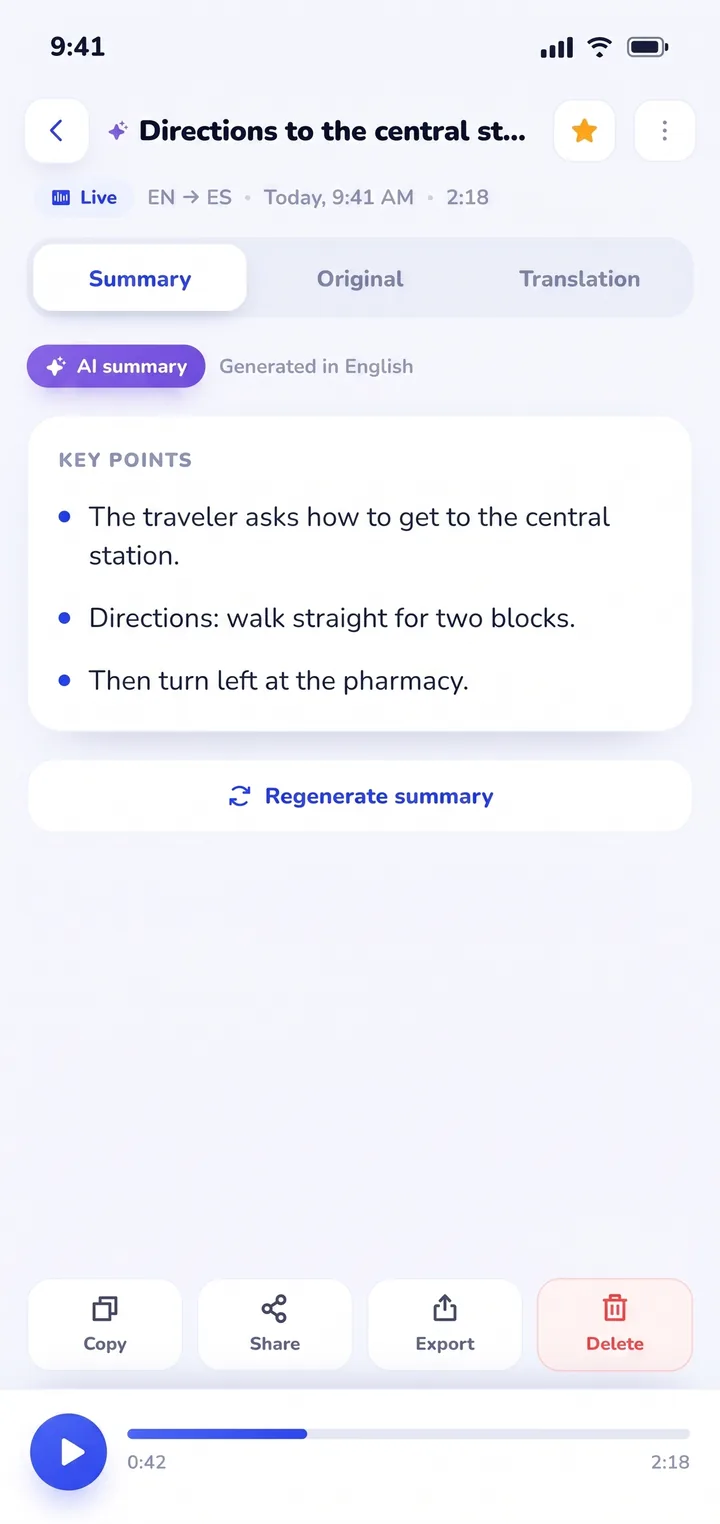
There are important boundaries to understand. Clawmium Translate processes speech through cloud models to maintain high translation accuracy, meaning it requires an active cellular data or Wi-Fi connection. It does not offer an offline speech mode. The app is free to download with a daily allowance for live transcription and spoken output that resets every day, and it's completely ad-free. An optional Pro monthly subscription raises daily allowances and adds every voice.
Real-world voice translation scenarios
Different conversational settings create distinct challenges for voice translator apps. Here is how specialized tools perform across common real-life environments:
International travel and transit hubs
Navigating unfamiliar transportation networks requires quick, decisive voice exchanges. When asking a station agent about platform changes, ticket validation, or missed connections, you rarely have time to type. Dedicated tools like our translation app for travel help you confirm details swiftly across language barriers.
If you're using an Android smartphone, check our companion guide to finding a translator app for Android, which explores built-in tools versus dedicated voice apps. iPhone travelers can consult our evaluation of real-time translator apps for iPhone to compare Apple's native features with third-party software. For major global language pairs, explore our dedicated guides to English to Arabic real-time voice translation and English to Chinese speech.
Healthcare visits and medical consultations
Speaking with a doctor, nurse, or pharmacist in another language is high-stakes communication. Missing a dosage schedule or misinterpreting symptoms can have serious consequences. While no consumer mobile application replaces a certified clinical interpreter, voice apps provide critical assistance when urgent questions arise abroad.
In medical contexts, the ability to review what was said is essential. A voice translator app that saves transcripts helps patients confirm prescription instructions and allergy warnings after leaving the clinic. For detailed strategies on managing clinical visits, read our guide to using a translator app for doctor appointments.
Family gatherings and cross-cultural relationships
Connecting with your partner's parents, foreign relatives, or international exchange students requires a warm, unhurried conversational tone. Passing a phone back and forth like a walkie-talkie feels formal and robotic. Placing a dual-screen phone flat on the dining table creates a shared, comfortable space where stories, recipes, and family memories can be exchanged naturally. For helpful advice on navigating these personal moments, see our article on talking to your partner's parents in another language.
Practical tips for speaking into a translator app
Even an advanced speech model can misinterpret speech if basic acoustic habits are ignored. Follow these practical rules to get the highest translation accuracy from any voice translator app:
- Speak in complete, natural clauses: Machine translation models rely on surrounding grammatical context to determine word meanings. Saying single disjointed words often produces literal, inaccurate results, whereas speaking a complete sentence gives the engine the context it needs.
- Maintain a steady conversational pace: You don't need to shout or speak unnaturally slowly. Speak clearly at normal volume, and pause slightly between thoughts to allow the streaming model to complete its translation cycle.
- Position your phone midway between speakers: Place the device flat on a stable surface roughly equidistant between both people. This ensures the phone's microphone array captures both voices with balanced gain.
- Mind background music and street noise: If you're in a noisy cafe or near heavy traffic, lean slightly closer to the microphone or angle the bottom edge of your phone toward whoever is speaking.
Sources
- Google Translate Help, Hear live speech to speech translations with live translate, checked 3 November 2026.
- Google, announcement of live translate in the Translate app, 26 August 2025.
- Apple Support, Translate in-person conversations with iPhone and Use Live Translation on iPhone, checked 3 November 2026.
- DeepL Help Center, DeepL mobile applications for iOS and Android, checked 5 November 2026.
- Microsoft Translator release notes for version 26.7.1, 30 June 2026, as listed on APKMirror, checked 3 November 2026.
Frequently asked questions
Can a voice translator app translate both speakers automatically?
Yes, modern voice translator apps like Google Translate and Clawmium Translate feature two-way automatic language detection. Once you select your two languages, the app listens continuously and determines which language is being spoken without requiring you to tap buttons back and forth.
Does a voice translator app work without Wi-Fi or cellular data?
Some apps, such as Apple Translate and Google Translate, offer downloadable offline voice packs for select languages. However, offline speech models have limited vocabulary and higher error rates when operating without an internet connection. High-accuracy voice translator apps like Clawmium Translate use cloud speech models that require an active Wi-Fi or cellular data connection.
What is the best free voice translator app?
Google Translate is the most versatile completely free voice translator app for general use across Android and iOS. Clawmium Translate is free to download with a daily allowance for speech transcription that resets every day, offering an inverted face-to-face split screen and automated AI session summaries without any advertisements.
Can a voice translator app save and summarize spoken conversations?
Most standard translator apps discard your dialogue the moment you close the conversation screen. Clawmium Translate is uniquely designed to save every conversation locally in History on your phone, providing a searchable dual-language transcript and a structured AI summary of key discussion points.
Are voice translator apps safe for private conversations?
Privacy policies vary by provider. Large tech platforms may use voice recordings to train speech models unless you opt out in your account settings. Clawmium Translate requires no account registration, keeps your saved session transcripts locally on your phone without cloud sync, and streams audio securely solely for real-time translation.
Try real-time voice translation on your phone
Free to start. 60+ languages. Put the phone between two people and talk naturally.