Start with Google Translate if you want broad language coverage across Android and iPhone, or use Apple Translate and Samsung Interpreter for built-in offline conversation on supported phones. If you want two people to read along simultaneously from one phone while preserving an editable transcript and an automated AI summary of key points, use Clawmium Translate, which is ours.
A real-time AI translator app uses neural speech recognition and language models to transcribe and translate spoken dialogue continuously. Rather than waiting for full silence before translating isolated words, modern AI engines analyze conversational context to resolve ambiguous grammar, homophones, and idioms as you speak. Google Translate supports more than 70 languages across Android and iOS with automated language detection.
Apple Translate and Samsung Interpreter provide zero-data translation for downloaded languages on compatible hardware. Clawmium Translate runs cloud speech and translation models across more than 60 languages, splitting the screen into two facing viewports and automatically generating structured AI summaries of each session. Real-time translation apps require clear audio and struggle with overlapping crosstalk, background street noise, and rare dialects.
How modern AI changed real-time voice translation
For decades, computer translation relied on statistical phrase lookup tables or rigid bilingual dictionaries. If you spoke a full sentence into an older translation tool, it attempted to substitute words sequentially, frequently mangling verb conjugations, formal honorifics, and idiomatic expressions.
Modern translation engines use neural networks and transformer architectures trained on vast multilingual datasets. When you speak into a neural translator today, the engine analyzes the semantic context of the entire utterance. It can differentiate between homophones based on surrounding nouns, resolve ambiguous pronouns, and rearrange entire clause structures to match the target language's natural syntax.
Real-time conversational translation introduces a unique technical challenge: balancing latency against linguistic context. If an engine begins translating after your first syllable, it risks mistranslating languages like German, Japanese, or Korean where verbs or negation particles sit at the very end of the sentence. If it waits until you finish an entire paragraph, the conversational pause feels awkward and disjointed.
Current mobile apps manage this trade-off using streaming speech recognition models. As sound enters the microphone, the speech engine predicts word boundaries in rolling chunks. When a coherent grammatical phrase stabilizes, the neural translation model outputs the translated text in fractions of a second, keeping the exchange fluid.
Five real-time AI translator apps, compared
These five applications represent the most capable mobile tools for translating live conversations between two people. While all five use modern artificial intelligence, their hardware integration, privacy boundaries, and post-conversation utility differ significantly.
| App | AI Architecture | Conversation View | Without Data | Best For | Key Limitation |
|---|---|---|---|---|---|
| Google Translate | Cloud Gemini & neural models | Face-to-face split screen | Pixel 9, 10 & 11 only | Everyday multi-language travel | No saved conversation summaries |
| Apple Translate | Apple Neural Engine | Face to Face split screen | Yes (downloaded packs) | iPhone travelers without data | Apple hardware only |
| Samsung Interpreter | Galaxy AI hybrid models | Dual-view split screen | Yes (downloaded packs) | Galaxy phone owners | Samsung hardware only |
| DeepL Voice | DeepL custom neural networks | Single continuous list | No (cloud connection required) | High-accuracy business text | Limited mobile dialogue layout |
| Clawmium Translate (ours) | Streaming speech + cloud LLM | Two-way inverted split screen | No (cellular data or Wi-Fi) | In-person dialogue with AI summaries | Requires active internet |
Google Translate: the most versatile global benchmark
Google Translate remains the most widely deployed translation tool in the world, available as a free download for Android and iOS. Its live translate feature supports continuous speech translation across more than 70 languages, backed by Google's massive multilingual neural models.
Google's conversation mode divides the mobile screen into two facing viewports. In its automatic detection mode, the app listens continuously through the microphone, detects which of your two configured languages is being spoken, and produces spoken audio translations automatically. We analyze its interface and settings in our detailed walkthrough of Google Translate's conversation mode.
The main trade-off with Google Translate involves zero-data functionality and session retention. Zero-data live spoken translation is restricted to Google's newer Pixel devices (Pixel 9, 10, and 11) for English paired with ten select languages. On standard iPhones and third-party Android handsets, speech translation requires an active internet connection. While Google saves basic history items, it does not generate structured meeting summaries or let you review multi-turn discussions as coherent transcripts.
Apple Translate: built-in privacy for iPhone
Built directly into iOS, Apple Translate provides a clean conversation tool for iPhone owners. Because it integrates deeply with Apple's Neural Engine, it excels at zero-data performance. Travelers can download language packs directly to device storage, enabling full spoken conversation translation in subway stations, rural valleys, or airplanes without mobile data.
Its Face to Face conversation mode splits the screen horizontally, rotating the top half 180 degrees so the person standing across from you reads their own language right side up. On newer devices running iOS 26, Apple also embeds real-time translation features into Phone calls, FaceTime audio, and Messages for devices supporting Apple Intelligence.
The boundary with Apple Translate is hardware availability. It operates exclusively on Apple devices, meaning Android users cannot install it. Its language catalog is also considerably smaller than Google's, focusing primarily on major world trade languages rather than regional dialects.
Samsung Interpreter: clean split-screen integration for Galaxy users
Samsung includes Interpreter as part of its Galaxy AI software suite on recent Galaxy smartphones. Like Apple Translate, Samsung's primary advantage is hardware acceleration. Galaxy users can download language packs in advance to handle spoken exchanges without an active SIM card or Wi-Fi network.
Interpreter offers a dual-window split-screen interface designed specifically for table placement. When activated from the Quick Settings panel, one side faces you while the top side displays translated Hangul, Spanish, Japanese, or French to your conversational partner. When paired with compatible Galaxy Buds, it can also route incoming translations directly into your earbuds while displaying the transcript on screen.
The obvious constraint is platform lock-in: Interpreter is restricted to Samsung Galaxy devices running compatible One UI versions. If you travel with an iPhone, a Google Pixel, or a Motorola phone, Interpreter is inaccessible.
DeepL Voice: nuanced linguistic phrasing for written and formal speech
DeepL has earned an exceptional reputation among professional linguists, translators, and European business travelers for its translation precision. Its neural models capture subtle grammatical subtleties, regional register, and complex technical phrasing with remarkable fidelity.
While DeepL's core strength remains written document and text translation, its mobile apps include voice input features that transcribe and translate spoken sentences. It handles European language pairs such as English, German, French, Italian, Spanish, and Dutch with superior natural flow.
However, DeepL was not engineered as a dedicated face-to-face conversation tool. It lacks an inverted split-screen display for counters and tables, requiring users to pass the phone back and forth or read over each other's shoulders. It also runs exclusively through cloud servers, requiring an uninterrupted data connection.
Where Clawmium Translate fits
Clawmium Translate is our app, so evaluate this description with that context in mind. We developed Clawmium Translate specifically to solve the practical friction points of face-to-face conversations between two people speaking different languages, running on both Android and iPhone.
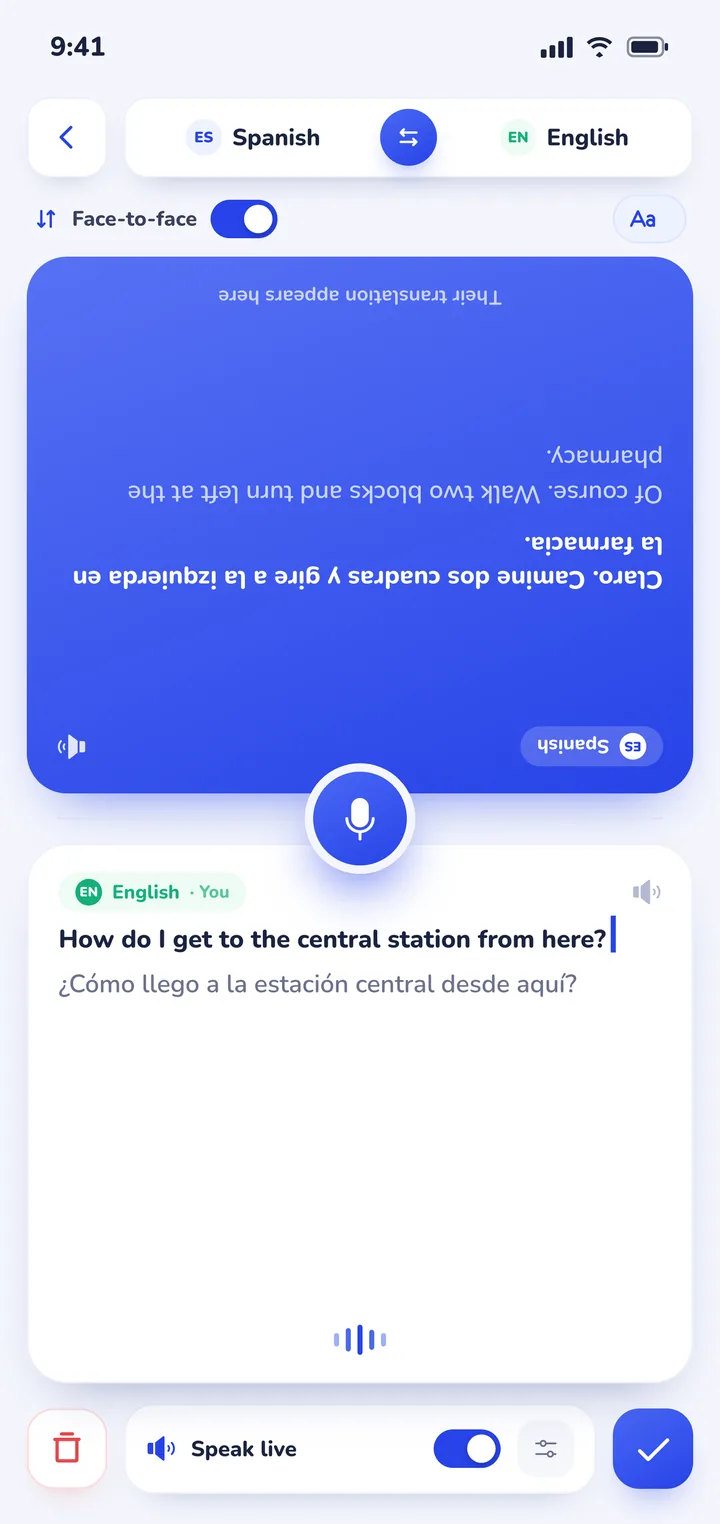
In conversation mode, the screen splits into two dedicated viewports. You place your smartphone flat on the counter or table between you. One side faces you, and the other half inverts so the person opposite reads along naturally in their own language. The app detects which speaker is talking automatically, eliminating the need to tap input switches between every sentence. Spoken translations can also be read aloud through the speaker, with distinct natural voices assigned to each speaker.
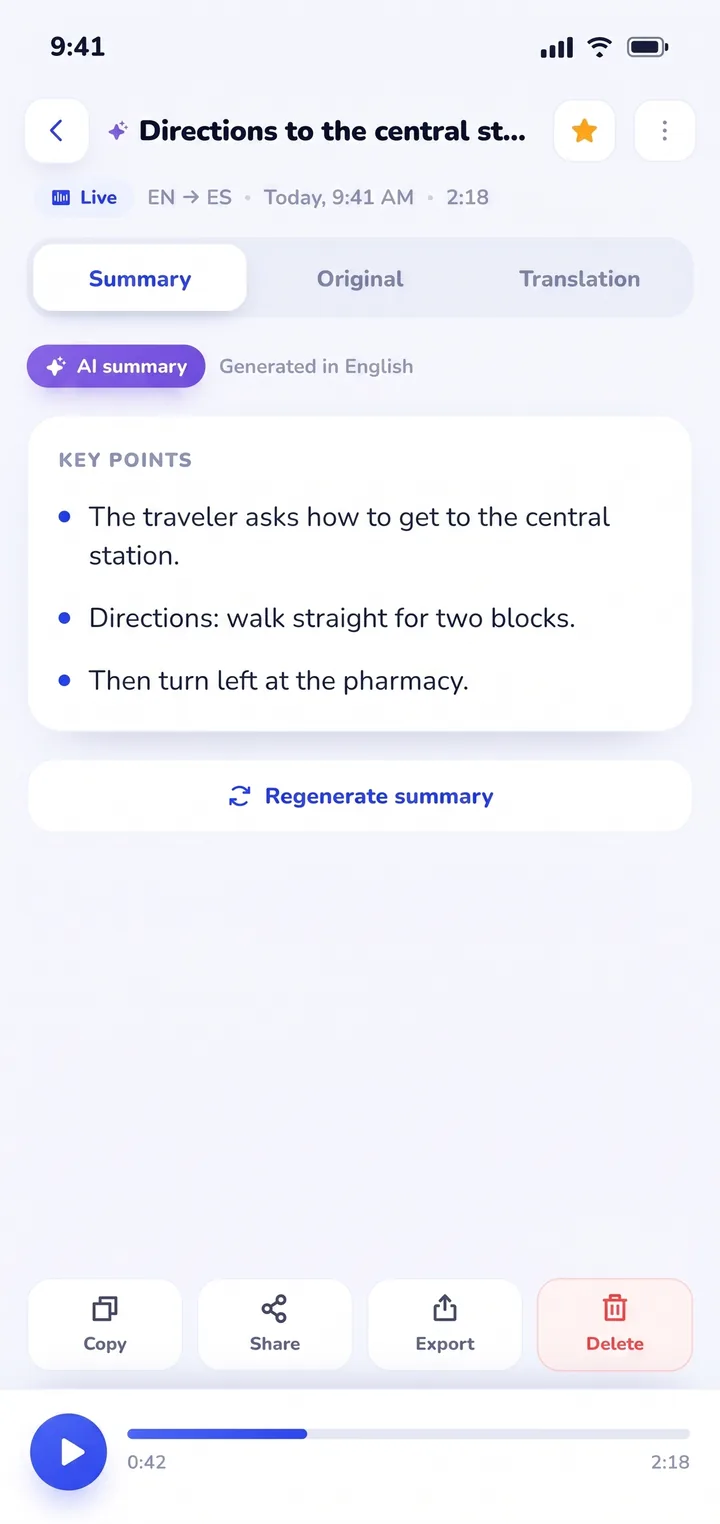
The defining feature of Clawmium Translate is what happens after your conversation finishes. While standard translation apps discard spoken exchanges when you close the screen, Clawmium Translate preserves every session in History on your device. It records the complete dual-language transcript and runs an AI summary that distills the key points, instructions, and practical takeaways into concise bullet points.
When an Italian train conductor explains a complicated platform change, a Tokyo station agent details walking transfers, or a foreign client reviews project milestones, you don't have to take hasty handwritten notes. You open your saved History, review the summarized takeaways, and export or share the transcript whenever necessary.
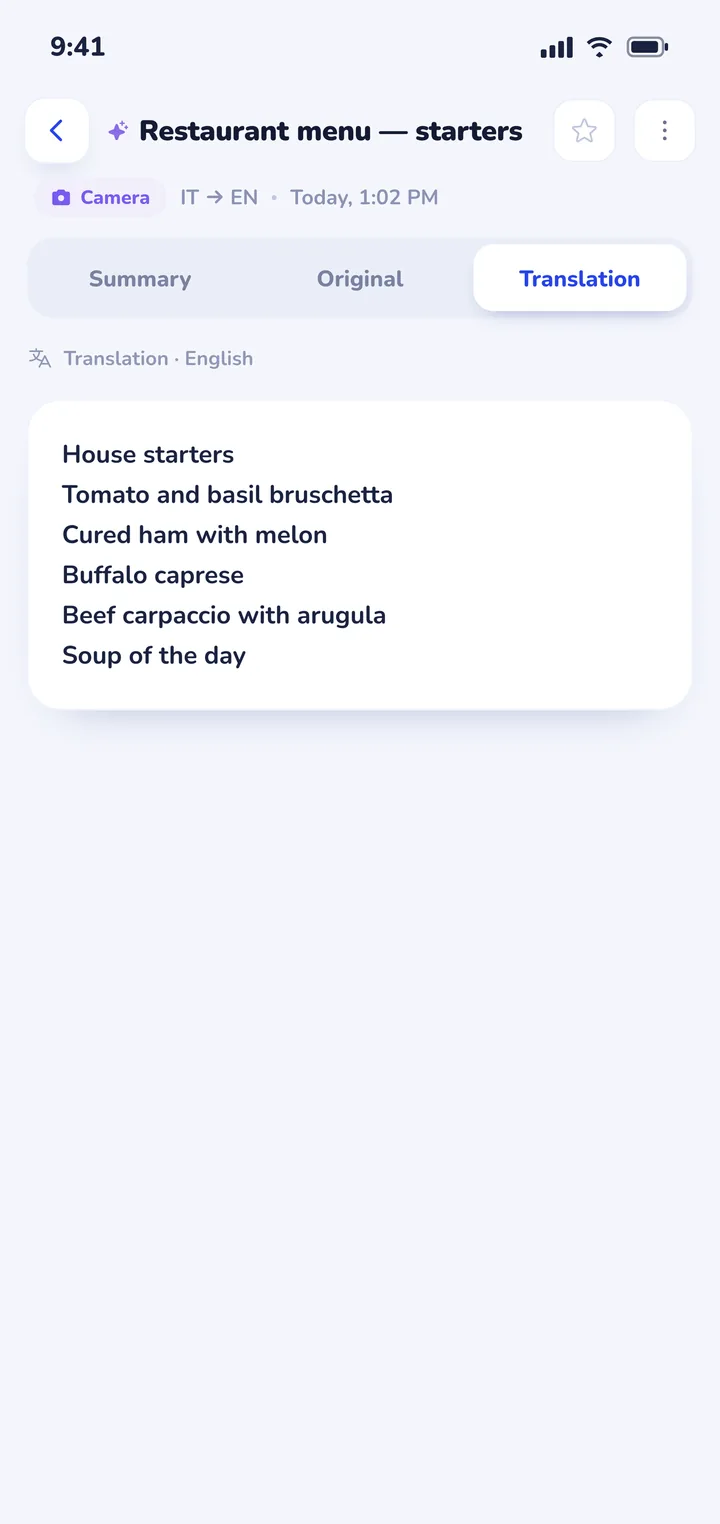
Clawmium Translate also includes a cloud camera translation feature that photographs printed restaurant menus, transit maps, and storefront signs, overlaying readable English translations directly over the original image. For practical dining advice, read our guide on how to translate a menu with your camera. The app supports more than 60 languages, including Spanish, Japanese, Korean, Italian, French, German, Arabic, and Vietnamese.
There are clear trade-offs to keep in mind. Clawmium Translate processes speech and camera translations through cloud models to maintain high linguistic accuracy, which means it requires an active Wi-Fi or cellular data connection. It does not offer an offline speech mode. It is free to download with a daily allowance for live translation that resets each day, and completely ad-free, with a Pro monthly tier that raises daily usage limits.
For remote wilderness hikes or underground subway tunnels where mobile reception disappears completely, Google Translate's downloaded pack remains the right safety net to keep on your phone. If you want to see how dedicated audio hardware compares to smartphone software, read our analysis of translator earbuds vs a phone app or explore our broader guide to translation apps for travel.


Key factors to consider before choosing an app
When selecting a real-time AI translation app for your daily workflow or upcoming international trip, consider these four practical criteria:
- Screen etiquette and ergonomics: Passing a smartphone back and forth across a busy counter or dining table is awkward and increases the risk of dropping your device. Split-screen conversation modes that invert the top half allow both participants to read comfortably while the phone rests flat between them. We detail conversation etiquette in our guide to using a conversation translator face to face.
- Cloud accuracy vs zero-data independence: Cloud-based neural models produce superior contextual nuance and adapt smoothly to complex syntax. However, they stop functioning when cellular reception fails. For international travel, keeping a cloud app for nuanced conversations alongside Google Translate's downloaded pack for transit emergencies provides a dependable setup. See our roundup of apps that translate in real time for platform breakdowns.
- Conversation memory and export: If you use a translator for doctor appointments, business negotiations, or detailed travel directions, disposable translation is a liability. Choose an application that stores transcripts locally and synthesizes key points so you can review critical facts later.
- Background noise handling: Live speech translation relies on clean microphone input. Look for apps that incorporate acoustic noise suppression and distinct speaker recognition, especially when communicating on busy city streets or crowded train platforms.
Sources
- Google Help, Translate speech in Google Translate, updated 26 August 2025, checked 8 November 2026.
- Apple Support, Translate text, voice, and conversations on iPhone, updated 20 September 2025, checked 8 November 2026.
- Samsung Support, Galaxy AI languages and usage guide, updated 1 July 2026, checked 8 November 2026.
- DeepL, DeepL Voice product announcement, published 15 October 2025, checked 8 November 2026.
- National Institute of Information and Communications Technology (NICT), VoiceTra speech translation research, checked 8 November 2026.
Frequently asked questions
How does a real-time AI translator app work?
A real-time AI translator uses automated speech recognition to transcribe spoken words into digital text in rolling audio buffers. A neural machine translation model or large language model processes the transcribed phrase, analyzes sentence context to select accurate vocabulary, and displays the translated text on screen or speaks it aloud using natural text-to-speech synthesis.
Can an AI translation app work without an internet connection?
Some translation apps can work without internet if you download language packages in advance. Apple Translate and Samsung Interpreter provide on-device neural translation that functions without cellular data on supported phones. Cloud-first tools like Clawmium Translate require active internet access to run advanced speech models that deliver higher conversational accuracy.
Do real-time AI translators keep a record of what was said?
Most standard translation apps discard spoken exchanges once the session closes or only keep short disconnected sentence fragments. Clawmium Translate automatically saves full two-way transcripts in History on your device and generates an AI summary highlighting key points, directions, and action items that you can copy, search, or export.
Can a real-time AI translator replace a human interpreter?
No. While real-time AI translators handle travel questions, casual dialogue, restaurant ordering, and retail interactions remarkably well, they cannot replace certified human interpreters in medical, legal, or high-stakes diplomatic environments where subtle misunderstandings carry serious legal or health consequences.
Try real-time AI conversation translation
Free to start. 60+ languages. Put the phone between two people and talk.