For serious hospital diagnoses or surgeries, always request a free certified medical interpreter under civil rights rules. For routine clinic visits, pharmacy pickups, and private practices, a translator app provides fast communication. While Google Translate and Apple Translate translate spoken words in real time, they discard your session when closed. Clawmium Translate divides your screen into two facing halves so you and your doctor can converse naturally, and automatically saves a dual-language transcript with an AI summary of instructions and dosages.
Communicating during a medical appointment involves distinct challenges: rapid speech, complex clinical terminology, and high anxiety. Patients with limited English proficiency often struggle to follow fast-paced verbal explanations, while clinicians need clear descriptions of symptoms and timelines. In hospitals receiving federal funding, qualified human interpreters must be provided at no cost under US Section 1557 and NHS regulations.
For routine outpatient appointments where on-demand interpreters are unavailable, translation apps help both sides communicate directly. The biggest post-visit challenge is remembering instructions: patients frequently forget medical advice and specific dosages after returning home. Using an app that automatically logs spoken dialogue and generates a structured summary of dosages and follow-up care ensures instructions aren't lost when you get home.
The communication gap during medical visits
Medical consultations are among the most stressful conversations people face. When language barriers are present, this stress increases significantly:
- High-stakes technical vocabulary: Medical terminology includes specialized words for anatomical structures, diagnostic tests, and pharmacological compounds. A minor misunderstanding regarding whether a pill should be taken with meals or on an empty stomach can lead to adverse drug reactions.
- The forgetting curve: Medical consultations move quickly. Even native speakers forget the majority of medical advice immediately after leaving the clinic room. For patients and family caregivers working across a second language, retaining specific milligram dosages, scheduling restrictions, and follow-up dates is exceptionally difficult without written records.
- Family caregiver burden: Non-native speakers frequently rely on adult children or family members to interpret. This creates emotional distress and can lead to vital details being missed or filtered out during stressful consultations.
When to use an app vs. your legal right to an interpreter
Before relying on any mobile translation application, understanding the legal boundaries of medical interpretation is essential for your safety.
In many countries, you have a legally protected right to a qualified human medical interpreter at no cost:
- United States: Under Section 1557 of the Affordable Care Act and Title VI of the Civil Rights Act, hospitals and healthcare providers that receive federal funding (such as Medicare or Medicaid) are legally required to provide competent language assistance services, including certified interpreters, in a timely manner and free of charge.
- United Kingdom (NHS): NHS policies dictate that patients have a right to professional interpreting services. Healthcare providers are responsible for booking qualified interpreters, and children or family members should not be asked to interpret clinical advice.
For serious diagnoses, surgical consultations, oncology reviews, or informed consent discussions, you should always insist on a professional human interpreter. Mobile translation applications are not certified medical interpreters and should not replace professional interpreters during critical medical procedures.
Where a translator app excels is during routine outpatient visits, private specialty clinics where human interpreters aren't provided on site, pharmacy counter consultations, dental checkups, and for capturing a written record of what was said.
Five translation apps for doctor visits, compared
These five applications cover the spectrum of healthcare communication, from free live speech translation to document translation and automated visit notes.
| App | Best For | Doctor-Patient Split Screen | Saves Visit Transcript | AI Visit Summary | Key Limitation |
|---|---|---|---|---|---|
| Google Translate | General quick speech translation | Face-to-face split screen | No (discards on close) | No summary feature | History isn't organized by consultation |
| Apple Translate | Offline conversation on iPhone | Face to Face split view | No (discards on close) | No summary feature | Restricted to Apple hardware |
| DeepL | Translating specialist letters & records | No (single text field) | Saved translation history | No conversation mode | Lacks live split-screen dialogue |
| Microsoft Translator | Basic speech translation fallback | Split-screen microphone mode | Text chat history only | No summary feature | Speech recognition slower on clinical terms |
| Clawmium Translate (ours) | Face-to-face visits with AI summaries | Two-way inverted split screen | Full dual-language transcript | Automated AI summary | Requires active internet connection |
Google Translate: quick everyday spoken translation
Google Translate is widely accessible and free on Android and iPhone. Its live conversation feature includes a face-to-face mode that divides the screen into two halves, displaying translated text and reading it aloud as the doctor and patient speak. We analyze its interface and settings in our overview of Google Translate's conversation mode.
The primary constraint for healthcare visits is that sessions disappear once you exit conversation mode. You cannot return home and review the doctor's exact verbal instructions, nor can you share a concise summary with family members who couldn't attend.
Apple Translate: built-in on-device privacy for iPhone
Apple Translate comes pre-installed on iOS devices. It features a clean Face to Face view that rotates the top half of the screen upside down, allowing the clinician sitting across from you to read text naturally while you read your own language.
Apple's neural speech engine runs on the device when offline packs are downloaded, which protects conversational privacy. However, like Google Translate, Apple Translate doesn't save meeting transcripts or generate post-visit summaries of key takeaways.
DeepL: ideal for medical letters and clinic discharge papers
DeepL is renowned for nuanced grammatical accuracy. If you receive a written medical referral, discharge summary, or specialist laboratory report, DeepL produces exceptionally fluent translations of written text and PDF documents.
The limitation is that DeepL isn't built for spoken dialogue across an exam desk. It lacks an inverted split-screen interface and requires an active internet connection to process text.
Microsoft Translator: versatile general fallback
Microsoft Translator supports split-screen spoken translation and downloadable offline dictionaries. While useful for general queries, its speech engine can struggle with fast clinical explanations and unfamiliar medication brand names.
Where Clawmium Translate fits
Clawmium Translate is our app, so evaluate this section with that context in mind. We developed Clawmium Translate to remove communication friction during in-person conversations, running on both Android and iPhone.
During a clinic visit, the screen divides into two facing viewports. You place your smartphone flat on the doctor's desk. One half faces you, and the other half inverts so the doctor reads along naturally in their language without having to hold your device.
The app automatically detects which of your two chosen languages is being spoken, eliminating the clumsy interruption of pushing buttons between every sentence. Spoken translations can also be read aloud through the speaker, with distinct natural voices assigned to each speaker.
The most valuable feature for medical appointments is what happens after the doctor finishes speaking. Every consultation is preserved in History on your device, complete with the dual-language transcript and an automated AI summary of key points. When a clinician outlines a three-step treatment plan, mentions specific warning symptoms, or specifies prescription timing, you don't need to scramble for a pen. You open your saved History, review the structured takeaways, and copy or share the details with family members or caregivers.
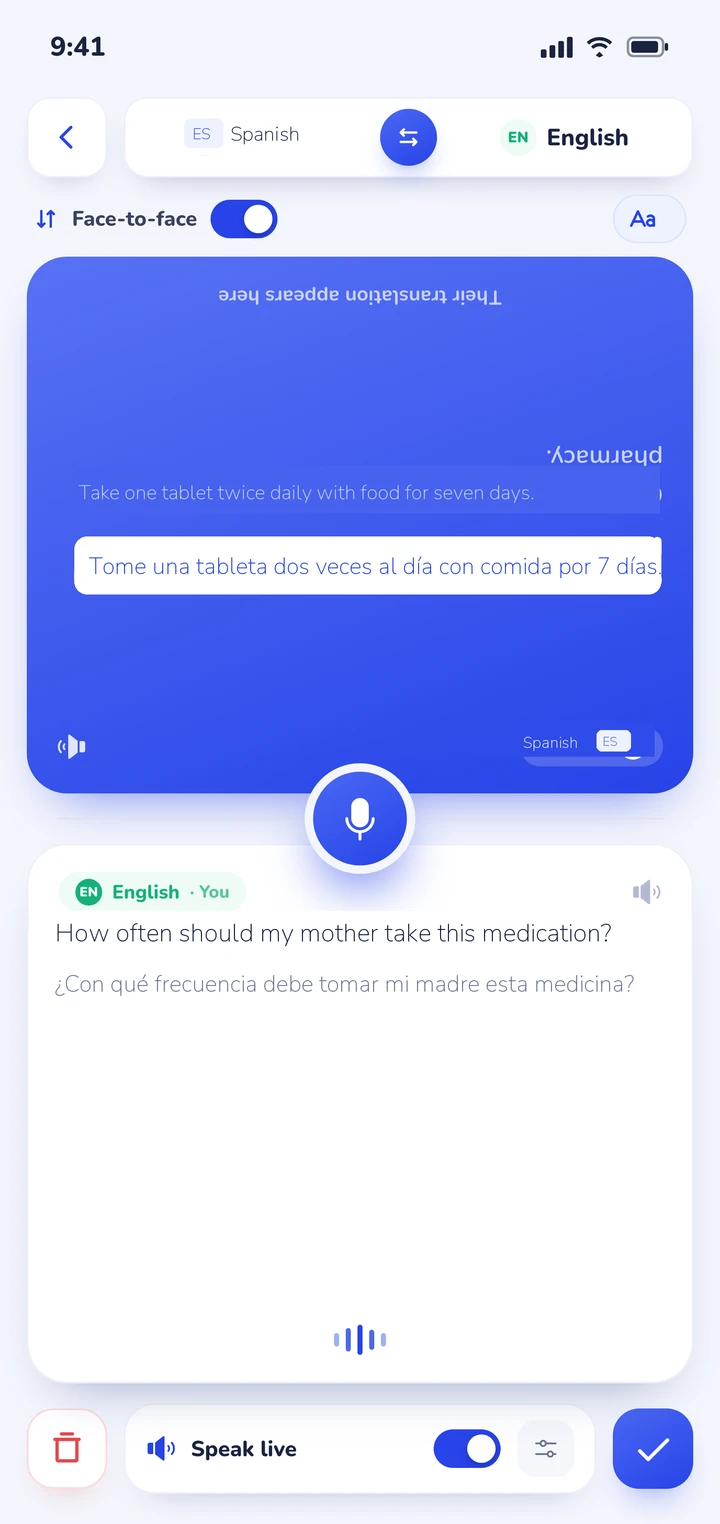
Clawmium Translate also includes a cloud camera translation feature that photographs printed prescription labels, medicine boxes, and discharge paperwork, overlaying readable translations directly over the text. The app supports more than 60 languages, including Spanish, English, French, German, Italian, Japanese, Korean, Arabic, Vietnamese, Tagalog, and Ukrainian.
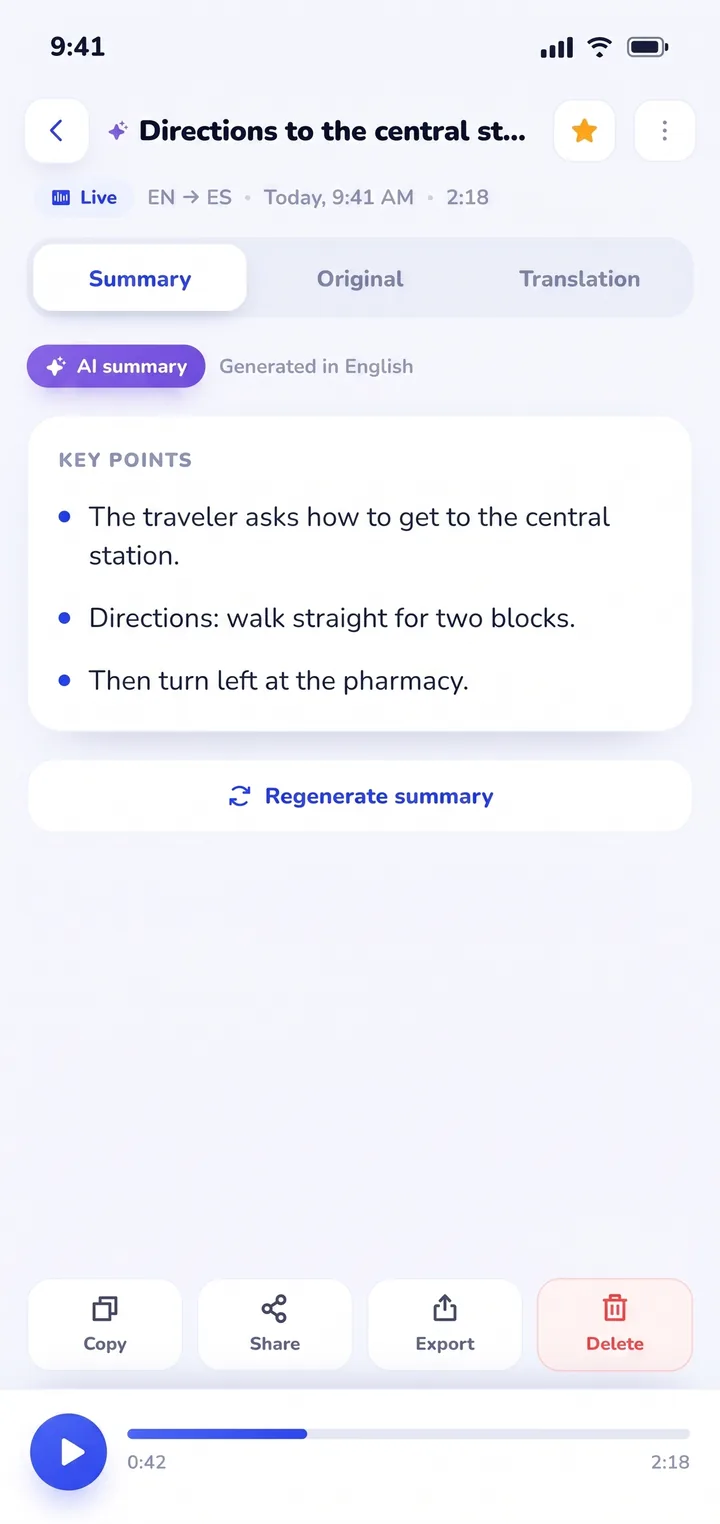
There are clear trade-offs to keep in mind. Clawmium Translate processes speech and camera translations through cloud models to maintain high linguistic accuracy, which means it requires an active Wi-Fi or cellular data connection. It doesn't offer an offline speech mode. It is not a certified medical interpreter or a medical device, and it does not guarantee clinical accuracy for diagnostic procedures. It's free to download with a daily allowance for live translation that resets each day, and completely ad-free, with a Pro monthly tier that raises daily usage limits.
For additional details on patient rights and how to request formal hospital interpreters, read our complete guide on how to talk to a doctor in another language. You can also explore our technical comparison of real-time AI translator apps.

How to use a translator app during a medical appointment
Using a translation application during a medical visit runs smoothest when you follow a structured approach:
- Inform the clinician upfront: Before starting your consultation, politely show the doctor your phone and explain: "I'm using this translation app so we can understand each other clearly and I can keep notes of your instructions. Is that alright with you?" Doctors almost always appreciate the initiative.
- Place the device flat equidistant on the desk: Lay the smartphone flat on the desk between you and the clinician. This ensures the microphone picks up both voices clearly, as detailed in our guide on using a conversation translator face to face.
- Speak in clear, single thoughts: Avoid long, rambling paragraphs. Speak one or two sentences at a time, then pause briefly to allow the translation to process and display cleanly on screen.
- Repeat back dosages and critical instructions: When the clinician explains medication schedules or warning signs, repeat the numbers and timing back to confirm the translation was accurate.
- Photograph medication boxes and paperwork: Before leaving, use the camera feature to snap photos of printed prescription labels, pharmacy instructions, or follow-up appointment slips.
Preparing for an appointment when you don't speak the language
Preparation before arriving at the medical office makes the appointment much more effective:
- Write down your symptoms in advance: Document when your symptoms began, where the pain is located, what triggers it, and what makes it feel better or worse. You can pre-translate this text and save it on your phone to show the intake nurse.
- Bring all current medications: Place all prescription bottles, over-the-counter supplements, and eye drops into a bag. Showing the actual bottles prevents confusion over brand names versus generic compounds.
- List your top three questions: Clinic visits often run short. Having your three most pressing questions written down ensures you don't leave without answers to your primary concerns.
- Note known drug allergies: Always have your allergies written clearly in both languages (such as penicillin or latex) and confirm them with clinical staff before any medication is administered.
Sources
- US Department of Health and Human Services (HHS) Office for Civil Rights, Section 1557 of the Affordable Care Act: Language access requirements, checked 11 November 2026.
- National Health Service (NHS) England, Guidance for interpreting and translation services in primary care, updated August 2025, checked 11 November 2026.
- Healthwatch England, Healthcare translation and patient communication rights, updated July 2025, checked 11 November 2026.
- Google Help, Translate speech in Google Translate, updated 26 August 2025, checked 11 November 2026.
- Apple Support, Translate text, voice, and conversations on iPhone, updated September 2025, checked 11 November 2026.
Frequently asked questions
Can I use a translation app for a doctor's appointment?
Yes. Translation apps are helpful for routine clinic checkups, pharmacy consultations, and dental appointments to translate speech and keep visit notes. However, for surgeries, serious hospital diagnoses, or informed consent, you have a legal right to a free certified medical interpreter under civil rights regulations.
What is the best translator app for doctor visits?
Clawmium Translate is ideal for in-person doctor appointments because its two-way inverted split screen lets patient and doctor read along across the desk, while automatically saving a dual-language transcript and AI summary of dosages and instructions. Google Translate is also a dependable free fallback for quick verbal questions.
How do I remember medical instructions after an appointment?
Using a conversation translation app like Clawmium Translate preserves the entire spoken dialogue in History, generating an automated AI summary of dosages, next steps, and instructions. You can review the summary at home, copy the details, or share the transcript directly with family members.
Can translation apps read prescription medicine bottles?
Yes. You can photograph a prescription bottle or packaging using the camera feature in Clawmium Translate or Google Translate to view translated instructions overlaid on the label, helping you verify dosage instructions and active ingredients.
Try a doctor visit conversation translation
Free to start. 60+ languages. Put the phone between doctor and patient.