For a trip to France, download Google Translate's offline French pack at home for underground metro stations where cellular reception drops. Use DeepL for drafting polite written messages to hotel hosts or rental agencies. When speaking face to face at bakeries, bistros, or ticket counters, Clawmium Translate divides your screen into two facing halves so each person reads in their language, and automatically saves each session with an AI summary.
A traveler visiting France faces three main translation tasks: scanning printed and handwritten signs, riding rail transit, and talking face to face with locals. Google Translate provides free live speech translation across Android and iOS, with offline dictionary packs that help in underground subway stations. Apple Translate offers on-device neural conversation mode for iPhone users traveling without international data. DeepL delivers the most natural French phrasing for written correspondence and accommodation emails.
Clawmium Translate specializes in two-way spoken conversations, placing an inverted display between two people and automatically saving dual-language transcripts with structured AI summaries. France has strict cultural etiquette regarding greetings: always open interactions with a polite greeting before showing a phone screen. For remote countryside travel where cellular reception drops without signal, carrying a downloaded offline dictionary alongside our live conversation app provides reliable coverage without data worries.
The three translation tasks you face in France
International travelers in France encounter three very different language challenges depending on where their itinerary leads:
- Deciphering printed and handwritten French: Traditional Parisian bistros, regional bouchons in Lyon, and provincial village cafes rarely print bilingual menus. Daily specials are frequently written in cursive chalk on slate boards (known as l'ardoise). Museum plaques, historical markers in Normandy, and pharmacy labels also require visual character recognition.
- Navigating national rail and urban transit: Moving through major hubs like Gare du Nord, Gare de Lyon, and regional rail lines (TER) involves ticket machines, platform announcements, and track changes (voies). In underground Paris Metro passages, mobile signal frequently cuts out, making offline maps and downloaded language packs essential without internet access.
- Face-to-face spoken conversation: Ordering at artisanal bakeries (boulangeries), checking into boutique hotels in Provence, buying produce at open-air markets, or asking a conductor about a missed connection in Bordeaux requires live two-way dialogue.
The golden rule of French travel etiquette: always greet first
Before launching any translation application in France, understanding a fundamental cultural convention will determine how helpful locals will be. In French culture, customer service is viewed as a social interaction between equals rather than a purely commercial transaction.
Walking up to a shopkeeper, waiter, or station agent and immediately holding out a smartphone screen or speaking English without a greeting is considered offensive. To the local, it feels as though you are treating them like an automated kiosk.
Always open every encounter with a clear greeting: "Bonjour, Madame" (in the morning and afternoon) or "Bonsoir, Monsieur" (in the evening). Pause and wait for them to greet you in return. Once that basic courtesy is established, people are remarkably willing to read your phone screen or speak into a translation app.
Five translation apps for France, compared
These five applications cover the spectrum of travel requirements in France, from free offline street navigation to nuanced live speech.
| App | Best For | Paris Metro & Offline | Menu Scanning | Face-to-Face Mode | Key Constraint |
|---|---|---|---|---|---|
| Google Translate | Everyday multi-purpose travel | Select Pixel phones only | Live camera & photo translation | Face-to-face split screen | Discards full conversation history |
| Apple Translate | Offline conversation on iPhone | Yes (with downloaded pack) | Text & photo translation | Face to Face split view | Restricted to Apple hardware |
| DeepL | Polite written messages & emails | No (requires internet connection) | Document & photo translation | Single continuous list | Lacks split-screen conversation UI |
| VoiceTra | Short tourism phrases | No (requires internet connection) | Text only (no camera mode) | Alternating turns | Short tourist phrases only |
| Clawmium Translate (ours) | In-person dialogue with AI summaries | No (cellular data or Wi-Fi) | Camera photo translation | Two-way inverted split screen | Requires active internet connection |
Google Translate: the essential baseline
Google Translate is an indispensable travel utility for any international trip. Its primary strength for France travel is the depth of its offline language support. Before flying, you can download Google's French language pack directly to your phone storage, enabling text and camera translation inside deep metro stations where cellular reception drops.
Its live translate feature includes a face-to-face mode that divides the screen in two, producing spoken audio and written text as each person speaks. We examine its layout and settings in our overview of Google Translate's conversation mode.
The main limitation is that offline live speech translation is restricted to Google's newer Pixel phones. On standard iPhones and non-Pixel Android devices, live spoken translation requires an active data connection. Google Translate also doesn't save structured meeting summaries or organize multi-turn conversations into reviewable transcripts.
Apple Translate: built-in offline conversation for iPhone
For iPhone owners, Apple Translate comes pre-installed in iOS and integrates directly with Apple's on-device Neural Engine. Travelers can download the French offline language pack in settings, allowing two-way spoken conversation translation without cellular data or Wi-Fi.
Its Face to Face view rotates the top half of the screen 180 degrees so the person standing across from you reads French right side up while you read English. On devices running iOS 26 with Apple Intelligence, Apple also integrates real-time translation into Phone calls and Messages. The constraint is platform lock-in: it can't be installed on Android devices, and its language catalog is smaller than Google's.
DeepL: the standard for natural French phrasing
Developed by European machine translation researchers, DeepL has earned an outstanding reputation for linguistic elegance. French grammar features complex gender agreements, formal versus informal pronouns (vous versus tu), and subtle subjunctive moods that trip up basic translation engines. DeepL handles these nuances with remarkable precision.
If you need to send an email to a French hotel, message an Airbnb host in Paris, or read a long cultural brochure, DeepL produces natural, flowing phrasing. However, DeepL isn't designed as a live conversation tool: it lacks an inverted split-screen interface, and it operates exclusively through cloud servers, requiring an active internet connection.
VoiceTra: speech translation for tourists
VoiceTra is a speech translation application developed by the National Institute of Information and Communications Technology. While originally built for Asian tourism pairs, it supports French and English speech translation.
VoiceTra includes a reverse-translation display that lets you verify how your English sentence was interpreted into French before showing it to someone. It is designed for simple, short phrases such as asking for the check or checking opening hours, rather than continuous open-ended conversations.
Where Clawmium Translate fits
Clawmium Translate is our app, so evaluate this section with that context in mind. We developed Clawmium Translate specifically to remove the friction of face-to-face conversations between travelers and locals, running on both Android and iPhone.
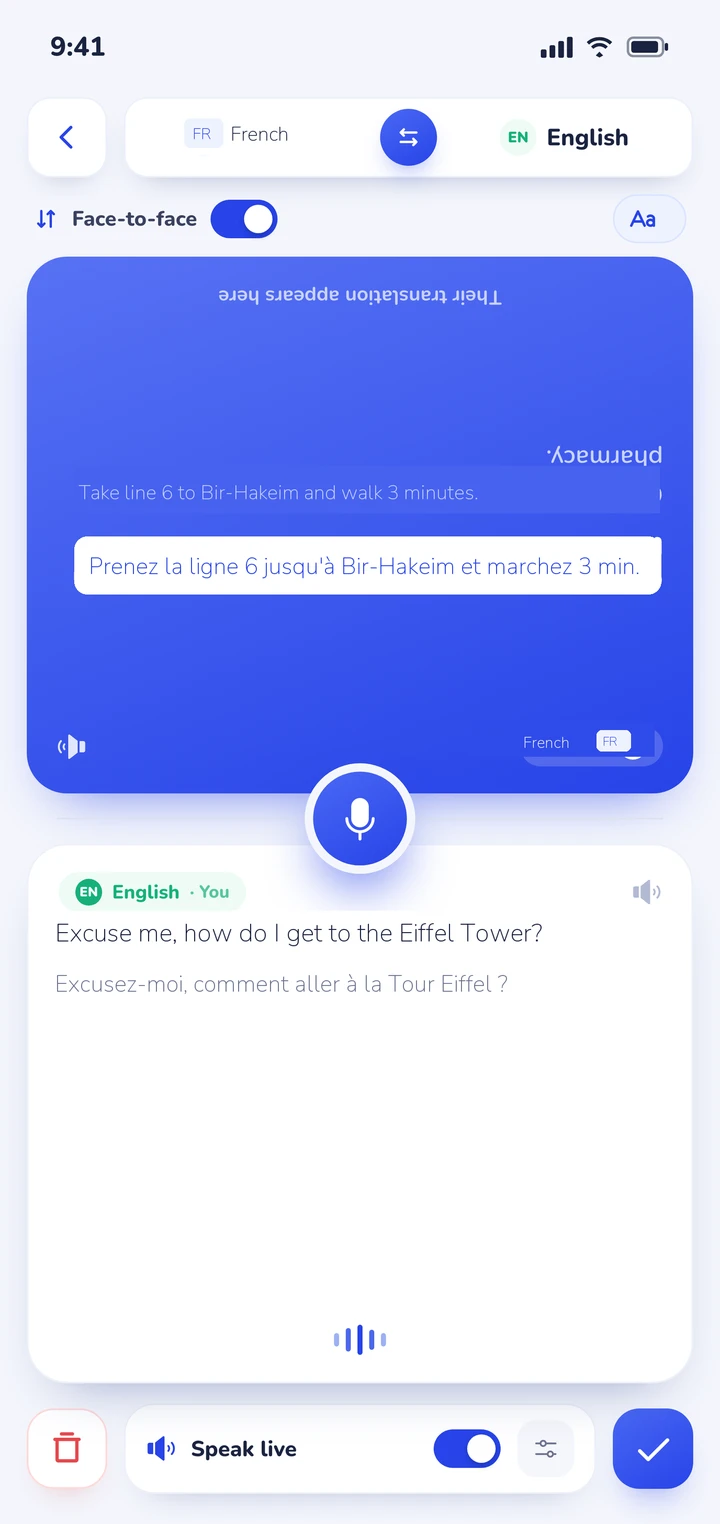
When you start conversation mode, the screen splits into two dedicated viewports. You place your smartphone flat on the counter at a Parisian bakery, a ticket window at Gare de Lyon, or a reception desk in Nice. One half faces you, and the other half inverts so the local speaker reads along naturally in French without needing to hold your personal device.
The app detects which of your two selected languages is being spoken automatically, eliminating the clumsy interruption of pushing buttons between every sentence. Translations can also be read aloud through the speaker, with distinct natural voices assigned to each speaker.
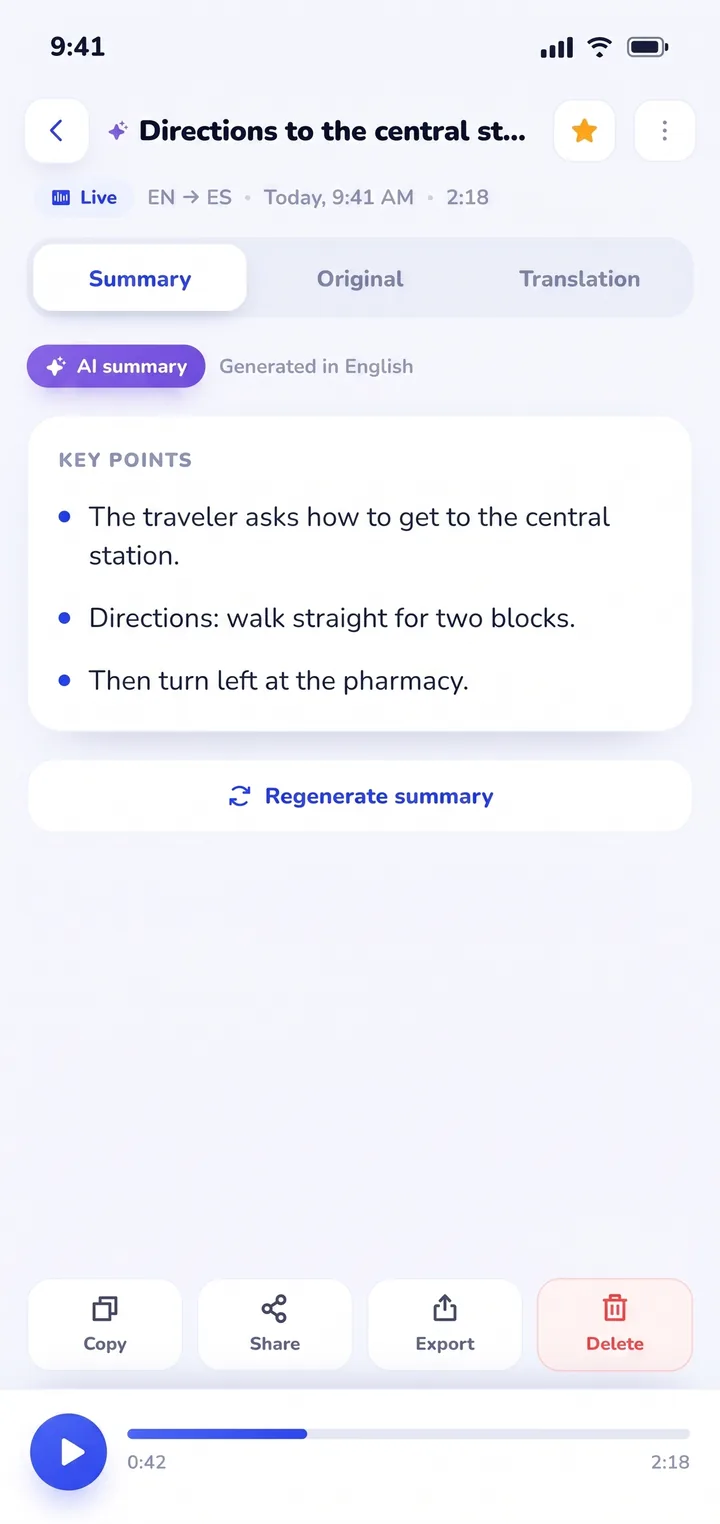
The most practical benefit for travelers in France is what happens after your conversation finishes. Every exchange is preserved in History on your device, complete with the dual-language transcript and an automated AI summary of key points. When a train conductor explains a multi-step platform transfer or a wine merchant in Bordeaux recommends three specific vineyards, you don't need to scramble for notes. You open your saved History, review the summarized takeaways, and copy or share the details whenever needed.
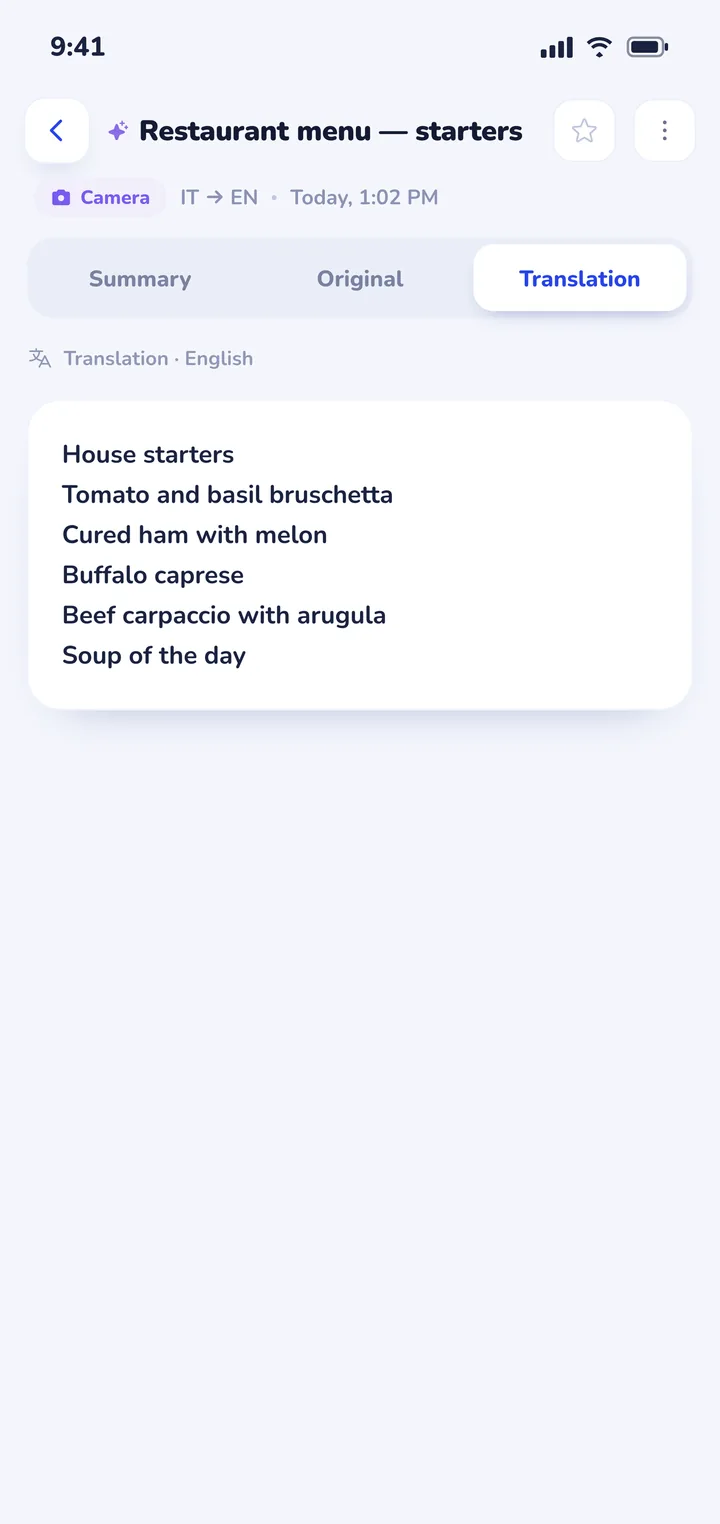
Clawmium Translate also includes a cloud camera translation feature that photographs printed restaurant menus, transit signs, and museum placards, overlaying readable English translations directly over the original image. For practical dining advice, read our guide on how to translate a menu with your camera. The app supports more than 60 languages, including French, English, Spanish, Italian, German, Japanese, Korean, and Arabic.
There are clear trade-offs to keep in mind. Clawmium Translate processes speech and camera translations through cloud models to maintain high linguistic accuracy, which means it requires an active Wi-Fi or cellular data connection. It doesn't offer an offline speech mode. It's free to download with a daily allowance for live translation that resets each day, and completely ad-free, with a Pro monthly tier that raises daily usage limits.
For remote underground train tunnels where cellular reception is unavailable, Google Translate's downloaded offline pack remains the ideal backup tool to keep on your device. To see how other spoken tools operate, read our comparison of apps that translate in real time or explore our technical overview of real-time AI translator apps.


Navigating French dining and bistros with a camera translator
Dining in France is a highlight of international travel, but navigating traditional menus presents several practical obstacles:
- Understanding l'ardoise (slate chalkboard menus): Many authentic bistros don't use printed paper menus. Instead, the chef writes the daily offerings in chalk on a hanging slate board. Position your phone camera steady, avoid glare from overhead lamps, and capture the text squarely. If lighting is dim, step closer rather than using digital zoom.
- Meat cooking temperatures: In French restaurants, meat is typically served rarer than in North America or the UK. Knowing the terms prevents surprises: bleu (very rare, seared exterior), saignant (rare), à point (medium-rare to medium), and bien cuit (well done).
- The fixed-price formula: Look for the words formule or menu du jour. These fixed-price combinations (usually starter plus main, or main plus dessert) offer superior value compared to ordering à la carte.
- Navigating food allergies: If you have dietary restrictions, translate your allergy clearly before ordering. Common French terms include sans gluten (gluten-free), produits laitiers (dairy products), and arachides (peanuts). Showing the written translation on screen ensures the kitchen understands your request.
Navigating French trains and transit: SNCF, TGV, and the Paris Metro
France has an extensive rail network operated by SNCF, ranging from high-speed TGV trains connecting Paris to Marseille, Lyon, and Bordeaux, to regional TER trains serving rural villages. Keep these transit guidelines in mind:
- Ticket validation (composter): If you purchase a physical paper ticket for regional TER trains, you must validate it in the small yellow stamping machines (composteurs) at the platform entrance before boarding. Failure to validate carries immediate onboard fines. Digital e-tickets on your smartphone don't require physical stamping.
- Platform announcements (voies): At major Paris stations like Gare du Nord, train platform numbers are only posted 15 to 20 minutes before departure. Watch the overhead departure screens for your train number and the corresponding voie.
- Rail strikes (la grève): French transport networks occasionally experience industrial action. Download the official SNCF Connect app to check live train statuses, and keep a translation tool ready to decipher platform advisory boards. If your travels extend east across the Rhine into Germany, compare options in our guide to translator apps for Germany. For southern travel across the Pyrenees, read our guide to translator apps for Spain, or explore our companion guide to translator apps for Italy for Italian rail etiquette.
- Cross-border European travel: If your itinerary spans multiple countries, read our complete guide to translation apps for travel to plan your cross-border digital setup.
Sources
- SNCF Connect, Passenger guidelines and ticket validation rules, checked 9 November 2026.
- RATP, Visiting Paris: Metro and RER network guide, updated August 2025, checked 9 November 2026.
- Google Help, Translate speech in Google Translate, updated 26 August 2025, checked 9 November 2026.
- Apple Support, Translate text, voice, and conversations on iPhone, updated September 2025, checked 9 November 2026.
- DeepL, DeepL French neural translation documentation, checked 9 November 2026.
Frequently asked questions
What is the best translator app for traveling in France?
Most travelers achieve the best balance by carrying Google Translate for offline camera translation of signs and metro boards, and Clawmium Translate for live spoken conversations with locals at bistros, bakeries, and hotels. DeepL is also great for drafting written messages to property hosts.
How do I translate handwritten French menus?
Use camera translation by pointing your camera squarely at the chalkboard slate board, keeping your hands steady to reduce blur. If restaurant lighting is dim, move closer to the board rather than using digital zoom, and tap the screen to lock focus before snapping the photo.
Do translation apps work inside the Paris Metro?
In underground Paris Metro stations and tunnel passages, mobile cellular reception frequently drops out. To maintain navigation capabilities, download Google Translate's French offline pack or use Apple Translate's downloaded pack before going underground.
What should I say before using a translation app in France?
Always greet the other person first with a polite "Bonjour, Madame" or "Bonjour, Monsieur" before asking a question or showing your smartphone screen. Acknowledging social courtesy first makes French locals much more receptive to communicating through a translation tool.
Try a conversation before your trip to France
Free to start. 60+ languages. Put the phone between two people and talk.