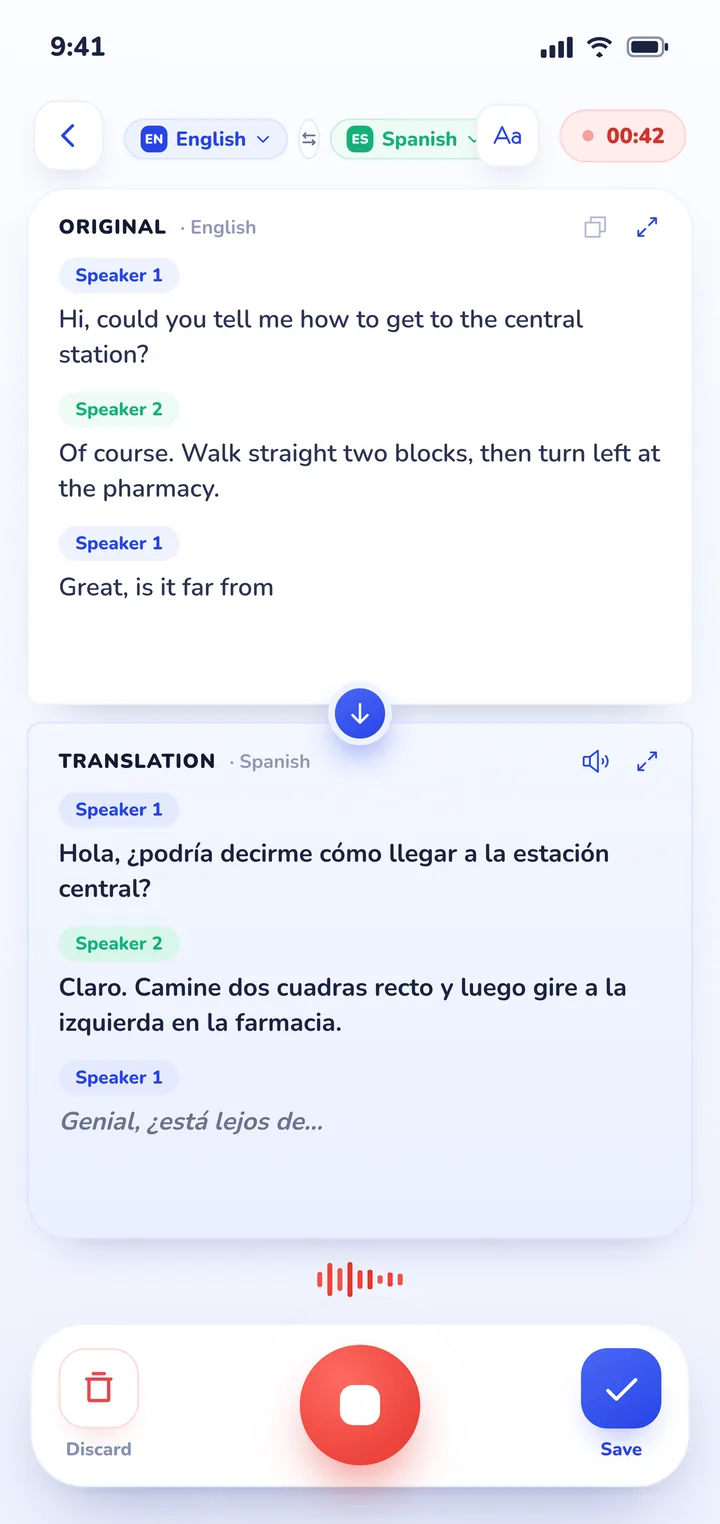
For a trip to South Korea, install Naver Papago for accurate everyday Korean syntax and Hangul camera translation, and download Google Translate's offline Korean pack for subway stations where data drops. Because Google Maps can't provide walking navigation in South Korea due to domestic security laws, pair your translation apps with KakaoMap or Naver Map. When speaking with locals at markets, hotels, or counters, Clawmium Translate provides a two-way split screen and automatically saves every conversation with an AI summary.
An international traveler in South Korea requires translation across three primary situations: reading Hangul characters on signs and restaurant menus, navigating local transit apps, and speaking face to face with locals. Because South Korean national security laws restrict foreign mapping platforms from exporting domestic geospatial data, Google Maps doesn't support walking directions. Travelers must use Korean apps like KakaoMap or Naver Map alongside their translation tools.
For signs and menus, Naver Papago and Google Translate provide optical character recognition for printed Hangul typography. For spoken conversations at markets or ticket counters, passing a personal phone back and forth disrupts the interaction. A split-screen conversation app placed flat on a counter allows each person to read in their own language. Because speech translation streams audio to cloud servers, travelers should purchase a South Korean travel eSIM rather than relying on zero-data phrasebooks alone.
The three language challenges of traveling in South Korea
South Korea is exceptionally modern and welcoming to tourists, but language barriers present unique practical hurdles outside international airport terminals:
- Reading Hangul on signs and menus: Hangul is an elegant and logical writing system, but foreign travelers rarely recognize words on sight. Subway exit directories, bus stops, street food stalls, and traditional barbecue restaurants rarely offer English descriptions. A dependable camera translation tool is vital for decoding street names and menus.
- The South Korea mapping anomaly: Due to national security laws regarding domestic spatial data, Google Maps can't provide walking navigation or driving directions in South Korea. Travelers must use domestic mapping apps such as KakaoMap or Naver Map. Because these apps show business listings and addresses in Korean, you frequently need to copy and translate location names between apps.
- Honorific speech registers (Jondaetmal): Korean spoken culture places immense value on social hierarchy and polite respect. General machine translation engines often default to blunt, informal phrasing that can sound unintentionally rude when speaking with taxi drivers, elders, or shopkeepers. Tools trained specifically on East Asian language models handle these polite registers with greater care.
Four translation apps for South Korea, compared
Here's how the leading translation tools compare for an international trip to South Korea:
| App | Best for | Works offline | Price | Key consideration |
|---|---|---|---|---|
| Naver Papago | Everyday Korean syntax and Hangul camera translation | Text only offline; camera and voice need data | Free | Built by South Korea's top search engine; understands honorifics and idioms |
| Google Translate | Offline subway backup and live AR camera signs | Yes (with downloaded Korean pack) | Free | Essential fallback when traveling through underground stations without data |
| DeepL | Polished written messages for hosts and tours | No (needs data) | Free tier available | Produces clean, respectful syntax for written Airbnb chats and inquiries |
| Clawmium Translate | Spoken conversations with locals and saved summaries | No (needs data) | Free daily allowance | Two-way split screen; automatically logs dual-language transcripts with AI summaries |
Naver Papago: the local standard for Korean syntax and signs
Naver Papago is developed by Naver, South Korea's dominant search and technology company. Because it's engineered specifically for Korean language pairs, Papago produces far more natural conversational sentences than western generalist tools.
Papago excels at identifying honorific levels and casual Korean idioms that trip up other algorithms. Its image translation allows you to photograph signs, subway posters, or menus and highlight individual lines of Hangul with your finger. For travelers who plan to explore local neighborhoods like Hongdae, Ikseon-dong, or Busan's Jagalchi Market, Papago is an essential daily utility.
Google Translate: essential offline backup for subway stations
While Google Translate can produce somewhat mechanical Korean phrasing, its primary strength for travelers is offline dependability. Seoul and Busan have extensive, deep underground subway networks where mobile connectivity can occasionally fluctuate.
Before your trip, download Google Translate's offline Korean language package over your home Wi-Fi. That ensures you can always point your camera at transit exit signs and platform transfers to confirm your direction, even when you have zero mobile signal.
DeepL: polished written messages for accommodations and tours
DeepL is renowned among frequent travelers for generating nuanced, grammatically refined written text. When you need to message a traditional Hanok guesthouse owner, coordinate with a private tour guide on Jeju Island, or communicate dietary requirements, DeepL generates phrasing that reads politely.
DeepL focuses on written correspondence rather than rapid spoken exchanges. Keeping it on your phone gives you an effective tool for drafting important travel emails and customer support inquiries.
Clawmium Translate: face-to-face dialogue you can review later
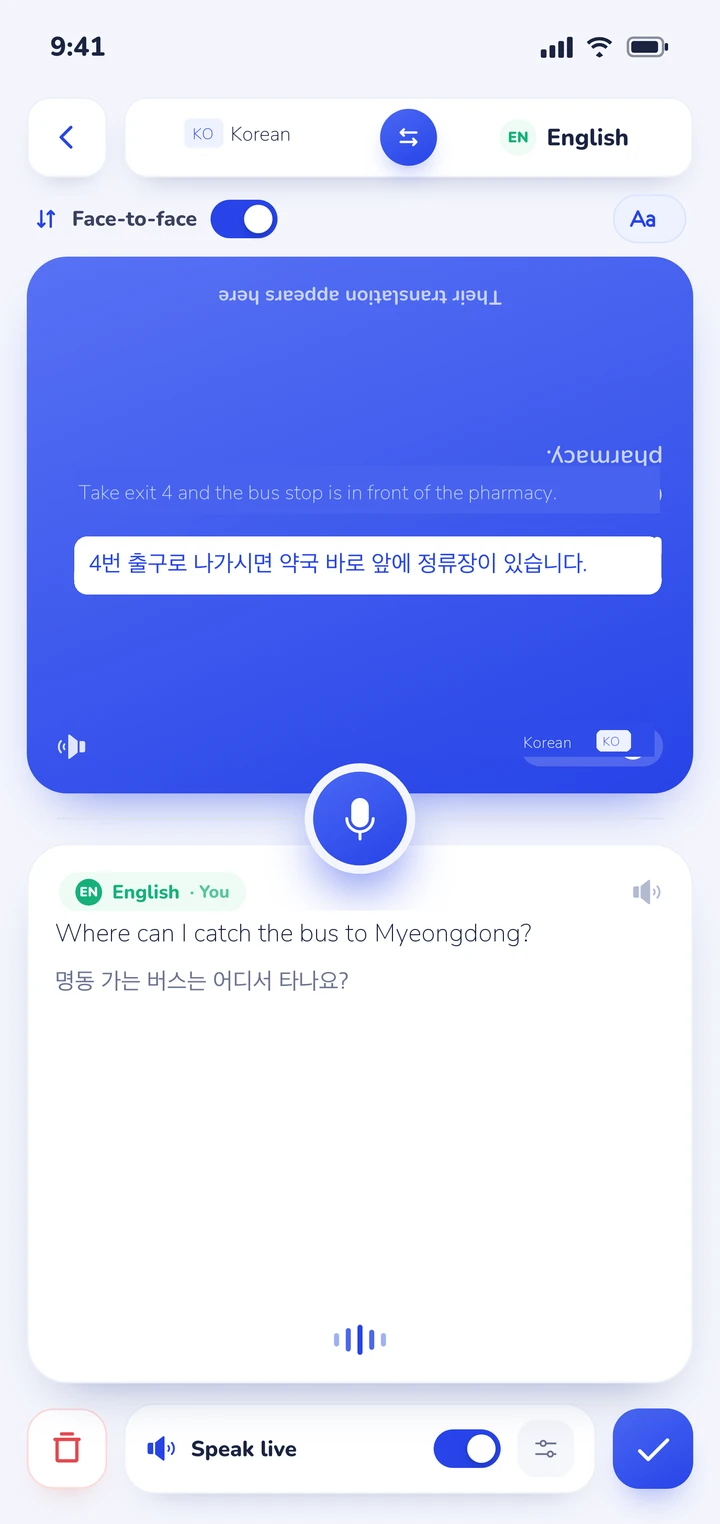
Clawmium Translate is built specifically for spoken conversations between two people who speak different languages. Instead of making you take turns passing your phone back and forth, the screen splits into two halves facing opposite directions.
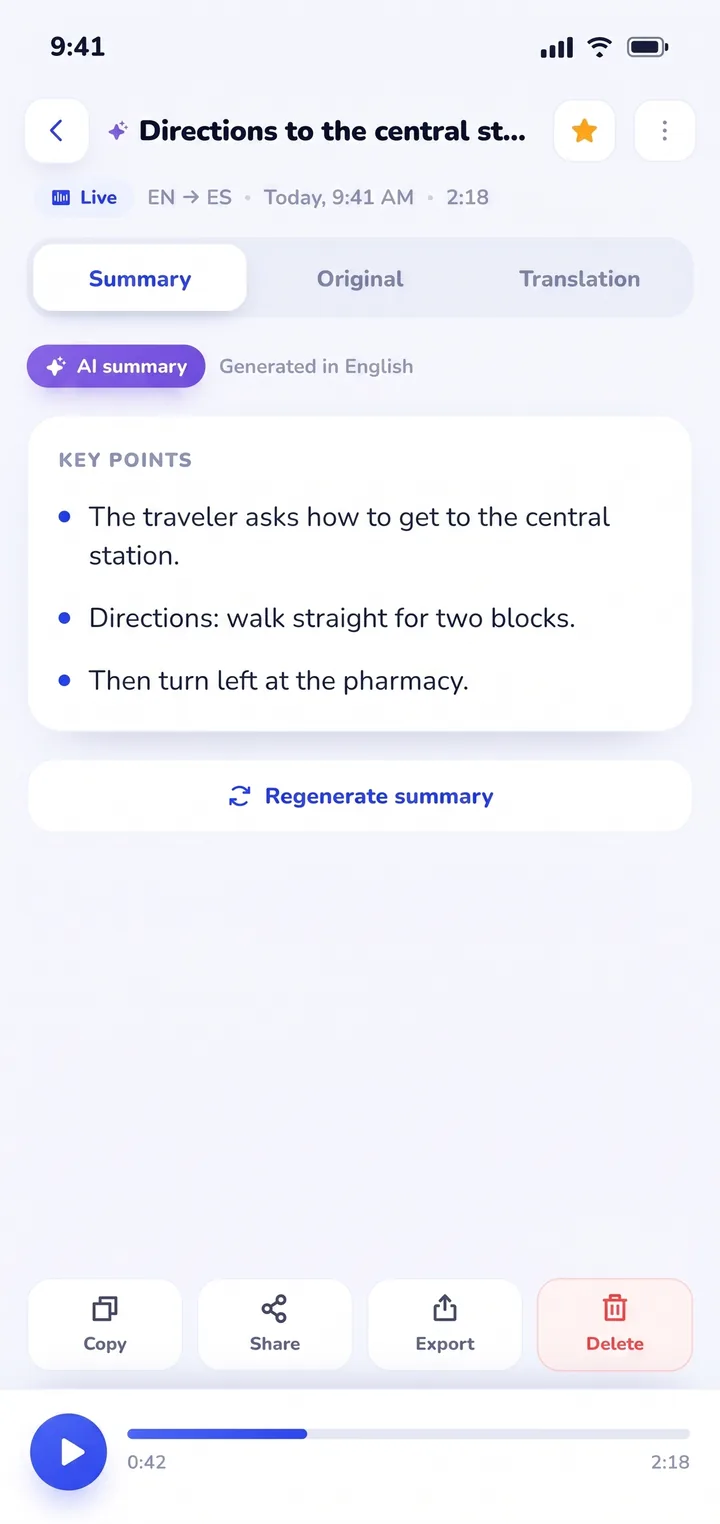
You lay the phone flat on the cafe table or counter. The app automatically listens and detects if someone is speaking English or Korean, displaying translated text in real time. Crucially for travelers, every exchange is saved in History with an AI summary, so you never lose local recommendations or directions that a resident shared with you.
Navigating Seoul and Busan: subway stations, taxis, and mapping apps
Getting around South Korea requires coordinating your translation tool with local navigation services:
- Install KakaoMap or Naver Map before arriving: Because Google Maps doesn't support walking routes in South Korea, install KakaoMap or Naver Map. Both apps support English interface options, but pasting Korean Hangul names of subway stations and landmarks finds the right transit routes.
- Subway transit with station numbers: The Seoul Metropolitan Subway and Busan Metro are numbered and color-coded. When station signs feel overwhelming, match the station numbers (for example, Station 202 for Euljiro 1-ga) alongside your camera translation tool to verify you're boarding the correct train.
- Riding taxis: Most South Korean taxi drivers don't speak conversational English. While ride-hailing apps like Kakao T allow you to hail cabs digitally, showing the destination written in Korean Hangul on your phone screen is far more reliable than pronouncing romanized street names out loud.
Where Clawmium Translate fits
Clawmium Translate is our app, so weigh this section with that context in mind. We make Clawmium Translate to give travelers a direct way to talk face to face with locals across different languages, running on both Android and iPhone.
In conversation mode, the screen divides into two facing sections. You place your phone flat on the table at a traditional barbecue joint or hotel reception desk. One side faces you, and the other side inverts so the person opposite reads along naturally in Korean without having to touch your phone.
The app automatically detects which language is being spoken, eliminating the awkward friction of toggling input buttons between sentences. Spoken translations can also be read aloud through the speaker, with distinct natural voices assigned to each speaker.
For travelers, the most practical advantage is what happens after the conversation ends. Every session is automatically stored in History on your phone, complete with the dual-language transcript and a concise AI summary of key points. When a market vendor recommends three specialty food stalls in Gwangjang Market or a station agent details a train transfer, you don't need to scramble for notes. You open History later and find the exact Korean names and instructions.
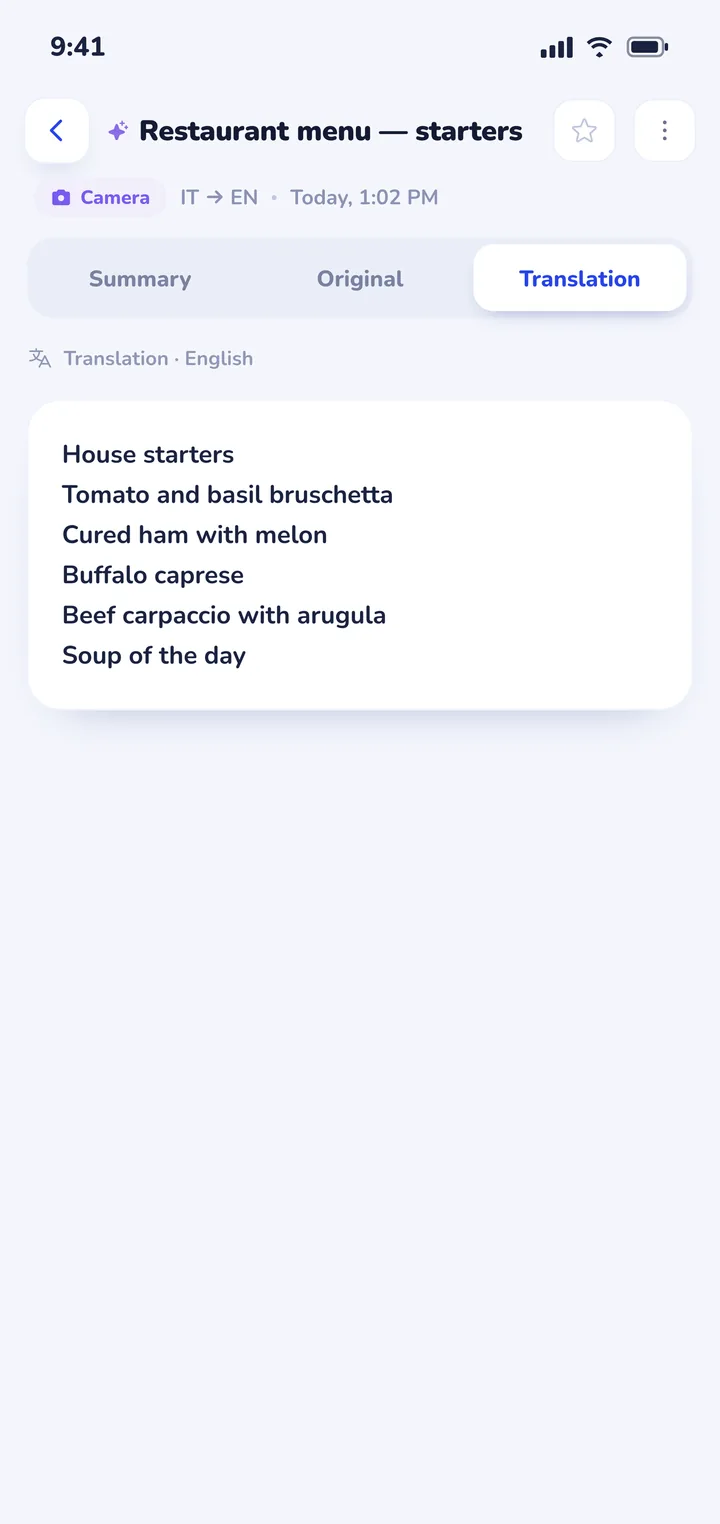
Clawmium Translate also includes camera translation that reads text from photos of printed Hangul signs and menus, plus document translation for saved PDF vouchers and booking slips. It supports more than 60 languages, including Korean, English, Japanese, Spanish, French, and German.
There are clear trade-offs to keep in mind. Clawmium Translate requires an active internet connection (cellular data or Wi-Fi) because speech and vision processing run through cloud models. It doesn't offer an offline speech mode. It's free to download with a daily allowance for live translation, completely ad-free, with a Pro monthly subscription that raises daily usage limits.
For subway tunnels with no cellular signal, Google Translate's offline pack remains the ideal backup. If you're comparing spoken translation tools across platforms, read our guide on apps that translate in real time.


Dining and conversation etiquette when using a translator in Korea
Using a translation app respectfully in South Korea involves following a few simple cultural customs:
- Use two hands when presenting your phone: In Korean etiquette, handing an object or showing something on your phone screen with both hands (or with your left hand lightly supporting your right forearm) demonstrates respect toward elders, clerks, and waitstaff.
- Keep sentences brief and clear: Complex metaphors, idioms, and nested clauses confuse machine translation algorithms. Speak one concise sentence at a time for the cleanest Korean output.
- Translating restaurant menus: Ordering food is one of the best parts of traveling in Korea. Read our practical guide on how to translate a menu with your camera for lighting and glare advice when scanning glossy barbecue menus or chalkboard signs.
- Planning multi-country itineraries: If your journey covers wider Asian destinations like Tokyo, Taipei, or Bangkok alongside Seoul, explore our guides to translator apps for Japan, translator apps for Taiwan, and translator apps for Thailand. For broader travel prep, read our complete guide to translation apps for travel.
- Microphone positioning: When talking at busy counters, placing the phone equidistant between both speakers ensures clear audio pickup, as detailed in our guide on using a conversation translator face to face.
Frequently asked questions
What is the best translator app for Korea travel?
Most travelers get the best results by pairing Naver Papago for Korean text and signs with Clawmium Translate for live face-to-face conversations with locals. Having Google Translate with a downloaded offline Korean pack provides a dependable safety net in underground subway stations.
Does Google Translate work well in South Korea?
Google Translate works adequately for basic signage and vocabulary, but its Korean conversational phrasing is often unnatural and grammatically blunt compared to tools trained specifically on Asian language syntax. It is best used for its offline language pack backup.
Why doesn't Google Maps work for walking directions in South Korea?
South Korean national security laws prohibit exporting high-precision domestic geographic data to foreign servers without government licenses. Consequently, Google Maps can't provide turn-by-turn walking or driving navigation in Korea. Travelers should install KakaoMap or Naver Map for walking and transit routes.
Can I use translation apps offline in South Korea?
Yes, for written text and camera translations if you download offline Korean language packs in Google Translate before departing. High-accuracy spoken conversation translation, however, requires streaming audio to cloud servers, so purchasing an affordable Korean travel eSIM is strongly recommended.
Do I need Wi-Fi or a travel eSIM for a trip to South Korea?
Yes. Having active mobile data through an international eSIM (such as LG U+, KT, SK Telecom, or Airalo) ensures you can navigate with KakaoMap, translate menus on the go, and hold smooth spoken conversations without depending on public Wi-Fi networks.
Sources
- Naver Papago, Papago translation features and Korean language models, checked 7 November 2026.
- Google Translate Help, Translate offline on Android and iPhone, checked 7 November 2026.
- Korea Tourism Organization, Visit Korea: Smart travel and mobile apps for travelers, checked 7 November 2026.
- Apple Support, Translate text, voice, and conversations on iPhone, checked 7 November 2026.
Try a conversation before you land in Seoul
Free to start. 60+ languages. Put the phone between two people and talk.