For a trip to Thailand, download Google Translate's offline Thai dictionary at home so you can read street signs and transit boards when cellular reception drops. Use Naver Papago for quick East and Southeast Asian conversational phrases. When speaking face to face at street food stalls, markets, or taxi stands, Clawmium Translate divides your screen into two facing halves so each person reads in their language, and automatically saves each session with an AI summary.
An international traveler in Thailand encounters three main communication tasks: reading continuous Thai script, riding urban transit and water ferries, and talking face to face with locals. Google Translate provides dependable offline dictionary packs and camera scanning that decode Thai signs without mobile data. Naver Papago offers specialized Asian translation models designed for regional idioms. VoiceTra features clean reverse-translation verification built for Asian tourism.
Clawmium Translate specializes in two-way spoken conversations, placing an inverted display between two people and automatically saving dual-language transcripts with structured AI summaries. Thai is a tonal language where minor pronunciation mistakes change word meanings entirely, making spoken audio output particularly valuable. For remote island coves where cellular reception drops without signal, carrying a downloaded Google offline dictionary alongside our online conversation app provides reliable coverage without data worries.
The three translation challenges you face in Thailand
Travelers exploring Thailand encounter three very different language environments depending on where their route leads:
- Deciphering continuous Thai script: The Thai alphabet features 44 consonants, 32 vowels, and no spaces between words. Spaces in written Thai indicate the end of a clause or sentence rather than word boundaries. For visitors, reading printed road signs, temple notices, or handwritten night market food boards without camera character recognition is nearly impossible.
- Five tones and spoken pronunciation: Thai is a tonal language with five distinct pitches: low, mid, high, falling, and rising. Saying a word with the incorrect inflection alters its definition entirely. For instance, the syllable mai can mean "new", "wood", "burn", or "not" depending on the tone. Using a mobile app that plays natural spoken audio eliminates the stress of mispronunciation.
- Riding urban rail and island transit: Moving through Bangkok involves the BTS Skytrain, the MRT subway, and Chao Phraya river express boats. Traveling south to the islands requires booking long-tail boats and ferries (between Phuket, Krabi, Koh Samui, and Koh Tao). In underground MRT stations or between limestone islands, mobile signal frequently cuts out, making offline maps and downloaded language packs essential without internet access.
Thai cultural etiquette: greetings and polite particles
Before launching a translation tool in Thailand, understanding traditional courtesy will make your interactions much more enjoyable. Thailand is famous as the "Land of Smiles", but social respect is deeply rooted in daily speech.
The most important custom is the use of polite ending particles. In Thai conversation, men end polite sentences with khrap (ครับ), while women end sentences with kha (ค่ะ). Including these particles when speaking or showing translated text signals respect.
When approaching a street food vendor, driver, or hotel clerk, open with a friendly "Sawatdee khrap" (for men) or "Sawatdee kha" (for women), accompanied by a gentle nod or a traditional Wai (palms pressed together in front of the chest). Greeting staff first establishes warmth before placing a phone screen on the counter.
Five translation apps for Thailand, compared
These five apps cover the spectrum of travel requirements in Thailand, from offline street navigation to live spoken conversations.
| App | Best For | MRT & Offline | Menu Scanning | Face-to-Face Mode | Key Constraint |
|---|---|---|---|---|---|
| Google Translate | Everyday multi-purpose travel | Select Pixel phones only | Live camera & photo translation | Face-to-face split screen | Discards full conversation history |
| Naver Papago | Asian language pairs & idioms | Text only (no voice offline) | Photo text translation | 1:1 conversation view | Limited to 14 languages |
| VoiceTra | Short tourism phrases | No (requires internet connection) | Text only (no camera mode) | Alternating turns | Short tourist phrases only |
| Apple Translate | Built-in quick iPhone lookups | Yes (downloadable pack) | Text & photo translation | Face to Face split view | Restricted to Apple hardware |
| Clawmium Translate (ours) | In-person dialogue with AI summaries | No (cellular data or Wi-Fi) | Camera photo translation | Two-way inverted split screen | Requires active internet connection |
Google Translate: the dependable offline baseline
Google Translate is an essential travel utility for any trip to Thailand, providing dependable assistance without an internet connection when needed. Its greatest asset for travelers is its downloadable Thai offline dictionary pack. Before heading out from your hotel Wi-Fi, download the Thai language pack to your phone storage so you're not caught without directions. This allows text and photo translations to work inside deep subway tunnels or remote beach coves where cellular reception drops.
Its live translate feature includes a split-screen conversation mode that shows translated text and plays spoken audio as each person speaks. We break down its interface and configuration in our guide to Google Translate's conversation mode.
The trade-off is that offline live speech translation is limited to Google's newer Pixel phones. On standard iPhones and non-Pixel Android devices, live spoken translation requires an active mobile data connection. Google Translate also doesn't save structured summaries or organize multi-turn conversations into reviewable transcripts.
Naver Papago: optimized for Asian travel
Developed by South Korea's search giant Naver, Papago is widely regarded as one of the sharpest translation tools for Asian language structures. It supports 14 languages, including Thai, English, Japanese, Korean, and Chinese.
Papago handles honorific customs and contextual phrasing well, making it helpful for deciphering Asian cultural nuances. Its 1:1 conversation mode lets you alternate speaking turns, and its photo feature scans signs cleanly. However, Papago's offline capabilities are limited to text, and it doesn't automatically summarize extended conversations into structured notes.
VoiceTra: speech translation designed for tourists
VoiceTra is a speech translation application developed by Japan's National Institute of Information and Communications Technology (NICT). It was built specifically to assist international tourists traveling across Asia, and it provides dependable English and Thai speech translation.
A unique benefit of VoiceTra is its reverse-translation verification. When you speak in English, the app displays how your words were translated back into English from the Thai output, letting you check for misunderstandings before showing the screen. It is designed for simple, short questions like asking for prices or directions rather than fluid discussions, and it requires an active internet connection.
Apple Translate: built-in lookups for iPhone
For iPhone owners, Apple Translate comes pre-installed in iOS and integrates directly with Apple's on-device Neural Engine. Travelers can download offline packs in settings, allowing two-way spoken conversation translation without cellular data.
Its Face to Face view rotates the top half of the screen 180 degrees so the person standing opposite reads Thai right side up while you read English. The constraint is hardware lock-in: it can't be installed on Android devices, and its vocabulary library for Southeast Asian dialects is smaller than Google's.
Where Clawmium Translate fits
Clawmium Translate is our app, so evaluate this section with that context in mind. We developed Clawmium Translate specifically to remove the friction of face-to-face conversations between travelers and locals, running on both Android and iPhone.
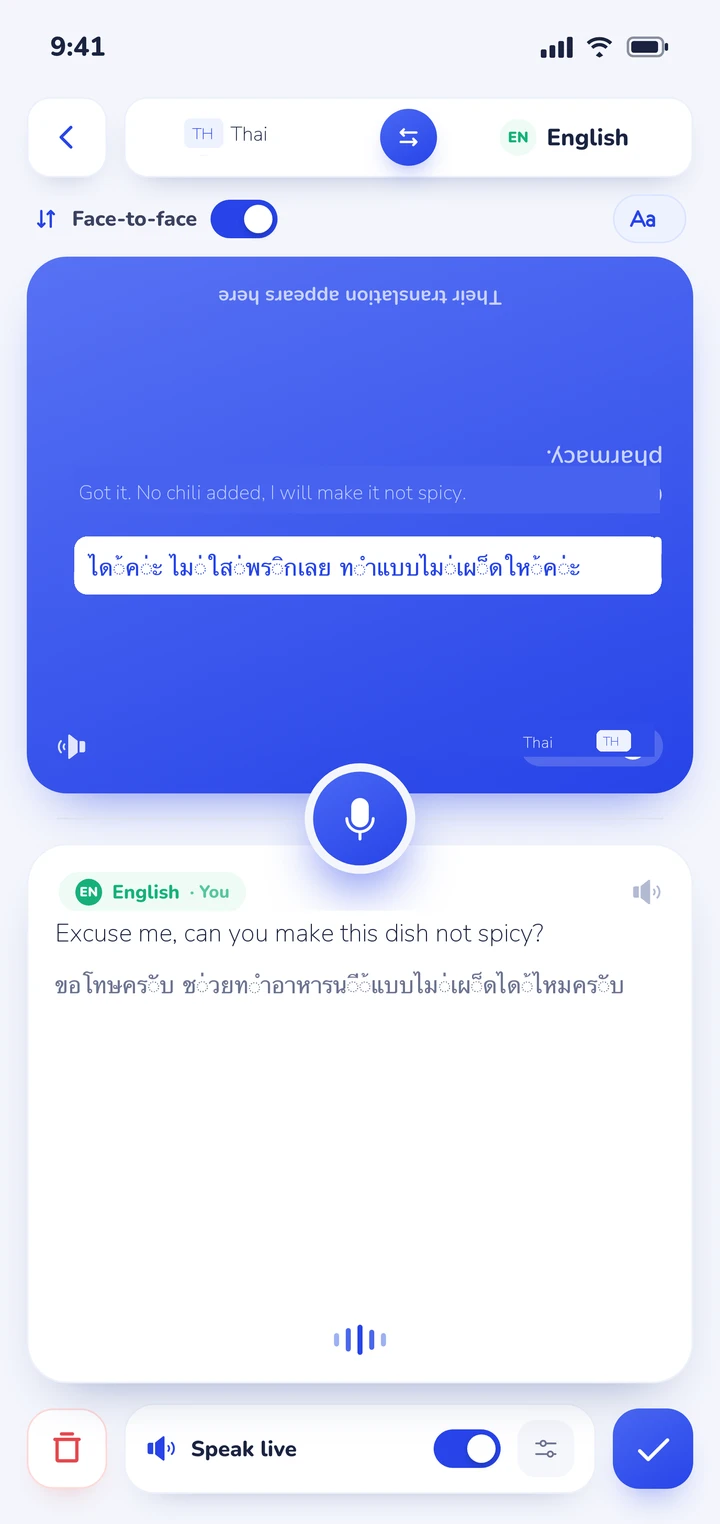
When you start conversation mode, the screen splits into two dedicated viewports. You place your smartphone flat on the counter at a Bangkok street stall, a ticket window at Hua Lamphong, or a dive shop counter in Koh Tao. One half faces you, and the other half inverts so the local vendor reads along naturally in Thai script without needing to hold your personal device.
The app detects which of your two selected languages is being spoken automatically, eliminating the clumsy interruption of pushing buttons between every sentence. Spoken translations can also be read aloud through the speaker, with distinct natural voices assigned to each speaker.
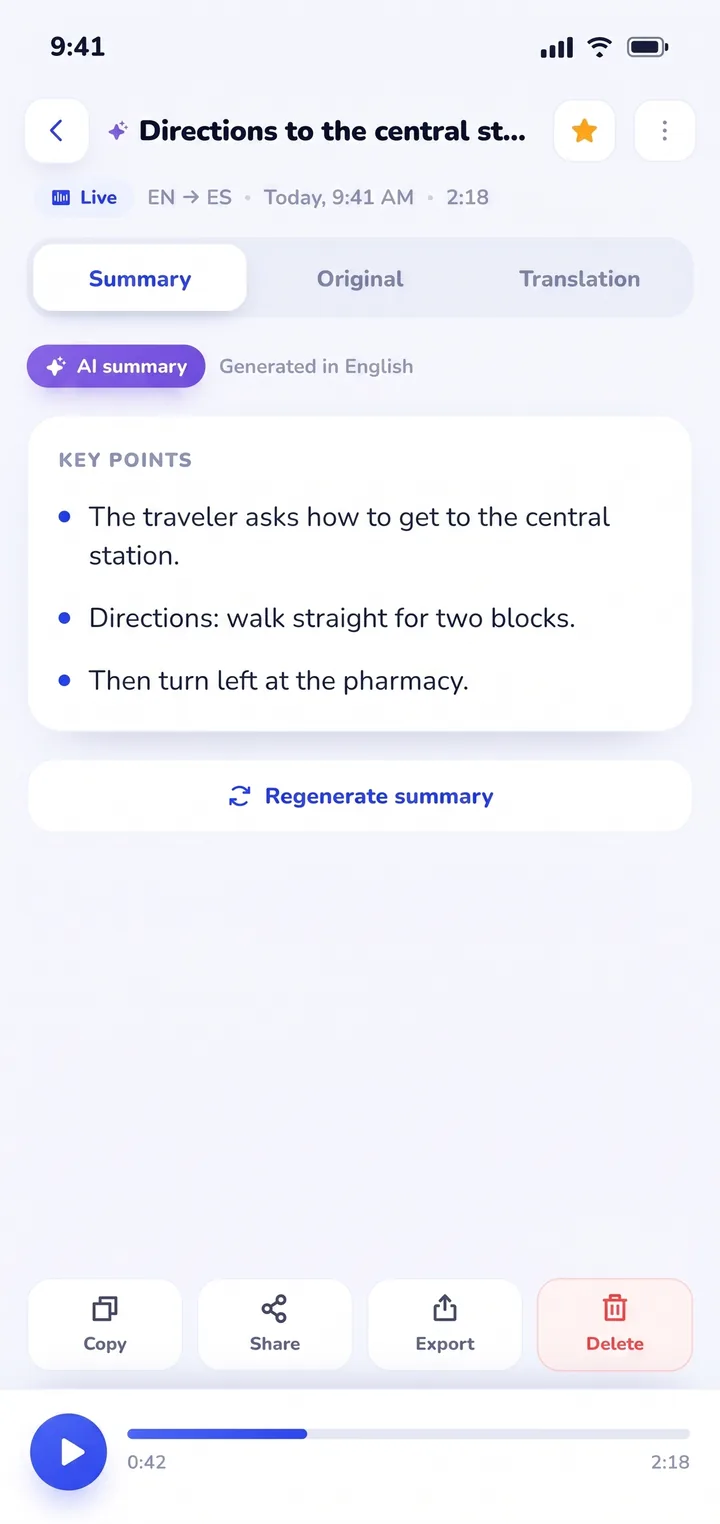
The most practical benefit for travelers in Thailand is what happens after your conversation finishes. Every exchange is preserved in History on your device, complete with the dual-language transcript and an automated AI summary of key points. When a boat captain explains island pickup times and snorkeling spots or a local cook shares the ingredients of a northern curry, you don't need to scramble for notes. You open your saved History, review the summarized takeaways, and copy or share the details whenever needed.
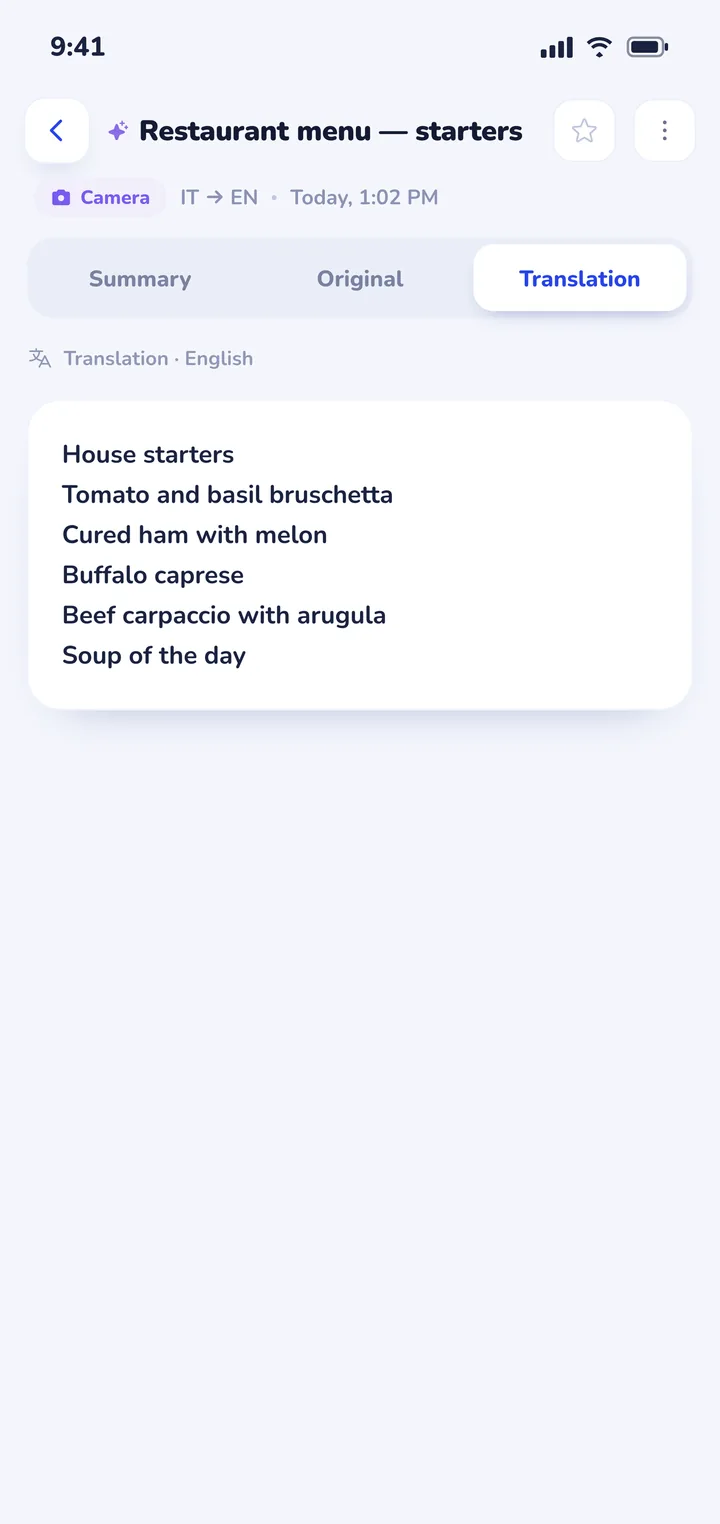
Clawmium Translate also includes a cloud camera translation feature that photographs printed restaurant menus, transit signs, and museum placards, overlaying readable English translations directly over the original image. For practical dining advice, read our guide on how to translate a menu with your camera. The app supports more than 60 languages, including Thai, English, Vietnamese, Tagalog, Japanese, Korean, Chinese, and European languages.
There are clear trade-offs to keep in mind. Clawmium Translate processes speech and camera translations through cloud models to maintain high linguistic accuracy, which means it requires an active Wi-Fi or cellular data connection. It doesn't offer an offline speech mode. It's free to download with a daily allowance for live translation that resets each day, and completely ad-free, with a Pro monthly tier that raises daily usage limits.
For remote jungle paths or underground train tunnels where cellular reception is unavailable, Google Translate's downloaded offline pack remains the ideal backup tool to keep on your device. To see how spoken translation technology operates in other destinations, explore our travel guides to translator apps for Japan and translator apps for Korea, or read our overview of real-time AI translator apps.


Navigating Thai street food, night markets, and dining customs
Eating street food in Thailand is an unforgettable experience, but ordering food involves unique culinary conventions:
- Specifying spice levels: Authentic Thai cooking uses generous amounts of bird's eye chilies. If you have low heat tolerance, learning key phrases prevents tears: mai phet (ไม่เผ็ด = not spicy at all), phet nit noi (เผ็ดนิดหน่อย = a little spicy), or phet mak (เผ็ดมาก = very spicy). Showing these phrases on screen ensures street cooks omit fresh chilies from your wok.
- Navigating food allergies and MSG: Peanuts and shrimp paste are common staples across Thai cuisine. If you have an allergy, show the written Thai text clearly: phae thua (แพ้ถั่ว = peanut allergy) or phae ahan thale (แพ้อาหารทะเล = seafood allergy). If you prefer food cooked without monosodium glutamate, say mai sai phong choo rot (ไม่ใส่ผงชูรส).
- Vegetarian food (Jay vs. Mangsawirat): In Thailand, strict vegetarianism is known as Jay (เจ), which excludes all meat, seafood, dairy, and pungent herbs like garlic and onions. General vegetarian cooking is called mangsawirat (มังสวิรัติ). Look for bright yellow triangular flags with red Thai script indicating Jay food stalls.
- Handwritten night market signs: Night markets often display specials written in cursive Thai chalk on slate boards. Point your smartphone camera squarely at the board with steady hands to view English descriptions overlaid on the text.
Navigating Thai transit: BTS, MRT, Tuk-tuks, and island ferries
Getting around Thailand involves a mixture of modern urban rail, river boats, and local road transport:
- Bangkok Skytrain (BTS) vs. Subway (MRT): The above-ground BTS Skytrain and underground MRT subway are operated by separate transport authorities. They require separate ticketing systems. BTS stations accept Rabbit cards or single-trip magnetic cards, while MRT stations accept contactless Mastercard/Visa credit cards directly at fare gates.
- Tuk-tuks and shared taxis (Songthaews): Unlike metered city taxis, Tuk-tuks and red shared pickup trucks (Songthaews in Chiang Mai) do not have meters. Always negotiate and agree upon the total fare before stepping inside the vehicle. Showing your destination address written in Thai on your phone screen prevents being dropped off at the wrong landmark.
- Ride-hailing apps: Ride-hailing services like Grab and Bolt operate widely in Bangkok, Phuket, and Chiang Mai. Using in-app translation features or a live translator helps you coordinate pickup locations with drivers who speak conversational Thai only.
- Multi-country Asian travel: If your journey extends across East and Southeast Asia, compare options in our guide to translation apps for travel, or check our dedicated guides to translator apps for Japan, translator apps for Korea, and translator apps for Taiwan.
Sources
- Tourism Authority of Thailand (TAT), Official Thailand travel and cultural etiquette guide, checked 11 November 2026.
- Bangkok Mass Transit System (BTS), Route map, ticket tariffs, and station guidelines, updated August 2025, checked 11 November 2026.
- Mass Rapid Transit Authority of Thailand (MRTA), Bangkok underground network and contactless payment rules, updated September 2025, checked 11 November 2026.
- Google Help, Translate speech in Google Translate, updated 26 August 2025, checked 11 November 2026.
- Naver Papago, Papago neural machine translation features and languages, checked 11 November 2026.
- NICT, VoiceTra speech translation application documentation, checked 11 November 2026.
Frequently asked questions
What is the best translator app for traveling in Thailand?
Most travelers get the best results by carrying Google Translate for offline camera translation of Thai script and street signs, and Clawmium Translate for live spoken conversations with locals at night markets, street stalls, and hotels. Papago is also helpful for Asian phrase nuances.
Do I need to speak Thai when visiting Thailand?
In major tourist quarters of Bangkok, Chiang Mai, and Phuket, hotel staff and tour operators speak conversational English. However, at street food carts, provincial open-air markets, Tuk-tuk stands, and smaller island piers, English is much less common. Carrying a live translation tool helps you order food and navigate transit smoothly.
Can translation apps read continuous Thai script?
Yes. Modern neural optical recognition in Clawmium Translate and Google Translate can detect and separate unspaced Thai letters, overlaying readable English translations directly over printed signs, food packaging, and chalkboard menus.
Do translation apps work offline on the Bangkok MRT?
In underground Bangkok MRT tunnels and subway station passages, cellular signals can fluctuate. To maintain uninterrupted navigation access, download Google Translate's offline Thai dictionary pack before entering the subway network.
Try a conversation before your trip to Thailand
Free to start. 60+ languages. Put the phone between two people and talk.