For everyday spoken conversations, Google Translate provides dependable automatic speech detection on Android and iPhone, while Apple Translate offers convenient offline speech packs for iOS users. Microsoft Translator works well for structured multi-device conferences. If you need a face-to-face conversation where the phone rests flat on a table between two people, displays Arabic right-to-left on an inverted screen, and automatically saves dual-language transcripts with AI summaries, Clawmium Translate, which is our app, is built specifically for that.
Real-time English-to-Arabic voice translator apps listen to spoken audio in English and Arabic, transcribing words into written text and playing the translation aloud. Google Translate remains the most flexible free utility globally, supporting automatic two-way language detection and spoken output in Modern Standard Arabic. Apple Translate comes built into iOS devices, offering reliable offline speech packs for travelers without local cellular data. Microsoft Translator excels at group conference rooms where multiple participants join via numeric room codes.
Clawmium Translate focuses on in-person, two-way table conversations on Android and iPhone. It divides your screen into two opposite-facing viewports so each person reads their own language naturally, rendering Arabic right-to-left while archiving complete dual-language transcripts and automated AI summaries on your device. Spoken translation requires an active cellular data or Wi-Fi connection. Neither consumer smartphone apps nor dedicated pocket gadgets replace a certified professional human interpreter for legal proceedings or hospital emergency consultations.
Four English and Arabic voice translator apps compared
Different mobile tools approach the Arabic language with different strengths. Some emphasize offline accessibility for travelers arriving at international airports, while others prioritize continuous in-person dialogue and meeting documentation.
| App | Best For | Spoken Mode | Without Internet | Dialect Focus |
|---|---|---|---|---|
| Google Translate | General spoken conversation | Two-way auto-detect conversation | Pixel 9, 10 and 11 for live speech | Modern Standard Arabic (MSA) |
| Apple Translate | iPhone travelers abroad | Face-to-face split conversation | Yes (downloaded Arabic pack) | Modern Standard Arabic (MSA) |
| Microsoft Translator | Multi-device group meetings | Multi-party code-based chat | Yes (offline text packages) | Modern Standard Arabic (MSA) |
| Clawmium Translate (ours) | Face-to-face dialogue & AI summaries | Inverted two-way split screen | No (cellular data or Wi-Fi) | Modern Standard Arabic (MSA) |
Google Translate: the accessible conversation standard
Google Translate is the most widely used tool for translating spoken English and Arabic. It's completely free on Android and iPhone with no subscription fees or intrusive advertising banners.
Its conversation mode listens for both English and Arabic speech simultaneously. When operating on an active internet connection, it automatically detects which person is speaking, transcribes the speech, and reads the translated sentence aloud in a natural neural voice. This makes spontaneous counter chats at an airport ticket booth or hotel reception straightforward.
Google Translate has two primary trade-offs for spoken Arabic. First, its acoustic and translation models default heavily to Modern Standard Arabic. If your speaking partner speaks in rapid colloquial Egyptian or Gulf slang, the recognition model can misinterpret regional idioms. Second, Google Translate discards your spoken dialogue the moment you close conversation mode, saving no transcript or meeting notes for later review.
Apple Translate: built-in offline speech on iPhone
If you carry an iPhone running modern iOS versions, Apple Translate is already installed on your device. It provides a clean, privacy-focused experience designed specifically for Apple hardware.
The app includes a dedicated Conversation tab with a Face to Face view that presents translated phrases in opposite directions on the screen. Apple's biggest advantage is offline convenience. By downloading the Arabic language pack before your departure, you can translate basic spoken phrases without an active cellular data plan or airport Wi-Fi connection.
The primary limitation is vocabulary scope and dialect handling. Apple Translate is tuned for Modern Standard Arabic and formal travel phrases. It struggles with colloquial vocabulary, regional grammar variations, and background street noise. It also limits history to manually favorited phrases rather than full conversation records.
Microsoft Translator: multi-device group conversations
Microsoft Translator is a dependable utility on both Android and iOS, particularly well-suited for group business discussions and classroom environments.
Its standout capability is multi-device conversation mode. A host creates a unique five-letter code, and other participants join from their own smartphones or laptops. As each person speaks into their device in English or Arabic, translated text appears on everyone's individual screen in their chosen language. This is helpful when three or four colleagues are sitting around a conference table.
For casual, spontaneous interactions on the street or in a taxi, Microsoft Translator feels cumbersome. Generating a session code, having the other person open an app or browser, and managing network connections takes too long for a quick two-minute interaction.
Where Clawmium Translate fits
Clawmium Translate is our app, so evaluate this section with that context in mind. We developed Clawmium Translate to solve the specific physical and social friction of face-to-face conversations between English and Arabic speakers, running natively on Android and iPhone.
When you start conversation mode, the screen splits into two dedicated viewports. You place your smartphone flat on a table, café desk, or counter between both speakers. The top half inverts 180 degrees to face the Arabic speaker, properly aligning the text from right to left in clean Arabic typography. The bottom half faces you in English. Each person reads their side comfortably without craning their neck, leaning forward, or passing an expensive smartphone back and forth.
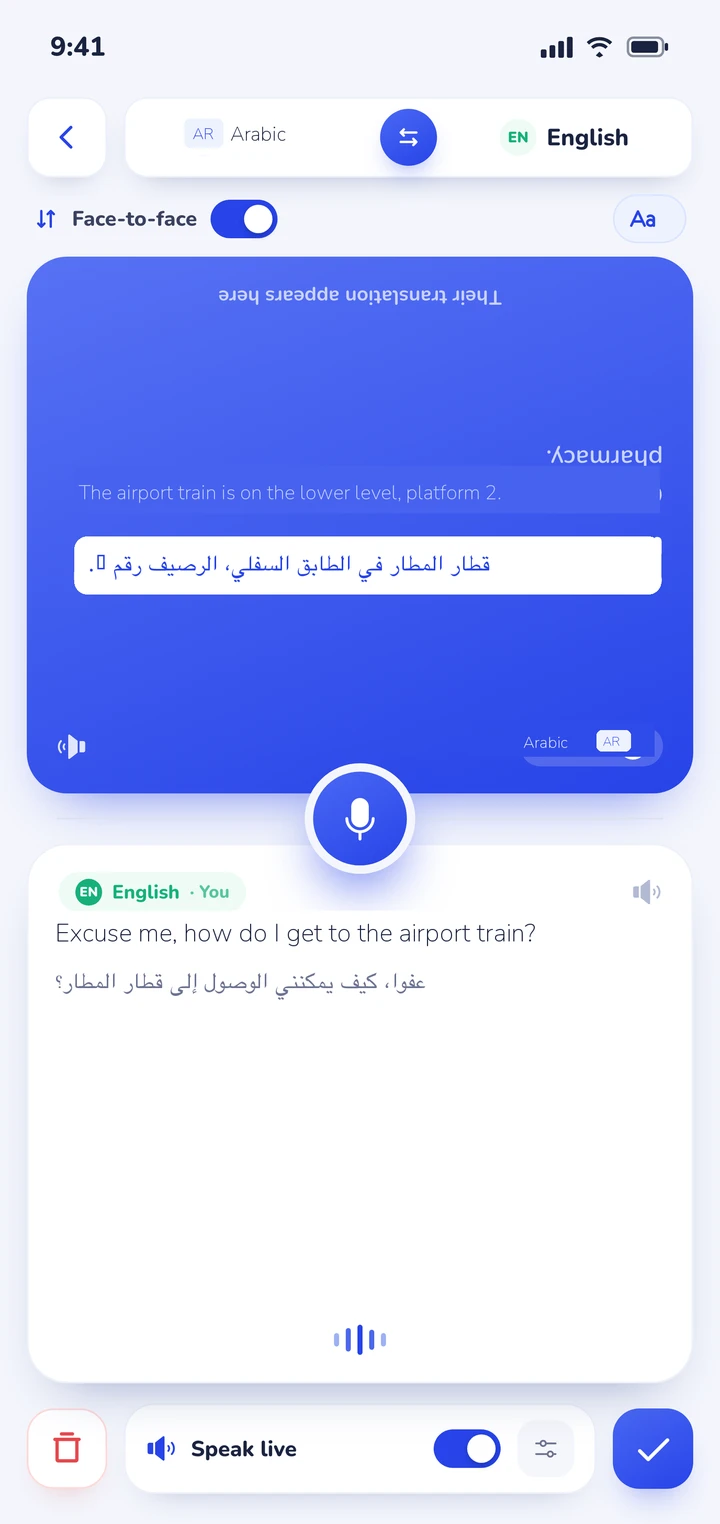
The app listens continuously and detects which of your two chosen languages is being spoken automatically. Spoken translations can play aloud through the device speaker, with distinct voices assigned to each speaker so you can follow along easily. During audio playback, the microphone mutes automatically to prevent acoustic feedback.
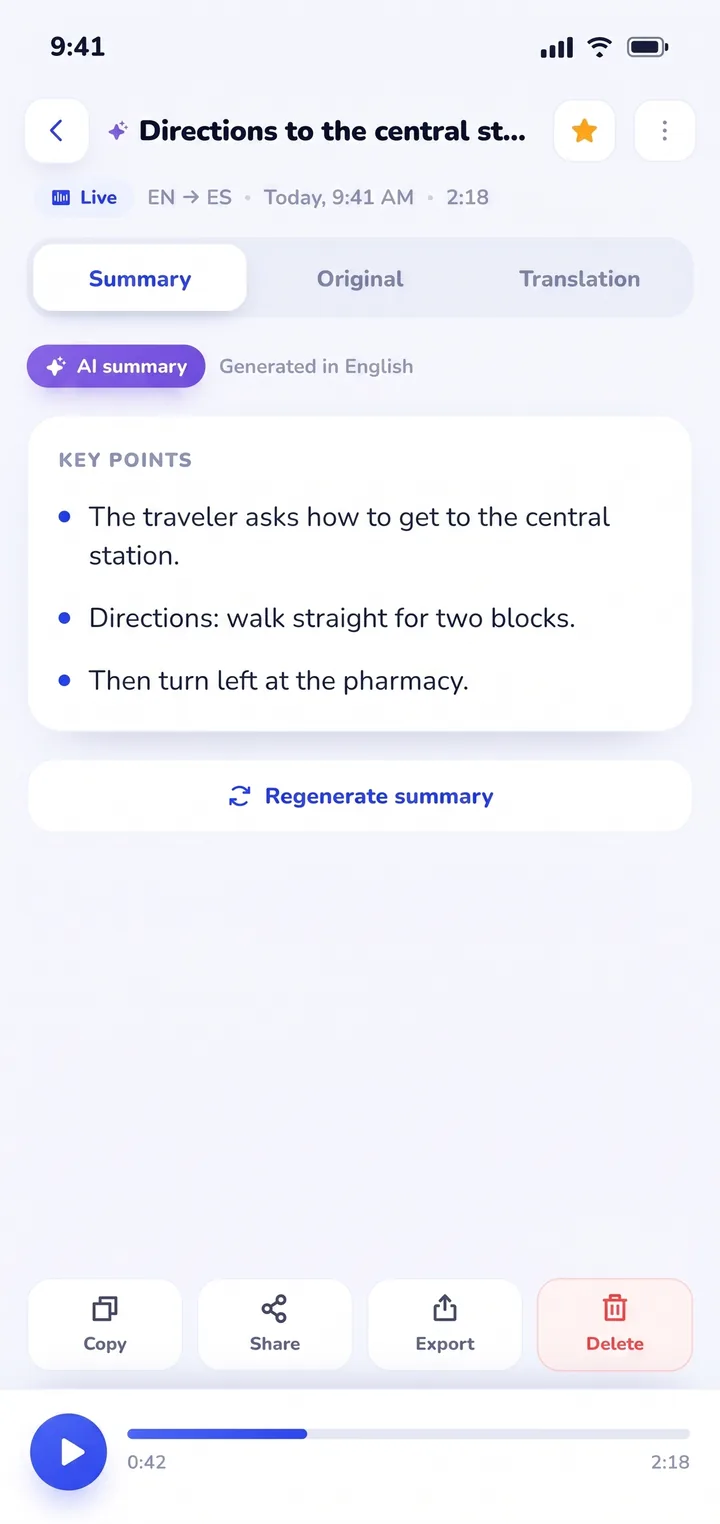
Where Clawmium Translate fundamentally differs from standard tools is session retention. When discussing lease terms with a landlord in Dubai, reviewing project milestones with an overseas client, or consulting a doctor about prescription dosages, remembering details is critical. Clawmium Translate automatically archives every conversation in History on your device. You receive a complete dual-language transcript alongside an automated AI summary highlighting agreed terms, dates, and instructions.
There are clear technical boundaries to keep in mind. Clawmium Translate processes speech through cloud models to maintain high translation accuracy, meaning it requires an active cellular data or Wi-Fi connection. It does not offer an offline speech mode. The app is free to download with a daily allowance for live transcription and spoken output that resets every day, and it's completely ad-free. An optional Pro monthly subscription raises daily limits and adds every voice.
Modern Standard Arabic vs. regional spoken dialects
The most common surprise for English speakers using translation apps in the Middle East is the gap between written Arabic and spoken street conversation. Linguists refer to this as diglossia.
Modern Standard Arabic, known as Fusha, is the formal literary standard taught in schools across the Arab world. It is the language of newspapers, legal contracts, television news broadcasts, and formal religious sermons. Every educated Arabic speaker understands Fusha. However, nobody speaks Fusha as their native cradle tongue at home, in the souk, or among friends.
In everyday life, people speak regional dialects known collectively as Ammiyya. These dialects vary significantly across geographical regions:
- Egyptian Arabic (Masri): Spoken by over 105 million people in Egypt. Because of Egypt's historic dominance in cinema, television, and pop music, Egyptian Arabic is widely recognized and understood across the entire Arab world. Words like kwayyes (good) and izayyak (how are you) are universally familiar.
- Levantine Arabic (Shami): Spoken across Lebanon, Syria, Jordan, and Palestine. It features soft consonants and smooth vocal transitions. Colloquial phrases like kifak (how are you) and shou (what) are common in everyday conversation.
- Gulf Arabic (Khaleeji): Spoken across the Arabian Peninsula, including the United Arab Emirates, Saudi Arabia, Kuwait, Qatar, Bahrain, and Oman. It retains certain classical grammatical structures while incorporating unique local vocabulary.
- Maghrebi Arabic (Darija): Spoken across Morocco, Algeria, and Tunisia. It blends Arabic roots with Amazigh (Berber), French, and Spanish influences. Because of rapid consonant clustering and unique loanwords, speech recognition models designed for eastern dialects often struggle with colloquial Maghrebi speech.
Because consumer speech engines are trained primarily on Modern Standard Arabic, speaking in complete, clear sentences helps the speech model recognize root words accurately, even if your speaking partner uses regional pronunciation.
Right-to-left script, Tashkeel, and the context rule
Arabic is written from right to left in a flowing cursive script where letter shapes change depending on whether they appear at the beginning, middle, or end of a word, or stand alone.
A defining characteristic of written Arabic is the absence of short vowel marks in everyday text. Full Arabic script includes diacritical markings called Tashkeel (such as fatha for a short 'a', kasra for 'i', and damma for 'u'). However, standard books, signs, mobile screens, and news articles omit Tashkeel entirely, writing only the consonant skeleton known as the rasm.
This creates a unique challenge for automated speech recognition. A three-letter consonant sequence like كتب (k-t-b) can represent several completely different words depending on intended vowels:
- Kataba (كَتَبَ): He wrote (past tense verb).
- Kutub (كُتُب): Books (plural noun).
- Kutiba (كُتِبَ): It was written (passive verb).
If you speak a single isolated word into your phone microphone, the speech engine has no way to know which vowel pattern you intended. It will often produce an incorrect translation or choose a rare homograph. However, if you speak a full sentence, such as "Where can I buy these books?", the natural language processing model evaluates the surrounding words and correctly translates kutub as books. Always speak in full, coherent sentences rather than disjointed individual words.
Face-to-face conversation etiquette across the Arab world
In Middle Eastern culture, personal relationships and conversational warmth precede business and transactions. Using a mobile translation app respectfully requires observing local conversational customs:
- Maintain eye contact and smile: Do not stare down into your phone screen while the other person speaks. When using an inverted split-screen app like Clawmium Translate, you can rest the device on the table, listen to the read-aloud voice, and keep respectful eye contact.
- Accept hospitality before rushing to business: If someone offers you Arabic coffee (gahwa) or mint tea, accept the cup politely with your right hand. Rushing immediately into price negotiations or device screens is considered poor form.
- Avoid thrusting the phone forward: Shoving a phone microphone directly into someone's face feels aggressive. Keep the phone resting on the counter or table between you, or hold it at waist level if standing in a market. For broader travel habits, read our guide on how to talk face to face in two languages.
- Use common courtesy phrases: Even when relying on an app for complex dialogue, knowing basic polite phrases sets a respectful tone. Saying Salam Alaykum (peace be upon you), Shukran (thank you), and Min fadlik (please) shows genuine goodwill.
- Preserve personal privacy: Avoid passing your personal smartphone to strangers in crowded train stations or street markets. Using a hands-free table mode or reviewing our two-way translator device guide highlights why keeping your device in your possession is safer while traveling.
How to run an English and Arabic live conversation
Following this simple step-by-step procedure ensures your translated conversation runs smoothly without awkward pauses:
- Configure your languages: Open your app's conversation mode, set the primary language to English and the secondary language to Arabic. Ensure the audio output volume is raised so read-aloud playback is audible above ambient room noise.
- Place the device between both speakers: Rest the smartphone flat on the table or counter between you. Ensure the top inverted half of the screen faces the Arabic speaker so they can read right-to-left text without leaning over your shoulder.
- Speak clearly in complete phrases: Press the microphone or rely on continuous listening. Speak one complete thought at a natural pace. Avoid shouting or speaking in unnatural broken English, which confuses natural language parsing models.
- Wait for the spoken translation to finish: Allow the automated read-aloud voice to finish speaking before your conversation partner replies. The microphone will un-mute automatically once playback finishes.
- Review and export your conversation notes: When finished, close the session and open History. Verify the saved dual-language transcript and check the automated AI summary to confirm key decisions, dosages, or prices. For travelers planning multiple journeys, explore our guide to translation apps for travel.
Frequently asked questions
Can translator apps understand spoken Egyptian or Gulf Arabic?
Most commercial speech translation engines are trained primarily on Modern Standard Arabic, but modern neural models increasingly recognize common colloquial phrases from Egyptian and Gulf dialects. Speaking in complete sentences with standard vocabulary yields the highest translation accuracy.
Do I need an active internet connection to translate spoken Arabic?
For high-accuracy conversational speech and automatic language detection, yes. Apps like Clawmium Translate process audio through advanced cloud neural models and require Wi-Fi or cellular data. Apple Translate and Google Translate offer downloadable offline packages, but offline vocabulary is limited to basic travel phrases.
Why does Arabic text look connected and read from right to left?
Arabic is a cursive script where letters join together within words, and the entire writing system flows from right to left. High-quality translation apps automatically adjust text alignment, typography, and punctuation to match native right-to-left standards.
Can mobile translator apps replace professional human interpreters?
No. Consumer mobile apps are designed for everyday social, dining, and travel interactions. They should never be used as substitutes for certified human interpreters in legal courtroom proceedings, official immigration interviews, or clinical medical consultations.
Is Google Translate or Apple Translate better for Arabic voice conversations?
Google Translate generally provides broader vocabulary and more fluid automatic speech detection for spoken Arabic conversations across Android and iPhone. Apple Translate is convenient for iPhone users needing basic offline translation abroad, but its conversational vocabulary is more restricted.
Sources and verification
- Holes, Clive. Modern Arabic: Structures, Functions, and Varieties. Georgetown University Press. Language diglossia and dialect analysis checked 2026-11-19.
- Google Translate Help, "Translate by speech and conversation mode". Feature verification checked 2026-11-19.
- Apple Support, "Translate speech and text on iPhone". Offline language pack verification checked 2026-11-19.
- Microsoft Translator Documentation, "Multi-device conversation feature". Group chat code verification checked 2026-11-19.
- Clawmium Translate in-app features and technical specifications, verified against codebase 2026-11-19.
Try an English and Arabic conversation on your phone
Free to start. 60+ languages. Put the phone between two people and talk naturally.