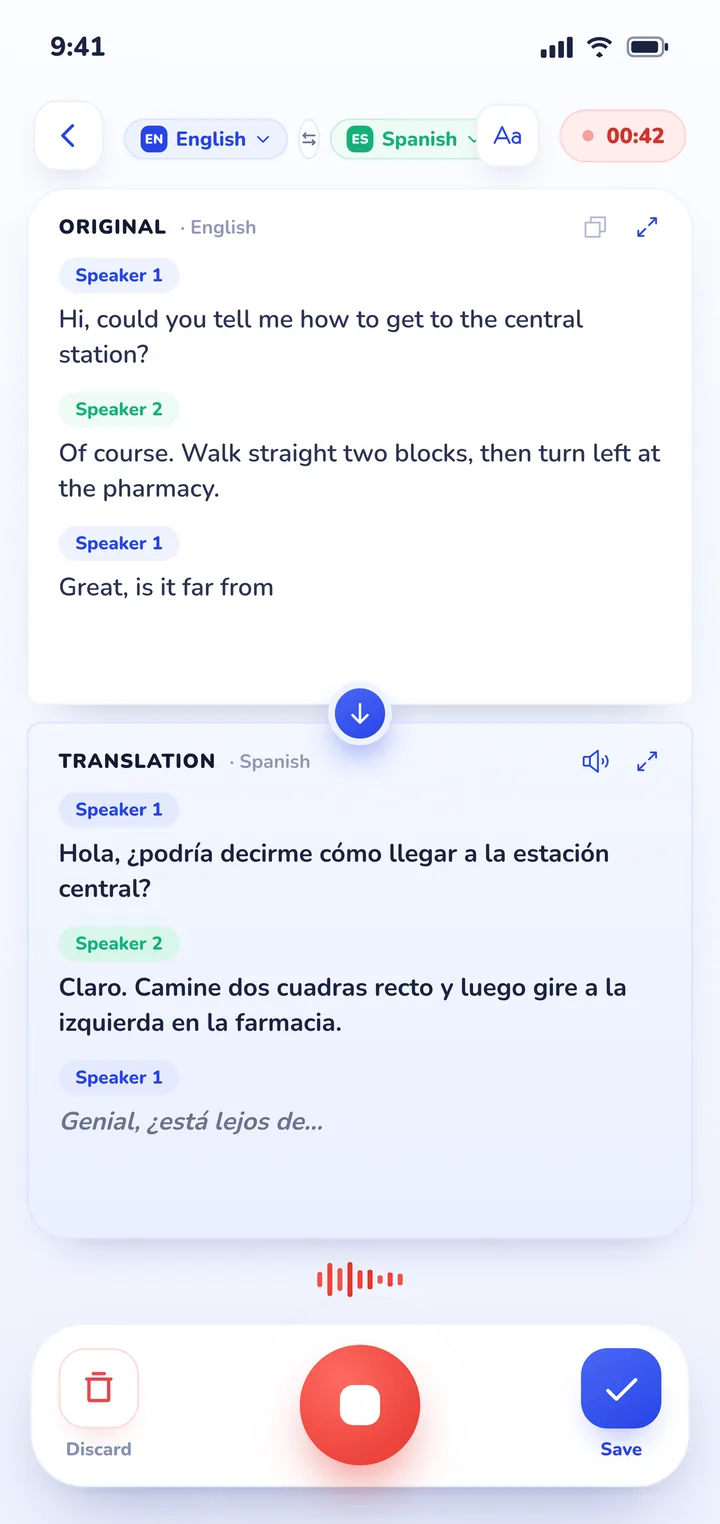
SayHi no longer works and has been removed from both app stores. For a free, simple replacement, Google Translate has a conversation mode on Android and iPhone, and Apple's Translate app has one built into the iPhone. For long face-to-face conversations where both people read their own language at once and you want a saved record afterwards, Clawmium Translate is built for that, on Android and iPhone.
SayHi Translate, Amazon's free voice translation app, was discontinued in early August 2024 and removed from the App Store and Google Play; apps with "Say Hi" in the name today come from other developers. The closest free replacement is Google Translate's live translate on Android and iPhone, which detects which of two languages is being spoken, reads translations aloud and has a face-to-face split screen. Apple's Translate app does the same on iPhone and works offline for downloaded languages.
Microsoft Translator was once the pick for groups, but it retired its multi-device conversation feature on 30 June 2026. Apps such as Clawmium Translate add a saved transcript and summary of each conversation. For Korean and Japanese, Naver's Papago is a free option with its own conversation mode.
What happened to SayHi Translate
SayHi was a voice translator: you picked two languages, tapped a button, spoke, and the app showed and spoke the translation. Its two-button conversation layout made it popular with travellers, and with organisations that needed a free way to talk with visitors.
Amazon, which ran the app, discontinued it in early August 2024. Users who opened the app found a discontinuation notice in place of the translator, and the listings disappeared from both the App Store and Google Play. Amazon didn't publish a public explanation, and it didn't name a replacement. The app's terms of service had always allowed Amazon to stop the service without notice, which is what happened.
If you still have SayHi installed, it won't translate anything. There's no setting or update that brings it back.
Beware of apps using the SayHi name
Search for SayHi in either app store today and you'll find apps with "Say Hi" or "SayHi" in their names. They come from other developers, not Amazon, and they aren't the app you used before. Some of them may be fine, but install them for what they are, not because of the name. Check the developer name on the listing before you download, and read the recent reviews.
Older "best translation apps" articles still link to SayHi, and those store links now lead to an error page. Our list of apps that translate in real time is up to date.
What made SayHi useful
Before choosing a replacement, it helps to know which parts of SayHi you relied on. For most people it came down to four things:
- Speaking instead of typing. You held a conversation, not a text box.
- A layout for two people, with one button per language, so it was always clear whose turn it was.
- Spoken output, so the other person could hear the translation without reading.
- No cost.
Every app below covers the first and third points. They differ on how they handle two people at once, how many languages they support, and what they keep after the conversation ends.
The alternatives
Google Translate
The closest like-for-like swap, and the first one to try. It's free on Android and iPhone, and Google says it supports more than 70 languages. Its live translate feature detects which language each person is speaking, reads the translation aloud, and has a face-to-face mode that splits the screen so each person reads their own language.
Microsoft Translator
Older guides recommend Microsoft Translator for groups, because each person could join one conversation from their own phone with a short code. Microsoft retired that multi-device conversation feature on 30 June 2026, according to the app's release notes, so it no longer covers what SayHi users needed most.
Apple Translate
Built into the iPhone, with a conversation mode for two people. It supports fewer languages than Google's app, but it's already on your phone, and Apple says conversations work without internet for languages you've downloaded. Recent versions of iOS also add Live Translation inside Messages, Phone and FaceTime on supported models.
Papago
Made by Naver in South Korea, Papago is free on Android and iPhone and has a one-to-one conversation mode. It supports 14 languages, including Korean, Japanese and Chinese. If most of your conversations are in those languages, it's a useful second app alongside a general one.
Which one should you choose?
- A quick question in a shop or a taxi, in any language: Google Translate.
- An iPhone and a common travel language, with nothing to install: Apple Translate.
- Mostly Korean, Japanese or Chinese: Papago, alongside a general app.
- A long conversation at a table, a meeting with family, or anything where you want to read back what was said afterwards: Clawmium Translate, which is ours.
- A doctor's appointment: a professional interpreter, often free, as our article on talking to a doctor in another language explains.
Many people end up with two: a general translator for quick phrases, and a conversation app for the conversations that matter. Our guide to using a conversation translator face to face covers the setup and the etiquette.
Where Clawmium Translate fits
This is our app, so weigh what follows with that in mind. It's built for the situation SayHi handled best, a face-to-face conversation, and adds a few things:
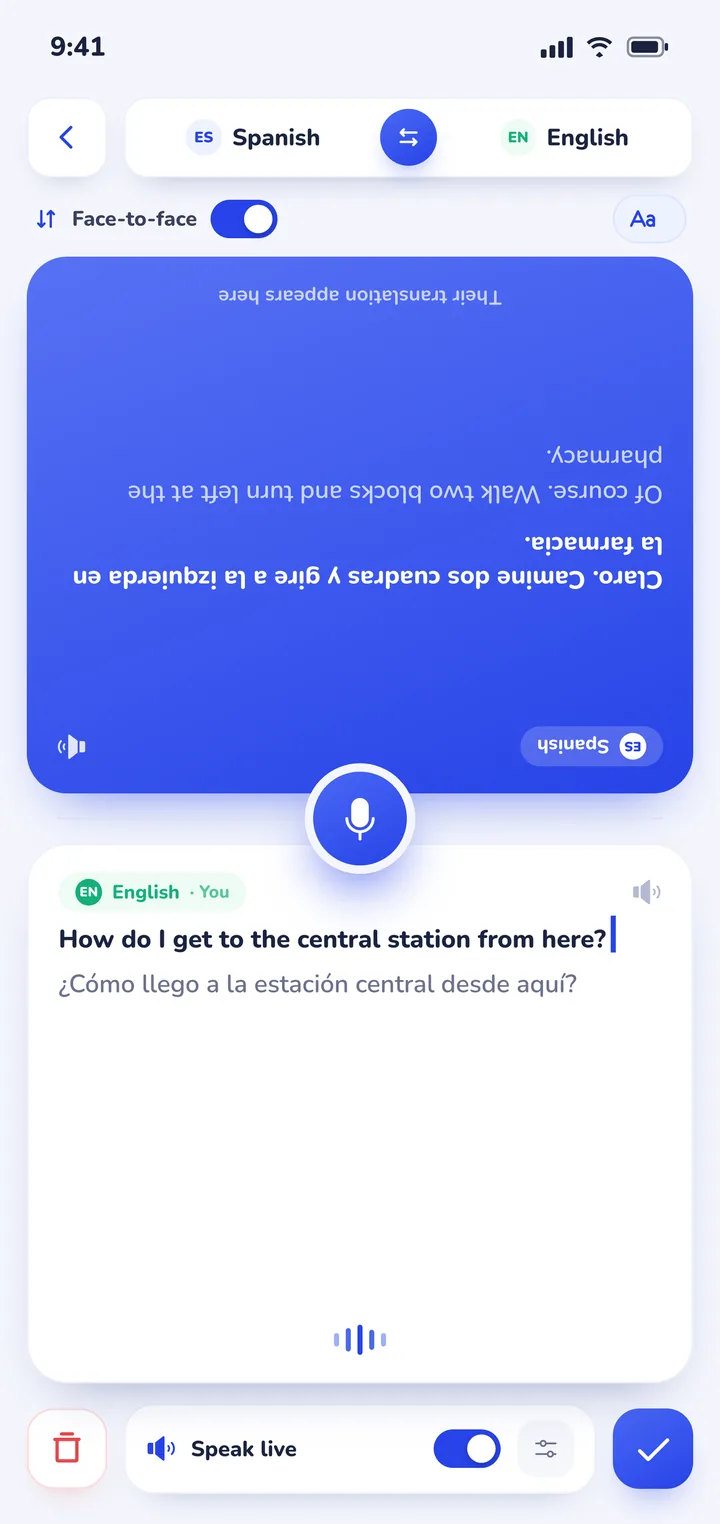
- A split screen: put the phone on the table between you, and each half shows the conversation in that person's language, with the top half turned to face the person opposite. Nobody passes the phone back and forth.
- Continuous listening: the app recognises which of your two languages each person is speaking, so there's no button to press before each turn.
- A saved record: every session is kept on your phone with the full transcript in both languages and an AI summary of the main points.
- Read-aloud, with a separate voice for each speaker if you want one.
- Camera and photo translation for menus, signs and letters.
It covers more than 60 languages and is free to download with a daily allowance and no ads. Pro raises the daily limits and adds every voice. It's on Android and iPhone, needs an internet connection and doesn't translate phone calls, so for a conversation with no signal, Apple Translate with the languages downloaded is the better choice.


If your organisation recommended SayHi
Schools, clinics and city services that listed SayHi on their websites now point visitors at an app that no longer exists. Replace the link with an app that is still maintained, check that it supports the languages your visitors speak, and test it once in a real conversation before you publish the recommendation. If your visitors use both Android and iPhone, list one option for each platform.
Sources
- User reports of the discontinuation notice in August 2024: Lemmy.World, Fairphone Community Forum, Threads.
- SayHi terms of service, which reserve Amazon's right to discontinue the service: archived copy from 2022. The sayhi.com website itself no longer loads.
- The original App Store listing (id437818260) and Google Play listing (com.sayhi.android.sayhitranslate) both return "not found", checked on 31 October 2026.
- Microsoft Translator release notes for version 26.7.1, 30 June 2026 ("The multi-device conversation feature has been retired"), as listed on APKMirror, checked 3 November 2026.
- Apple Support, Translate in-person conversations with iPhone, and Naver Papago, App Store listing, checked 3 November 2026.
Frequently asked questions
Is SayHi Translate still available?
No. Amazon discontinued SayHi Translate in August 2024. The app was removed from the App Store and Google Play, and installed copies show a discontinuation notice instead of translating.
Why was SayHi discontinued?
Amazon didn't give a public reason. The app's terms of service allowed Amazon to discontinue it at any time without notice.
Are the new SayHi apps in the app stores made by Amazon?
No. Apps that now use "Say Hi" or "SayHi" in their names come from other developers. Check the developer name on the listing before you install one.
What is the best free alternative to SayHi?
For quick exchanges, Google Translate is the closest free replacement, on Android and iPhone. For long face-to-face conversations with a split screen and a saved transcript, Clawmium Translate is free to download on Android and iPhone.
Is there a SayHi alternative that saves the conversation as a transcript?
Yes. Clawmium Translate saves every session on your phone with the transcript in both languages and an AI summary, so you can read back what was said.
Try a live conversation
Free to start. 60+ languages. Each person reads their own language.