For everyday spoken conversations, Google Translate provides dependable live two-way detection on Android and iPhone, while Apple Translate offers clean offline voice packs on iOS. For looking up individual characters, stroke orders, and radicals, Pleco is the gold standard dictionary app. If you need two-way face-to-face dialogue where the phone rests flat between two people and automatically archives dual-language transcripts with AI summaries, Clawmium Translate, which is our app, is built specifically for that.
Real-time English-to-Chinese translator apps convert spoken words between English and Mandarin, displaying written characters and reading the translation aloud. Google Translate remains the most versatile free option globally, supporting automatic conversation detection in both Simplified and Traditional scripts. Apple Translate comes pre-installed on iOS devices, offering reliable offline speech packs for Mandarin. Pleco serves as an indispensable character dictionary, while Baidu Translate excels at domestic colloquialisms within mainland networks.
Clawmium Translate specializes in face-to-face two-way conversations on Android and iPhone. It divides your screen into two facing viewports so each person reads their own language naturally, while saving complete dual-language transcripts with automated AI summaries on your phone. Spoken translation requires an active internet connection. Neither consumer mobile apps nor handheld gadgets replace a certified professional interpreter for legal contracts or clinical medical consultations.
Five English and Chinese translator apps compared
Different tools excel at different aspects of the Chinese language. Some specialize in dictionary definitions and character strokes, while others focus on live spoken conversation.
| App | Best For | Spoken Mode | Without Internet | Script Support |
|---|---|---|---|---|
| Google Translate | General spoken conversation | Two-way auto-detect conversation | Pixel 9, 10 and 11 for live speech | Simplified and Traditional |
| Apple Translate | iPhone owners traveling abroad | Face-to-face split conversation | Yes (downloaded Mandarin pack) | Simplified Chinese |
| Pleco | Looking up characters & radicals | Single-word audio pronunciation | Yes (offline dictionary database) | Simplified, Traditional, Pinyin |
| Baidu Translate | Mainland colloquialisms & slang | Two-way voice dialogue | Limited offline text packs | Simplified Chinese |
| Clawmium Translate (ours) | Face-to-face dialogue & AI summaries | Inverted two-way split screen | No (cellular data or Wi-Fi) | Simplified and Traditional |
Google Translate: the versatile conversation baseline
Google Translate is the most widely accessible tool for translating spoken English and Chinese. It's completely free on Android and iPhone with no subscription tiers or advertising banners.
Its conversation mode listens continuously for both English and Mandarin, automatically detecting which language is being spoken without requiring manual button taps. You can set the written output to either Simplified Chinese (used in mainland China and Singapore) or Traditional Chinese (used in Taiwan, Hong Kong, and many diaspora communities). The app reads translations aloud in natural Mandarin neural voices.
There are two primary limitations to consider. First, Google services are blocked by local networks in mainland China, meaning Google Translate requires an international roaming eSIM or a virtual private network to function there. Second, the app discards your spoken dialogue the moment you exit conversation mode, saving no searchable transcript or meeting summary.
Apple Translate: built-in offline speech on iPhone
If you carry an iPhone running iOS 14 or later, Apple Translate is already installed on your device. It offers a clean, uncluttered interface designed specifically for Apple hardware.
The app includes a dedicated Conversation tab with a Face to Face split view that presents translated text in opposite directions. Apple's major advantage is offline capability. By downloading the Mandarin Chinese language pack before your trip, you can translate spoken phrases without cellular data or Wi-Fi. This is invaluable when arriving at international airports before securing local internet access.
The main trade-off is language scope: Apple Translate currently supports Mandarin Chinese only in Simplified script, lacking built-in support for Cantonese or Traditional characters. It also limits history to individually favorited phrases rather than full conversation transcripts.
Pleco: the indispensable character dictionary
Pleco is not a real-time conversation app, but every serious traveler, student, and professional dealing with the Chinese language keeps it installed. Available on Android and iOS, Pleco is the undisputed gold standard mobile Chinese dictionary.
Where general speech translators often provide a single translation without context, Pleco breaks down every character into its constituent radicals, stroke order, pinyin pronunciation, and example sentences. It includes an optical character recognition tool that deciphers stylized signs and handwritten characters without an internet connection. If a speech translator produces a confusing phrase, opening Pleco helps you understand the exact shades of meaning behind each word.
However, Pleco is designed as an analytical study tool. It does not provide an automated two-way voice conversation mode, making it too slow for rapid back-and-forth dialogue across a dining table or meeting desk.
Baidu Translate: domestic slang within mainland China
Baidu is China's largest search engine, and Baidu Translate is widely used across mainland China. Because it operates inside Chinese networks, it functions reliably on local Wi-Fi without connection drops.
Baidu excels at understanding modern Chinese internet slang, regional business terminology, and domestic colloquialisms that western translation models frequently miss. Its speech recognition engine is finely tuned for varied regional mainland accents, from Beijing rhotic speech to southern accents that blend nasal consonants.
The drawback for English speakers is user experience. The app's interface is heavily weighted toward Chinese speakers learning English, and it contains promotional banners and commercial modules that clutter navigation.
Where Clawmium Translate fits
Clawmium Translate is our app, so evaluate this section with that context in mind. We developed Clawmium Translate to solve the specific physical and social awkwardness of face-to-face conversations between English and Chinese speakers, running natively on Android and iPhone.
When you open conversation mode, your screen splits into two dedicated viewports. You lay your smartphone flat on a table, desk, or counter between both speakers. The top half of the screen inverts 180 degrees to face the Chinese speaker, while the bottom half faces you. Each participant reads their own language in large, clear type without craning their neck, leaning awkwardly, or passing the phone back and forth.
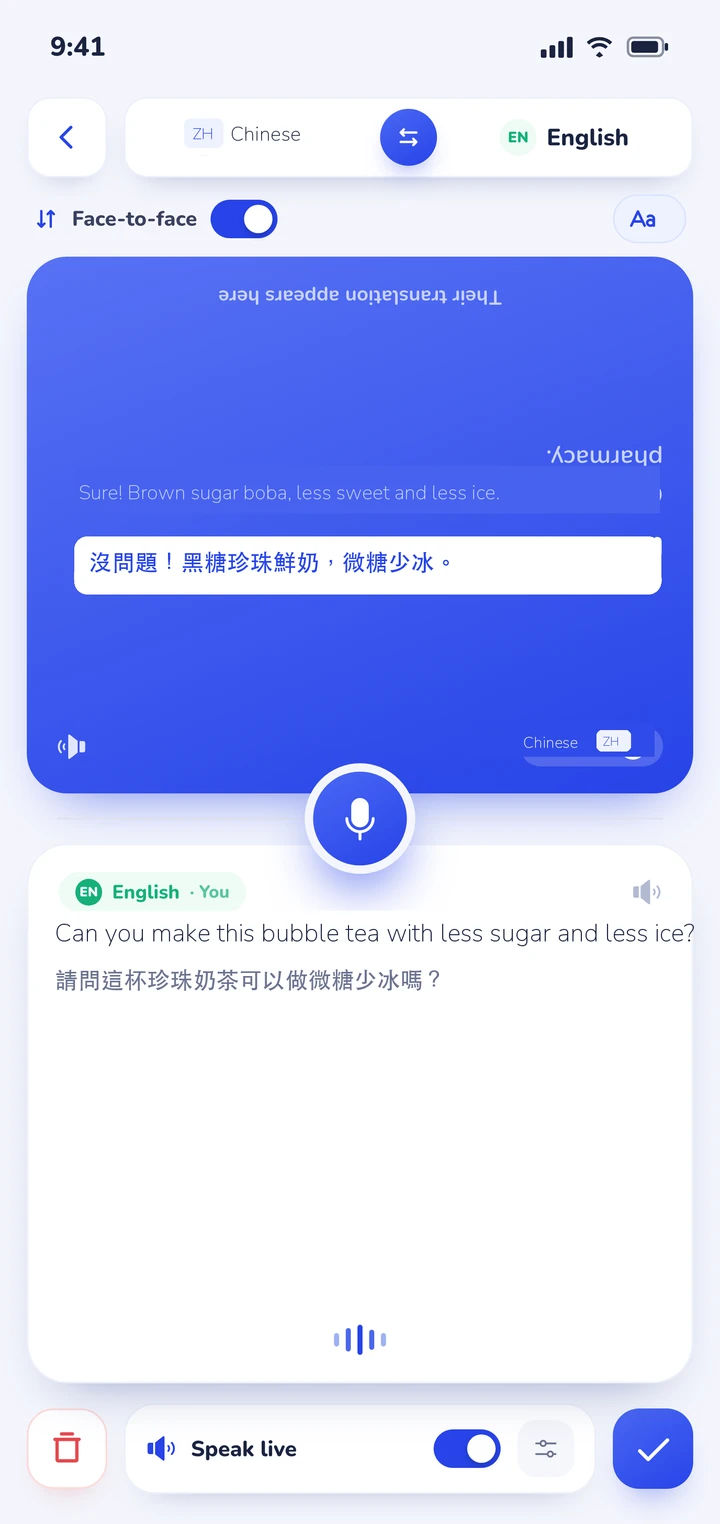
The app listens continuously and detects which of your two chosen languages is being spoken automatically. Spoken translations can play aloud through your device speaker, with distinct natural voices assigned to each speaker so you can follow along easily. During spoken playback, the microphone mutes automatically to prevent audio feedback.
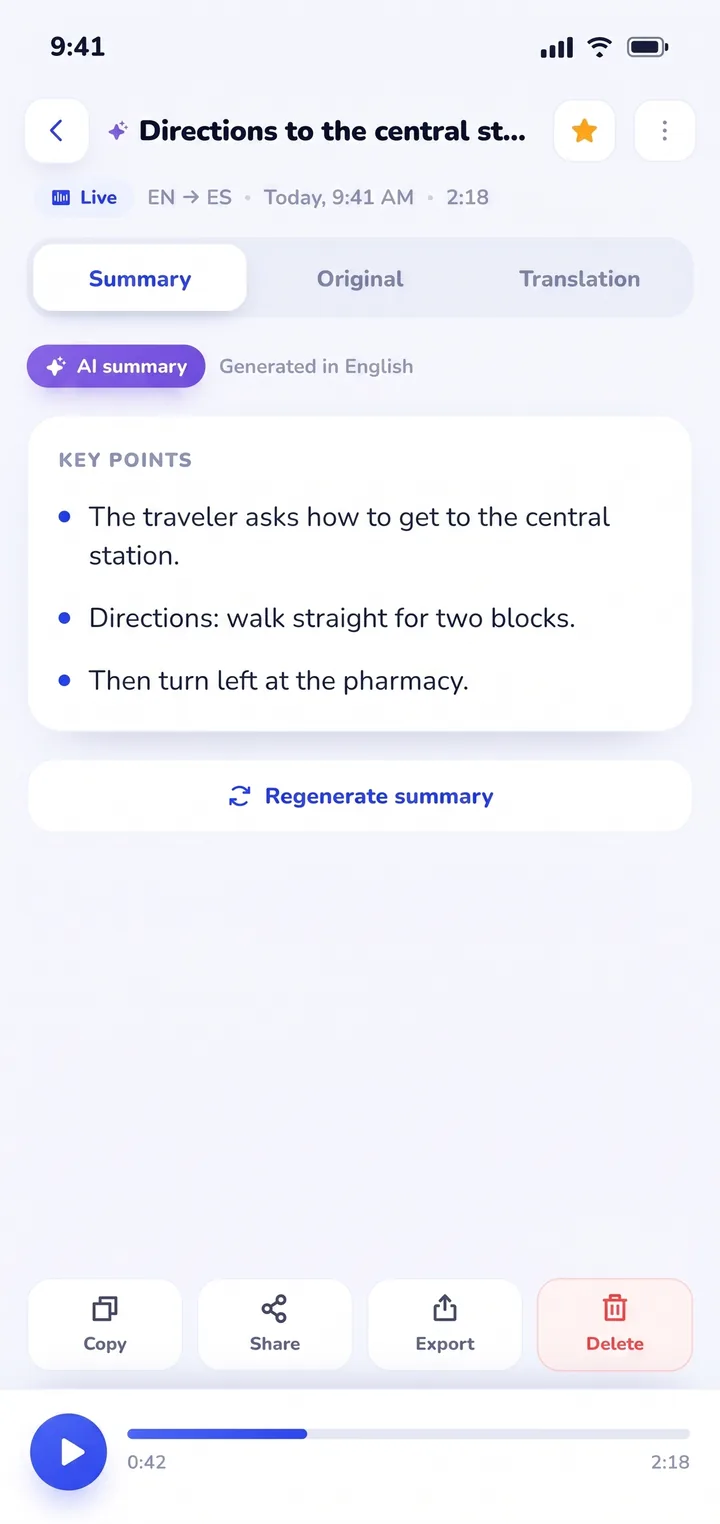
Where Clawmium Translate fundamentally differs from standard tools is session retention. When discussing manufacturing specifications with a supplier, reviewing lease terms with a landlord, or consulting with an overseas doctor, remembering specific details is critical. Clawmium Translate automatically archives every conversation in History on your device. You receive a complete, dual-language transcript alongside an automated AI summary highlighting agreed prices, delivery dates, and follow-up tasks.
There are clear technical boundaries to keep in mind. Clawmium Translate processes speech through cloud models to maintain high translation accuracy, meaning it requires an active cellular data or Wi-Fi connection. It does not offer an offline speech mode. The app is free to download with a daily allowance for live transcription and spoken output that resets every day, and it's completely ad-free. An optional Pro monthly subscription raises daily limits and adds every voice.
The four tonal traps of spoken Mandarin
Mandarin Chinese is a tonal language built on syllables that have distinct pitch contours. There are four primary tones plus a neutral tone:
- First tone (high and flat, ā): High pitch held steady, like singing a sustained high musical note. For example, mā (妈) means mother.
- Second tone (rising, á): Starts at mid-pitch and glides upward, similar to the rising inflection used when asking "Huh?" in English. For example, má (麻) means hemp or numb.
- Third tone (dipping and rising, ǎ): Dips down into a low pitch before rising back up. For example, mǎ (马) means horse.
- Fourth tone (sharp falling, à): Starts high and drops sharply downward, sounding decisive like a firm command. For example, mà (骂) means to scold.
- Neutral tone (light and short, a): Pronounced lightly and briefly with no fixed pitch contour. For example, the second syllable in māma (妈妈).
If you speak single isolated words into a translator app, mispronouncing a tone leads to bizarre misunderstandings. Saying mǎ when you intended mā confuses the acoustic model. However, modern neural speech engines use contextual language models. If you speak a complete sentence, the algorithm evaluates the surrounding grammatical context to deduce your intended meaning, even if your pitch inflection wavers.
Simplified vs. Traditional characters: which should you choose?
When setting up your translation app for Chinese, you will be prompted to select between Simplified Chinese (简体中文) and Traditional Chinese (繁體中文). Here is how to choose the right script:
Choose Simplified Chinese if: You are communicating with people in mainland China, Singapore, or Malaysia, or working with international state organizations like the United Nations. Simplified characters were standardized in the 1950s to increase literacy, reducing the number of strokes in common characters.
Choose Traditional Chinese if: You are traveling to Taiwan or Hong Kong, reading signs in historic Chinatown districts in North America and Europe, or communicating with older overseas diaspora communities. Traditional characters preserve historical radical structures and calligraphy aesthetics. For dedicated travel guidance in Taiwan, read our detailed guide on translator apps for Taiwan.
How to run an English and Chinese live conversation
Following these practical habits ensures your translated dialogue flows smoothly without confusion:
- Select your languages and script: Open your app's conversation mode, set English as your language, and select Chinese (Simplified or Traditional depending on your partner).
- Place the device flat between you: Rest the smartphone on the table with the inverted top viewport pointing directly at your counterpart so neither person holds the phone.
- Explain the tool politely: Say a brief opening phrase: "我在用翻译软件,你可以看这边" (I am using a translation app, you can look at this side). Most native speakers immediately appreciate the courtesy.
- Speak in complete, natural clauses: Avoid fragmented phrases like "Train... when?". Instead, say "Excuse me, what time does the train to Shanghai depart?". Full sentences provide the grammatical context neural models need to select correct homophones.
- Confirm numbers, dates, and currency: Chinese numbering uses wàn (万, ten thousand) as a primary numerical unit rather than hundred-thousands. Always confirm large prices or dates by pointing to the written digits on screen.
Real-world voice translation scenarios
Spoken translation proves invaluable across several common cross-cultural situations:
Business meetings and factory supplier visits
Visiting manufacturing facilities, sourcing markets, or trade exhibitions involves technical negotiations over quantities, lead times, and materials. A dedicated conversation tool helps you discuss terms clearly. To evaluate whether pocket electronic devices or smartphone apps work better for business travel, read our guide to choosing a two-way translator device vs. a phone app.
For broader comparisons of mobile voice options, browse our evaluation of the best voice translator app choices, or explore our companion breakdown of options for a translator app for Android.
Dining and food markets
Chinese cuisine features regional cooking terms, specialized ingredients, and unique character combinations. Pairing a spoken conversation tool with camera scanning makes ordering street food and decoding banquet menus straightforward. Read our step-by-step guide on how to translate a menu with your camera.
Family gatherings and meeting foreign in-laws
Conversing with Chinese-speaking relatives or your partner's parents requires patience and warmth. Passing a phone back and forth feels robotic and stressful. Placing a dual-screen phone flat on the dining table allows natural eye contact while sharing stories. For practical relationship advice, read our article on talking to your partner's parents in another language.
Sources
- Google Translate Help, Hear live speech to speech translations with live translate, checked 3 November 2026.
- Apple Support, Translate in-person conversations with iPhone, checked 3 November 2026.
- Pleco Software, Pleco Chinese dictionary and character recognition, checked 10 November 2026.
- Unicode Consortium, Unicode Han Database (Unihan) character specifications, checked 5 November 2026.
Frequently asked questions
Can an app accurately translate spoken Chinese despite the four tones?
Yes. While individual mispronounced syllables can cause confusion, modern neural speech translation engines evaluate full sentence context. Even if your pitch tone is imperfect, the cloud model uses surrounding vocabulary and grammar to identify the correct Chinese characters.
Does Google Translate work inside mainland China?
Google services are blocked on local domestic networks in mainland China by the Great Firewall. However, Google Translate functions if you connect through an international roaming cellular data plan (such as a travel eSIM) or a virtual private network. Apps like Apple Translate and Baidu work domestically without restrictions.
What is the difference between Mandarin and Cantonese in translator apps?
Mandarin and Cantonese are distinct spoken varieties of Chinese with different pronunciations and grammatical structures, though they share written characters. Most voice translator apps focus primarily on Mandarin (Putonghua). If you need spoken Cantonese for Hong Kong or Guangdong, verify that your chosen app specifically supports Cantonese speech input.
Should I choose Simplified or Traditional Chinese in my app?
Select Simplified Chinese for mainland China, Singapore, and international business contexts. Select Traditional Chinese if you are traveling to Taiwan or Hong Kong, or speaking with diaspora communities who learned writing in Traditional script.
Can a translation app replace a professional Chinese interpreter?
No. While mobile voice translator apps like Clawmium Translate are excellent for travel, dining, family conversations, and general business discussions, they do not replace certified human interpreters for formal legal contracts, court hearings, or critical medical procedures.
Try an English and Chinese conversation on your phone
Free to start. 60+ languages. Put the phone between two people and talk naturally.