For everyday offline lookups, Google Translate is the most versatile free app on Android, offering downloadable language packs and camera translation. Samsung owners should use built-in Interpreter for quick face-to-face talks without extra downloads. If you need two-way spoken conversations saved with dual-language transcripts and automated AI summaries, Clawmium Translate, which is our app, is built specifically for that.
Android devices provide several ways to translate text, speech, and images. Google Translate is free on the Google Play Store, supporting more than 70 languages with a live conversation mode and downloadable offline packs. Samsung Galaxy phones running modern One UI include Interpreter in the Quick Panel, which translates two-way speech without mobile data once language files are installed. DeepL provides precise written translations for documents and messages, while Microsoft Translator offers dependable offline text packs.
Clawmium Translate specializes in face-to-face spoken dialogue on Android. It divides your screen into two facing halves so two people can talk naturally across a table, while automatically saving dual-language transcripts with structured AI summaries. Spoken translation requires an active Wi-Fi or cellular data connection. No automated translation tool replaces a certified human interpreter for legal proceedings or high-risk medical consultations.
The Android translation ecosystem: built-in tools vs. dedicated apps
Android is the world's most widely used mobile operating system, powering devices from Google, Samsung, Motorola, Xiaomi, and OnePlus. Because Android hardware varies widely, translation capabilities differ depending on the device you carry:
- System-level integration: Google Pixel phones use custom Tensor processors to run on-device language models for live captions and camera OCR. Similarly, recent Samsung Galaxy flagships integrate Galaxy AI directly into the Quick Panel. If you own one of these devices, you already have built-in translation features ready to use without extra setup.
- Play Store specialized applications: While built-in tools handle quick single-sentence lookups, third-party apps handle specific situations. Dedicated conversation apps offer inverted dual-screen viewports, specialized microphone noise filtering, and persistent session histories that default system tools discard when closed.
- Privacy and local storage: Travelers, business professionals, and clinic patients frequently handle sensitive conversations. Knowing whether an app streams audio to cloud models or saves consultation transcripts on your phone is an important consideration.
How Android handles offline translation and hardware acceleration
One of Android's greatest strengths is its support for offline computing, but offline translation has distinct technical boundaries that searchers frequently misunderstand:
Offline text dictionaries are lightweight and practical. Downloading a 50 to 100 megabyte language pack allows your Android phone to translate typed words and photographed street signs without cellular data. This is invaluable when riding underground subways or traveling abroad before buying a local travel SIM card.
Offline speech translation is far more demanding. Accurately converting natural speech into text, translating the sentence structure, and generating spoken audio in real time requires substantial processor power and memory. Google limits offline live speech translation to newer Pixel phones (Pixel 9, 10, and 11) for select languages. On other Android hardware, live speech translation streams audio to cloud models, requiring an active cellular or Wi-Fi data connection.
Five translator apps for Android, compared
These five applications cover the spectrum of Android translation needs, from offline hiking survival to business negotiations.
| App | Best For | Offline Support | Camera OCR | Face-to-Face Mode | Key Constraint |
|---|---|---|---|---|---|
| Google Translate | Everyday general travel | Yes (text & signs; voice on Pixel) | Live camera & photo translation | Face-to-face split screen | Discards full conversation history |
| Samsung Interpreter | Samsung Galaxy device owners | Yes (downloaded packs) | No (uses Samsung Gallery) | Split-screen conversation | Restricted to Samsung Galaxy phones |
| DeepL | Nuanced written text & documents | No (requires internet connection) | Text extraction from photos | No live conversation mode | Focused on text, not live voice |
| Microsoft Translator | Offline text and phrasebooks | Yes (downloadable packs) | Photo text translation | Split-screen two-person view | Multi-device group mode retired |
| Clawmium Translate (ours) | Spoken dialogue with AI summaries | No (cellular data or Wi-Fi) | Camera photo translation | Two-way inverted split screen | Requires active internet connection |
Google Translate: the standard Android baseline
Google Translate is the default translation benchmark on Android. Developed by Google and deeply integrated with Android system services, it's completely free to download from the Google Play Store with no subscription tiers or paywalls.
Its live translate feature listens continuously to conversation partners, automatically identifying which of the two selected languages is being spoken. It offers a split-screen face-to-face view that places one language at the top and the other at the bottom. Google says it supports more than 70 languages. Its camera feature translates street signs and menus directly in your viewfinder using Google Lens technology.
The primary constraint involves conversation retention. Sessions disappear once you exit conversation mode, without saving structured notes or searchable consultation transcripts.
Samsung Interpreter: built-in Galaxy AI for Samsung owners
If you own a recent Samsung Galaxy smartphone (such as the Galaxy S24, S25, Z Fold, or Z Flip series), Samsung Interpreter is already installed in your Quick Settings panel. It was developed as part of Samsung's Galaxy AI suite.
Swiping down from the top of your screen reveals the Interpreter tile. Tapping it opens a clean split-screen conversation interface. The top half rotates 180 degrees to face the person across from you, while the bottom half faces your direction. Once you download your chosen language packs over Wi-Fi, Interpreter translates spoken conversations completely offline without an internet connection.
The limitation is hardware exclusivity: Interpreter works only on supported Samsung Galaxy devices. It can't be downloaded on Google Pixel, Motorola, OnePlus, or other Android phones. It also doesn't maintain an organized transcript archive with summarized key points.
DeepL: the highest quality written translation
DeepL has earned an outstanding reputation among professional translators, writers, and international business travelers for its exceptional translation nuance on written passages. On Android, the DeepL app translates typed text, uploaded PDF documents, and images.
Where general translation engines often produce stiff, literal translations, DeepL captures tone, regional vocabulary, and formal registers naturally. If you need to compose an important email to an overseas supplier, translate a legal contract, or understand a technical manual on your Android phone, DeepL is the strongest tool available.
However, DeepL isn't engineered for rapid back-and-forth spoken conversations. It doesn't provide an inverted dual-screen conversation interface, and it requires an active internet connection to process translations.
Microsoft Translator: multi-purpose offline dictionary
Microsoft Translator remains a reliable free utility on the Google Play Store. It supports more than 70 languages and provides downloadable offline language packs for travelers heading into regions with weak cellular coverage.
The app includes a two-person split-screen conversation view, camera translation for signs and printed documents, and categorized travel phrasebooks with pronunciation guides. Note that Microsoft officially retired its multi-device group conversation feature (joining group chats with a room code) in version 26.7.1 on 30 June 2026. For two people sharing a single Android screen, its face-to-face mode works smoothly.
Where Clawmium Translate fits
Clawmium Translate is our app, so evaluate this section with that context in mind. We developed Clawmium Translate to solve the specific frustrations of face-to-face conversations between people who don't speak the same language, running natively on Android and iPhone.
When you open conversation mode on Android, your screen divides into two dedicated viewports. You place your smartphone flat on a desk, counter, or dining table. One half faces you, and the other half inverts so the person opposite reads along naturally in their language without leaning over or holding your device.
The app detects which of your two chosen languages is being spoken automatically, eliminating the clumsy habit of pressing buttons back and forth between every sentence. Spoken translations can also play aloud through your device speaker, with distinct natural voices assigned to each speaker.
The core advantage of Clawmium Translate on Android is what happens after your conversation finishes. Every dialogue is saved automatically in History on your device. You receive a complete dual-language transcript alongside an automated AI summary capturing agreed decisions, instructions, dates, and dosages. If you're discussing travel arrangements with a hotel host, consulting with an overseas doctor, or reviewing project specs with a contractor, your notes are preserved and searchable.
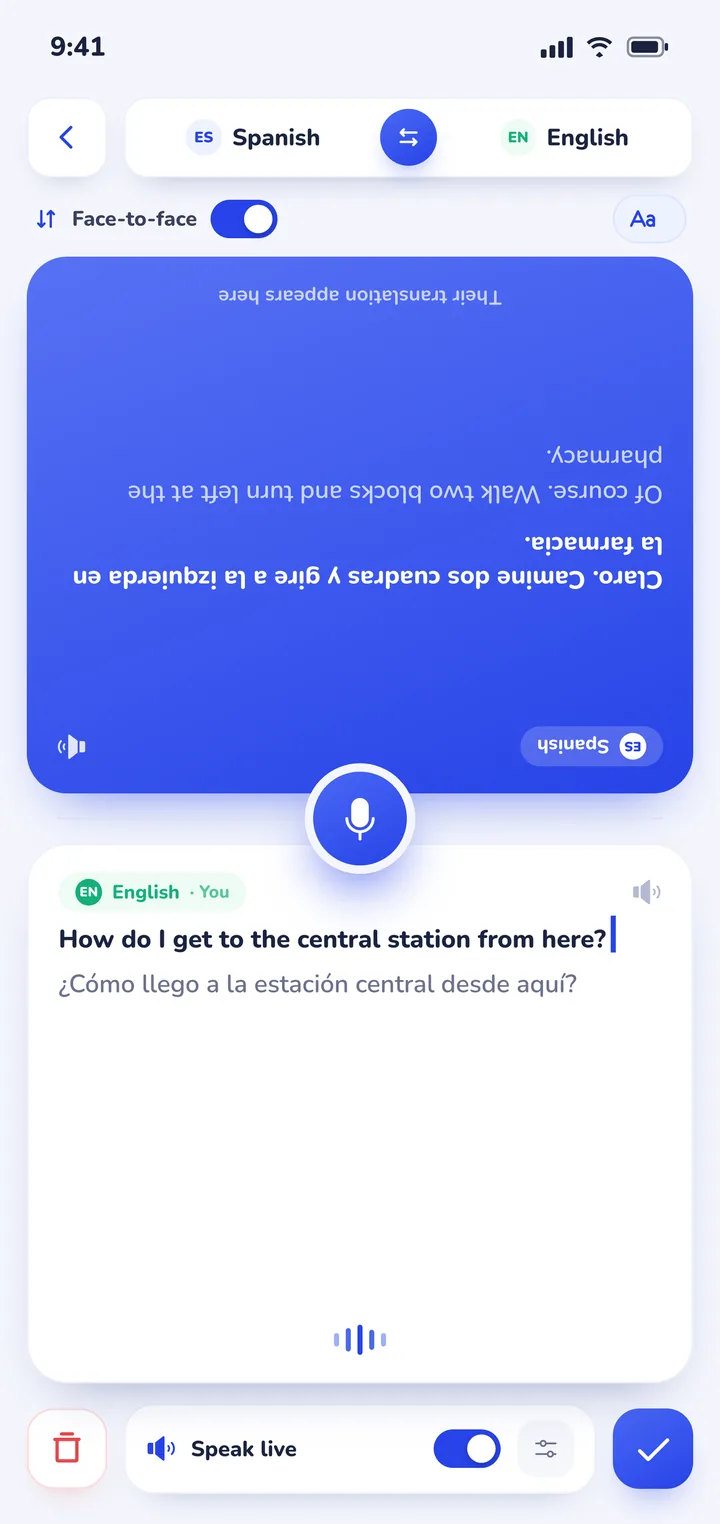
Clawmium Translate also includes a cloud camera translation feature that photographs printed restaurant menus, transit signs, and museum placards, overlaying clear English translations directly over the original image. For practical dining advice, read our guide on how to translate a menu with your camera. The app supports more than 60 languages, including Spanish, French, German, Italian, Japanese, Korean, Chinese, and Thai.
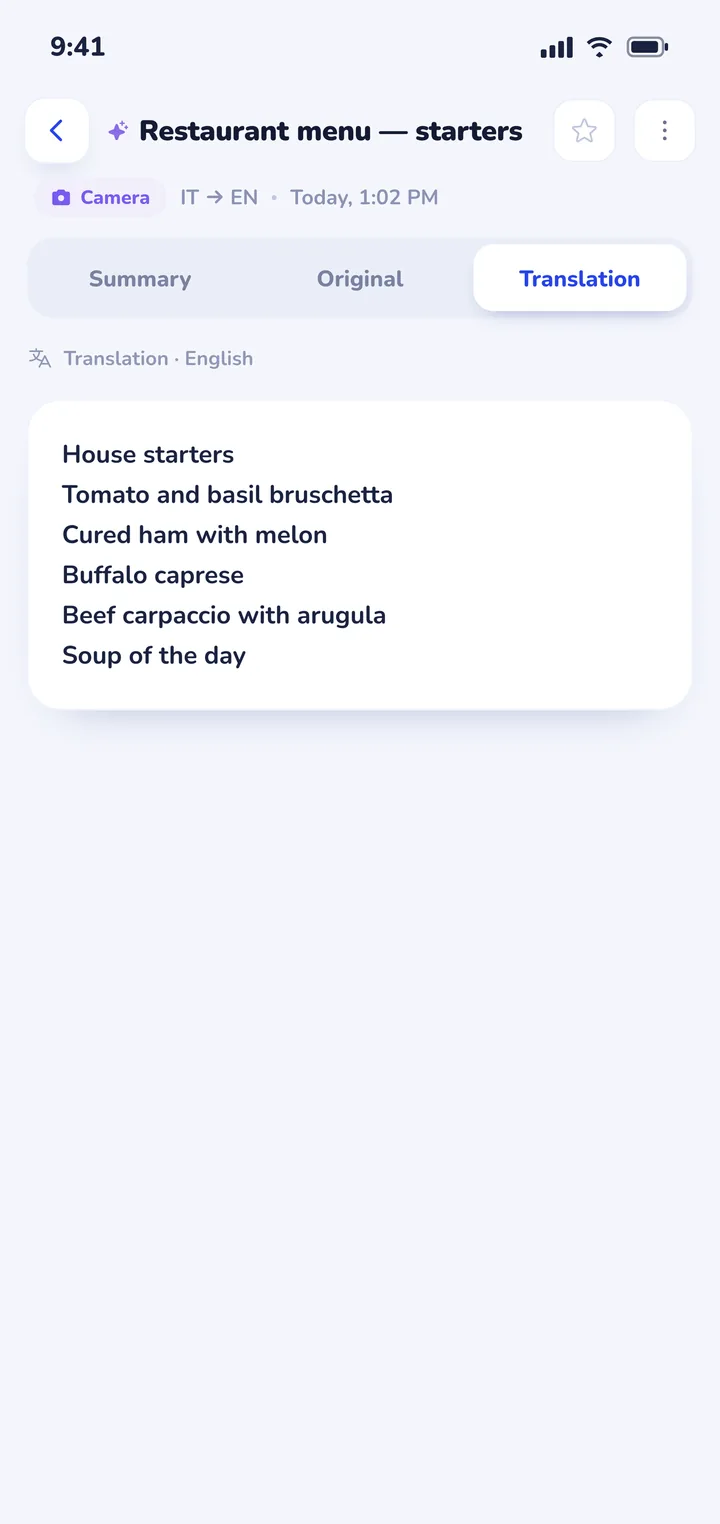
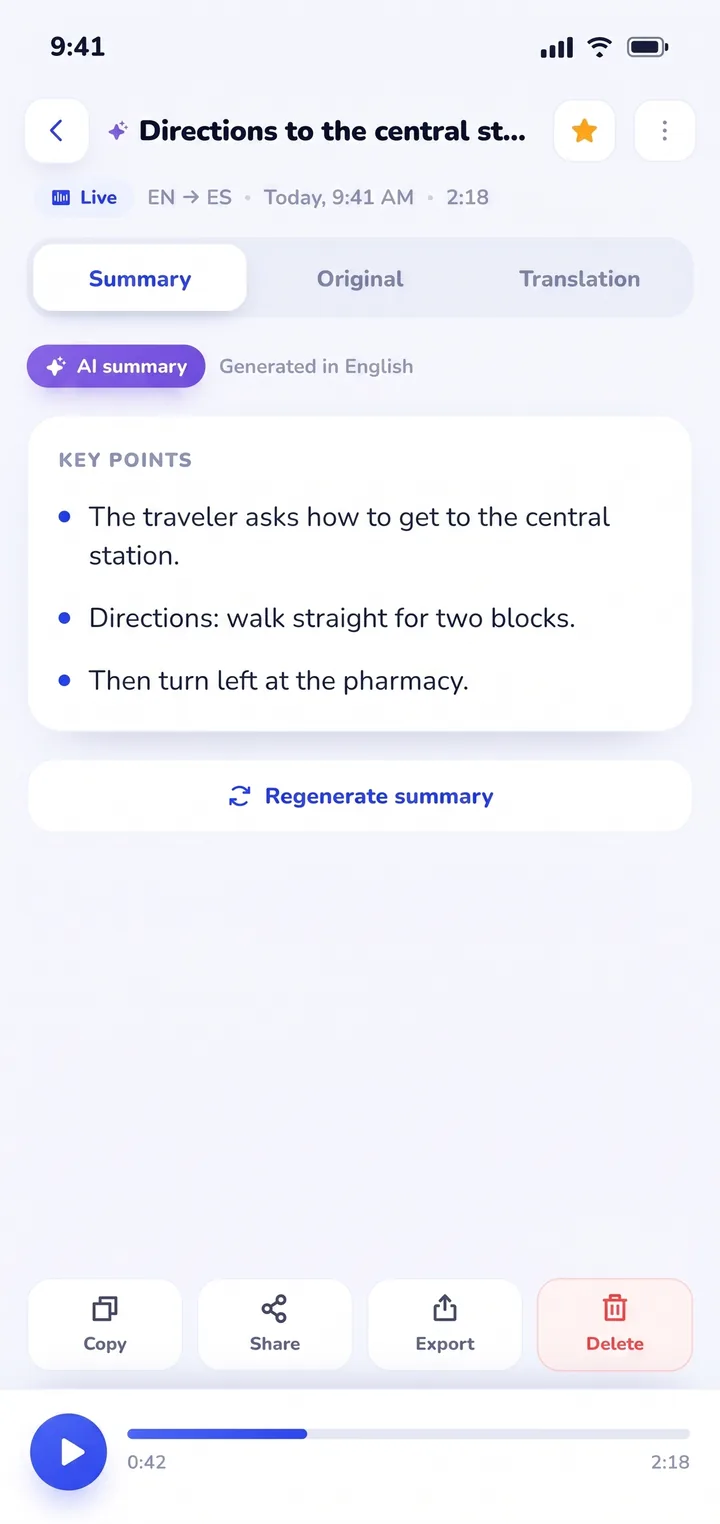
There are clear trade-offs to keep in mind. Clawmium Translate processes speech and camera translations through cloud models to maintain high linguistic accuracy, which means it requires an active Wi-Fi or cellular data connection. It doesn't offer an offline speech mode. It's free to download with a daily allowance for live translation that resets each day, and completely ad-free, with an optional Pro monthly tier that raises daily limits.
For remote subway tunnels or rural hiking paths without cellular signal, Google Translate's downloaded offline pack remains the ideal backup tool to carry on your Android device. If you also use Apple devices or want to compare platforms, explore our companion guide to real-time translator apps for iPhone, or read our overview of real-time AI translator apps.


Choosing an Android translator app by use case
Because no single application excels at every translation task, seasoned Android users choose their tool based on the specific situation:
- Daily international travel and street navigation: Keep Google Translate installed with downloaded offline packs for your destination country. Use its camera mode to read street signs, subway maps, and museum placards without relying on cellular data.
- Face-to-face conversations across a counter: Use Clawmium Translate or Samsung Interpreter. Placing the phone flat on the surface between two people removes the awkward friction of passing a personal smartphone back and forth.
- Doctor appointments and medical consultations: Use an app that saves structured transcripts. Patients and caregivers frequently forget complex medical advice once they leave the clinic. Having an automated AI summary in History ensures you can review medication dosages and instructions accurately at home.
- Composing formal written messages: Copy your draft into DeepL to ensure correct grammar, natural phrasing, and appropriate cultural register before hitting send.
- Multi-country travel preparation: If you are planning an overseas journey, read our complete guide to translation apps for travel, or check our dedicated guides to translator apps for Japan, translator apps for Germany, translator apps for Spain, and translator apps for France.
Sources
- Google Help, Hear live speech to speech translations with live translate on Android, updated 26 August 2025, checked 15 November 2026.
- Google Help, Translate offline on Android and iPhone, checked 15 November 2026.
- Samsung Support, How to use Interpreter on your Galaxy phone, updated September 2025, checked 15 November 2026.
- DeepL Help Center, DeepL mobile applications and document translation features, checked 15 November 2026.
- Microsoft Support, Microsoft Translator features and supported language list, checked 15 November 2026.
Frequently asked questions
What is the best free translator app for Android?
Google Translate is the most dependable general free translator app for Android, providing text, camera, and speech translation across more than 70 languages with no ads or subscription fees. For Samsung Galaxy owners, the built-in Interpreter tool is an outstanding free utility for offline spoken conversations.
Does Google Translate work offline on all Android phones?
Google Translate supports offline text and camera translation on all modern Android devices once you download offline language packs. However, offline live speech translation is currently limited to Google Pixel phones (Pixel 9, 10, and 11) for select languages. On other Android hardware, live speech translation requires an active cellular or Wi-Fi connection.
Can Android phones translate two-way spoken conversations in real time?
Yes. Apps like Clawmium Translate, Google Translate, and Samsung Interpreter offer split-screen conversation modes that listen to both speakers, automatically detect which language is being spoken, and play translated speech aloud in real time.
How do I use Samsung Interpreter on Galaxy devices?
Swipe down twice from the top of your Samsung Galaxy screen to access the Quick Settings panel, then tap the Interpreter tile. Choose your two languages, tap the microphone, and speak. Tapping the flip icon rotates the top half of the screen 180 degrees so the person facing you can read their side easily.
Does Clawmium Translate require an account or internet on Android?
Clawmium Translate requires an active Wi-Fi or cellular data connection because speech recognition and translation run through high-accuracy cloud models. It doesn't require an account or sign-in, and all saved session transcripts and AI summaries are stored locally on your device.
Try real-time conversation translation on Android
Free to start. 60+ languages. Put the phone between two people and talk.