DeepL produces superior written prose for emails and documents across roughly 30 languages, but its mobile app lacks a two-way conversation mode and offers no face-to-face split screen. Google Translate supports over 130 languages with a hands-free conversation mode that detects which language is being spoken, though it discards your history once closed. If you need an inverted split screen that displays both languages simultaneously and saves transcripts with AI summaries, Clawmium Translate, which is our app, is built specifically for that.
The contest between Google Translate vs DeepL voice tools highlights a fundamental split between written translation and live speech. DeepL relies on neural networks trained on curated bilingual text, producing nuanced, natural phrasing with accurate formality across European language pairs. However, DeepL's voice input acts as a dictation tool: you tap to speak one passage, view the text, and manually tap to play audio. It lacks continuous two-way conversational turn-taking and offers no split screen for an in-person conversation partner.
Google Translate supports over 130 languages with an automated conversation mode that detects two speakers back and forth without button tapping. Clawmium Translate solves table-talk ergonomics by splitting your screen into two opposite-facing viewports while saving complete dual-language transcripts and AI summaries on your phone. Spoken translation requires an active cellular data or Wi-Fi connection. Neither consumer mobile app replaces a certified human interpreter for legal contracts or medical emergencies.
Google Translate vs. DeepL at a glance
Comparing these services requires separating written translation quality from real-time spoken workflow. Here is how leading mobile translation engines compare on conversational speech:
| Feature | Google Translate | DeepL Voice | Clawmium Translate (ours) |
|---|---|---|---|
| Primary strength | Global language breadth & live mode | Nuanced, idiomatic written prose | Inverted table split screen & AI summaries |
| Spoken languages | 130+ languages | 30+ languages | 60+ languages |
| Hands-free conversation mode | Yes (auto-detects two speakers) | No (single push-to-talk dictation) | Yes (auto-detects two speakers) |
| Face-to-face inverted split screen | Yes (two facing halves) | No (single-direction text list) | Yes (180-degree inverted viewports) |
| Saved session transcripts | No (discarded upon closing) | No (only manually saved phrases) | Yes (searchable dual-language history) |
| Automated AI meeting summaries | No | No | Yes (bullet points of key decisions) |
| Without internet access | Yes (downloaded offline packs) | Limited offline text packs | No (requires cellular data or Wi-Fi) |
| Cost & monetization | Completely free, no ads | Free tier, paid Pro subscriptions | Free daily allowance, no ads, optional Pro |
The text vs. speech paradox: why written quality diverges from live voice
DeepL gained global popularity because its underlying machine learning architecture produces written translations that sound remarkably human. In blind comparison tests evaluating written French, German, Spanish, and English text, readers consistently rank DeepL ahead of Google Translate for capturing tone, idioms, and natural sentence cadence.
However, live spoken conversation is not a document translation problem. In a real-world interaction, three factors matter far more than literary nuance:
- End-to-end audio latency: When talking to a train conductor or shop clerk, a delay of four seconds feels like an eternity. Spoken conversation demands streaming speech-to-text where translated words begin rendering almost immediately as syllables are spoken.
- Acoustic noise resilience: Background street traffic, espresso machine hissing, and train platform announcements distort speech waveforms. The best text translation engine in the world produces gibberish if its front-end acoustic model misinterprets spoken vowels.
- Bilingual turn-taking: A real conversation involves two people speaking back and forth rapidly. An app that forces speakers to manually switch language direction between every turn interrupts conversational rhythm.
Google Translate invested heavily in acoustic modeling and streaming translation pipelines, making its spoken turn-taking faster and more automatic than DeepL. DeepL remains an exceptional written tool, but its voice feature operates primarily as an audio input method rather than a live conversational interpreter.
Turn-taking and the physical problem of table conversations
The biggest barrier to smooth communication across a foreign language barrier is rarely vocabulary. It is physical device ergonomics.
When using DeepL's mobile app, you tap the microphone button, speak your sentence, wait for the translation to generate, and then hold your phone out toward the other person so they can read the screen or listen to the speaker. If they want to reply, you must manually change the language direction, tap the microphone again, and hand the device toward them. For more details on why device passing breaks down, read our guide to how to talk face to face in two languages.
Passing an expensive smartphone back and forth between two people creates awkward hesitation. In busy train stations, outdoor markets, or foreign cities, many travelers are understandably nervous about handing their personal smartphone to a stranger. Similarly, the other person often feels uncomfortable handling someone else's personal electronics.
Google Translate addressed part of this dilemma by introducing a face-to-face view within its conversation mode, turning the top half of the screen upside down. However, Google Translate still discards your entire dialogue the moment you close the tab. If you discussed a medication schedule, directions to an obscure bus stop, or a negotiated hotel rate, those details vanish immediately.
Where DeepL wins
DeepL remains the clear winner in specific communication scenarios where grammatical precision and formal tone outweigh real-time speed:
- Composing professional emails and messages: If you are writing a business proposal, a letter to a foreign landlord, or an inquiry to an overseas university, DeepL's translations are substantially more polished and natural than Google Translate.
- Tone and formality control: DeepL allows users to toggle between formal and informal modes (such as Sie versus du in German, or usted versus tú in Spanish). This prevents embarrassing social faux pas in professional correspondence.
- Long document translation: DeepL can ingest entire PDF, Word, or PowerPoint files and translate them while preserving original font styles, headers, and image formatting.
- European language nuances: DeepL's training datasets are heavily concentrated on European languages. For French, German, Italian, Polish, Dutch, and Spanish text, DeepL captures subtle colloquial idioms that other engines render literally.
Where Google Translate wins
Google Translate remains the dominant utility for international travel and quick daily utility for several practical reasons:
- Global language coverage: Google Translate supports more than 130 languages, including major non-European languages like Hindi, Tagalog, Vietnamese, Thai, Arabic, and dozens of regional African and Asian dialects where DeepL has no coverage.
- Hands-free conversation mode: Google Translate's auto-detect capability listens for both speakers simultaneously. Neither person has to touch the screen between sentences, allowing spontaneous verbal exchanges. To understand how to configure this feature, check our tutorial on Google Translate conversation mode.
- Offline language packs: Google allows travelers to download language packages directly to their phones. If you are hiking in an area without mobile reception or arriving at an airport before buying a local SIM card, Google Translate can translate basic text and speech without a data connection.
- Zero software cost: Google Translate is entirely free. It contains no monthly subscription tiers, no usage caps, and no advertisements.
Where Clawmium Translate fits
Clawmium Translate is our app, so evaluate this section with that context in mind. We developed Clawmium Translate specifically to resolve the conversational gap left between DeepL's written focus and Google Translate's ephemeral conversation mode, running natively on Android and iPhone.
When you sit down with a speaking partner across a café table, office desk, or train seat, you open conversation mode and set your phone flat between both people. The top half of the screen inverts 180 degrees so the other person reads their language right-side up, while the bottom half faces you in your language.
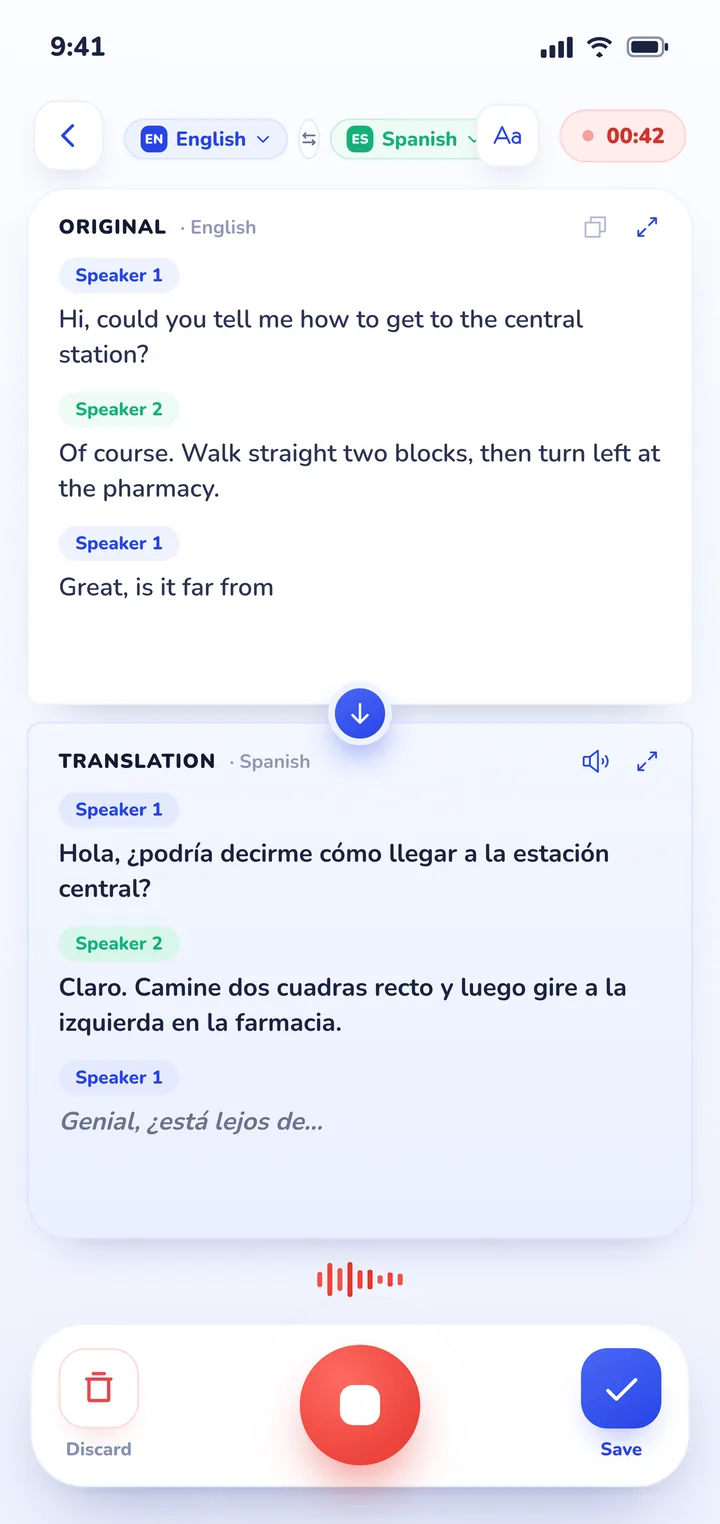
The application listens continuously with automatic language detection, recognizing which person is speaking without requiring manual screen taps. When read-aloud playback begins, the microphone mutes automatically to prevent acoustic feedback, using natural neural voices assigned to each speaker.
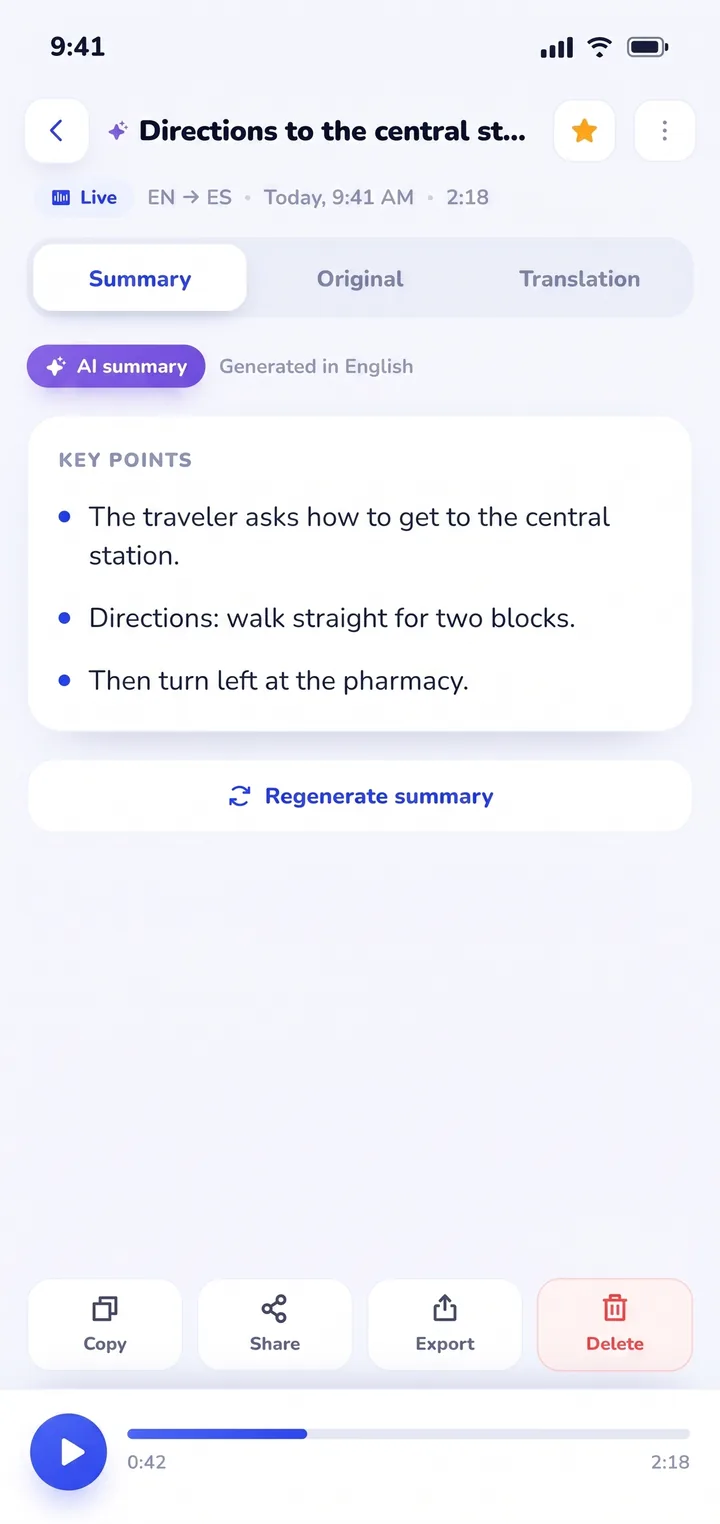
Where Clawmium Translate fundamentally departs from both DeepL and Google Translate is what happens after the conversation ends. In daily life, conversations carry consequences: rental lease agreements, business quotes, dosage instructions, or travel recommendations. Clawmium Translate automatically archives every session in History on your device. You receive a complete dual-language transcript alongside an automated AI summary highlighting key decisions, numbers, and dates.
There are clear technical boundaries to keep in mind. Clawmium Translate relies on cloud neural models to maintain conversational speech accuracy, meaning it requires an active cellular data or Wi-Fi connection. It does not offer an offline speech translation mode. The app is free to download with a daily allowance for live transcription and spoken output that resets every day, and it's completely ad-free. An optional Pro monthly subscription raises daily limits and adds every voice.
Which tool should you use in each situation?
Because no single translation tool solves every communication need, experienced travelers and cross-border professionals use specialized tools depending on the medium:
- For writing emails, documents, or formal business proposals: Use DeepL. Its grammatical nuance, tone controls, and natural vocabulary selection make your written correspondence read like it was drafted by a native speaker.
- For reading street signs, offline travel menus, and basic emergency words: Use Google Translate. Downloading Google's offline language packs ensures you have an immediate safety net when traveling through areas with poor cellular reception. For menu photography, see our guide on how to translate a menu with your camera.
- For face-to-face table conversations where you need a record of what was said: Use Clawmium Translate. Placing the phone flat between two people eliminates the awkwardness of passing devices back and forth, and the automated AI summary ensures neither party forgets agreed prices, appointment times, or medical advice. To explore hardware alternatives, read our comparison of two-way translator devices versus phone apps.
- For large multi-speaker group meetings: Use Microsoft Translator. Its unique join-code feature lets several participants connect their individual laptops and smartphones into a synchronized bilingual chat room.
Frequently asked questions
Does DeepL have a live conversation mode like Google Translate?
No. DeepL's mobile app includes a voice dictation button that transcribes single spoken passages, but it does not provide an automated two-way conversation mode that detects two speakers back and forth or splits the screen for opposite-facing users.
Is DeepL voice translation more accurate than Google Translate?
For written text translation across major European languages, DeepL generally produces more idiomatic, natural phrasing than Google Translate. However, for live spoken audio, Google Translate's faster streaming speech recognition and automatic speaker detection make spoken turn-taking significantly smoother.
Can I use DeepL or Google Translate voice without internet?
Google Translate allows users to download offline language packages for basic text and speech translation without an internet connection. DeepL requires an active internet connection for voice features and cloud-based translation processing.
How many languages do Google Translate and DeepL support?
Google Translate supports more than 130 languages worldwide, including dozens of Asian, African, and Middle Eastern languages. DeepL supports approximately 30 languages, concentrating primarily on European languages plus Japanese, Korean, Arabic, and Chinese.
Do Google Translate or DeepL save conversation transcripts with summaries?
No. Both Google Translate and DeepL discard live conversation dialogue once you exit the translation screen. Neither app generates automated post-conversation meeting summaries or searchable dual-language session archives.
Sources and verification
- DeepL SE, "DeepL Translator mobile app features and language availability", checked 2026-11-21.
- Google Translate Help, "Translate by speech and conversation mode features", checked 2026-11-21.
- Clawmium Translate technical specifications and in-app feature verification, checked against codebase 2026-11-21.
- Bojar, Ondřej, et al. "Findings of the Conference on Machine Translation (WMT)", European Association for Machine Translation, evaluation of neural translation engines, checked 2026-11-21.
Try a real-time conversation on your phone
Free to start. 60+ languages. Put the phone between two people and talk naturally.