Buy a dedicated two-way translator device like a Pocketalk or Vasco if you travel constantly for business, require bundled global cellular data without buying local SIM cards, or work in environments where handing someone your personal smartphone is a security risk. For almost everyone else, a smartphone translation app with a split-screen face-to-face mode, such as Google Translate, Apple Translate, or Clawmium Translate (which is our app), handles conversations faster, displays larger text, and saves structured session transcripts without costing hundreds of dollars.
A two-way translator device is a dedicated handheld gadget designed to translate spoken conversations back and forth between two people. Premium models like the Pocketalk Plus and Vasco V4 feature built-in global eSIM connections, physical push-to-talk buttons, and loud speakers. They operate independently of your personal phone, saving your smartphone battery and eliminating the need to hand your personal device to strangers. However, dedicated devices cost between $150 and $400 upfront, carry small screens that make reading long translations difficult, and discard session records once conversations conclude.
Modern smartphone apps provide an adaptable alternative. With a two-way split-screen app like Clawmium Translate, you place your phone flat between both speakers without handing it back and forth, while automatically preserving complete dual-language transcripts with AI summaries. Neither consumer devices nor smartphone apps replace a certified medical or legal human interpreter.
How dedicated two-way translator devices work
Dedicated electronic translators look like miniature smartphones from a decade ago. Inside the plastic shell, they run a modified version of Android powered by a budget mobile processor, a cellular modem, dual microphones with noise reduction, and a small touchscreen.
The standard operating mechanism uses physical push-to-talk buttons. You assign Language A to one button and Language B to the other. When you want to speak, you press and hold your button, talk into the microphone, and release. The device converts your speech to text, sends the data to a cloud translation server via its internal cellular connection, and reads the translated sentence aloud through its speaker. When your conversation partner replies, they press the second button and repeat the process.
The defining technical selling point of premium hardware is bundled cellular data. Devices like the Pocketalk Plus include two years of built-in global cellular service across more than 130 countries, while Vasco offers lifetime global connectivity in nearly 200 destinations. You don't need to connect to hotel Wi-Fi, swap physical SIM cards, or configure roaming settings on your personal smartphone.
Why travelers consider buying a handheld gadget
Before smartphones became ubiquitous, pocket electronic dictionaries were travel essentials. Today, dedicated hardware manufacturers still sell thousands of units every month by addressing three genuine smartphone anxieties:
- The smartphone handover fear: Many travelers feel deeply uncomfortable handing their personal smartphone to a taxi driver, street vendor, or stranger in an unfamiliar city. If a stranger drops your phone or runs off with it, your credit cards, boarding passes, and primary communication tools vanish. Handing someone a standalone $150 device feels far less risky.
- Protecting primary phone battery life: Continuous GPS navigation, camera usage, and search queries drain phone batteries quickly during full days of sightseeing. Running continuous speech recognition on top of maps can leave your phone dead before dinner. A dedicated translator preserves your smartphone battery for emergencies.
- Simplified physical buttons: Older travelers and less tech-savvy users often find navigating mobile operating systems, permission popups, and app stores frustrating. A dedicated device with two colored buttons (blue for you, red for them) offers reassuring simplicity.
Where dedicated hardware falls short
Despite their conveniences, dedicated handheld translators come with substantial technical and economic drawbacks that marketing advertisements rarely mention:
The most immediate hurdle is the steep upfront purchase price. A dependable device like the Pocketalk S costs around $250, while the larger Pocketalk Plus sells for $299 and the Vasco V4 reaches $389. Paying $300 for a single-purpose electronic gadget that sits in a desk drawer for 48 weeks a year makes little financial sense for casual vacationers.
Screen size is another constant irritation. Handheld devices typically feature displays measuring between 2.8 and 4 inches diagonally. Reading complex, high-density non-Latin scripts like Japanese Kanji, Korean Hangul, Arabic, or Thai on a tiny 2.8-inch display strains your eyes. If you have mild vision impairment, deciphering small text across a restaurant table becomes nearly impossible.
Hardware devices also suffer from rapid obsolescence. When the bundled two-year cellular plan on a Pocketalk expires, renewing the service costs around $50 per year. If the manufacturer discontinues server support or stops updating software patches, the physical device becomes completely useless. By contrast, smartphone translation apps benefit from constant neural language model updates downloaded automatically to the phone you already own.
Dedicated devices vs. smartphone apps compared
This table compares the leading standalone translator hardware against modern smartphone applications across key purchasing criteria.
| Device / App | Price | Connectivity | Two-Way Method | Screen Size | Transcript Retention |
|---|---|---|---|---|---|
| Pocketalk Plus | $299 | 2-year global eSIM included | Push-to-talk physical buttons | 3.9-inch touchscreen | Basic history list; no summaries |
| Vasco Translator V4 | $389 | Lifetime global eSIM included | Push-to-talk physical buttons | 5.0-inch touchscreen | Text logs; no structured notes |
| Amazon Budget Gadgets | $50–$100 | Requires phone Bluetooth tether | Manual button press | No screen or tiny 2-inch LCD | None; relies on companion app |
| Google Translate (app) | Free | Wi-Fi, cellular, or offline packs | Face-to-face split screen | Full smartphone display (6"+) | Discards conversation on exit |
| Clawmium Translate (ours) | Free daily allowance; Pro | Active cellular data or Wi-Fi | Inverted two-way split screen | Full smartphone display (6"+) | Dual transcripts with AI summaries |
Pocketalk Plus: the corporate benchmark
Pocketalk is the most widely recognized brand in dedicated translation hardware. The Pocketalk Plus features a 3.9-inch touchscreen, noise-canceling dual microphones, and an integrated camera for translating printed signs and menus.
Its primary strength is its bundled global cellular plan. Powered by an internal SIM card, it connects to cellular networks in over 130 countries straight out of the box without setup menus. The physical buttons provide positive tactile feedback, making it popular in airport customer service desks and commercial logistics centers.
However, once the initial two-year cellular coverage period concludes, keeping the device connected requires a paid subscription extension. Its text-to-speech output also sounds somewhat stiff compared to modern smartphone neural voices, and the device cannot export organized consultation summaries.
Vasco Translator V4: premium rugged design
Vasco Electronics designs high-end translators geared toward European business travelers and emergency responders. The Vasco Translator V4 features a 5-inch display, a shock-resistant casing, and an exceptionally loud 99-decibel speaker designed to cut through noisy industrial environments.
The major selling proposition of the Vasco V4 is its unlimited lifetime international data. Vasco covers the cellular data costs in nearly 200 countries for the entire lifespan of the product, with no annual subscription renewals or expiration dates. For travelers in remote areas without cellular reception, Vasco also includes photo translation and ten offline language pairs.
The obvious barrier is cost: at nearly $400, the Vasco V4 costs as much as a capable midrange smartphone. It's also bulky, weighing roughly 188 grams, making it an awkward extra brick to carry in your jacket pocket alongside your phone and wallet.
The budget gadget trap: why $60 Amazon translators fail
Searching Amazon or social media for portable translators surfaces dozens of generic devices sold under names like Muama Enence, Poliglu, or Cheetah Talk, priced between $40 and $90. These products often look like sleek voice recorders, but they are deeply frustrating in practice.
Almost all budget translators lack built-in cellular modems and standalone processing chips. Instead, they are simply cheap Bluetooth microphones. To function, they must stay paired to a companion smartphone app running in the background. You still need your smartphone running and connected to mobile data, completely defeating the purpose of carrying a separate device.
Worse, many of these budget brands disappear within twelve to eighteen months. When the manufacturer abandons its mobile app or shuts down its translation API servers, the plastic gadget stops working entirely. Spending $60 on a plastic Bluetooth fob offers zero advantages over using a free smartphone app directly.
Where Clawmium Translate fits
Clawmium Translate is our app, so evaluate this section with that context in mind. We developed Clawmium Translate to solve the core reasons people consider buying dedicated two-way translator devices, without requiring you to spend $300 on extra hardware.
The primary reason travelers buy a Pocketalk is to avoid passing their personal phone back and forth like a walkie-talkie. Clawmium Translate solves this social friction directly through software on Android and iPhone. When you open conversation mode, the screen splits into two dedicated viewports.
You lay your smartphone flat on a table, desk, or counter between both speakers. The top half of the screen inverts 180 degrees to face your conversation partner, while the bottom half faces you. Each person reads their own language in large, crisp typography on a bright six-inch display. Neither participant needs to hold the phone, reach across the table, or hand their device over.
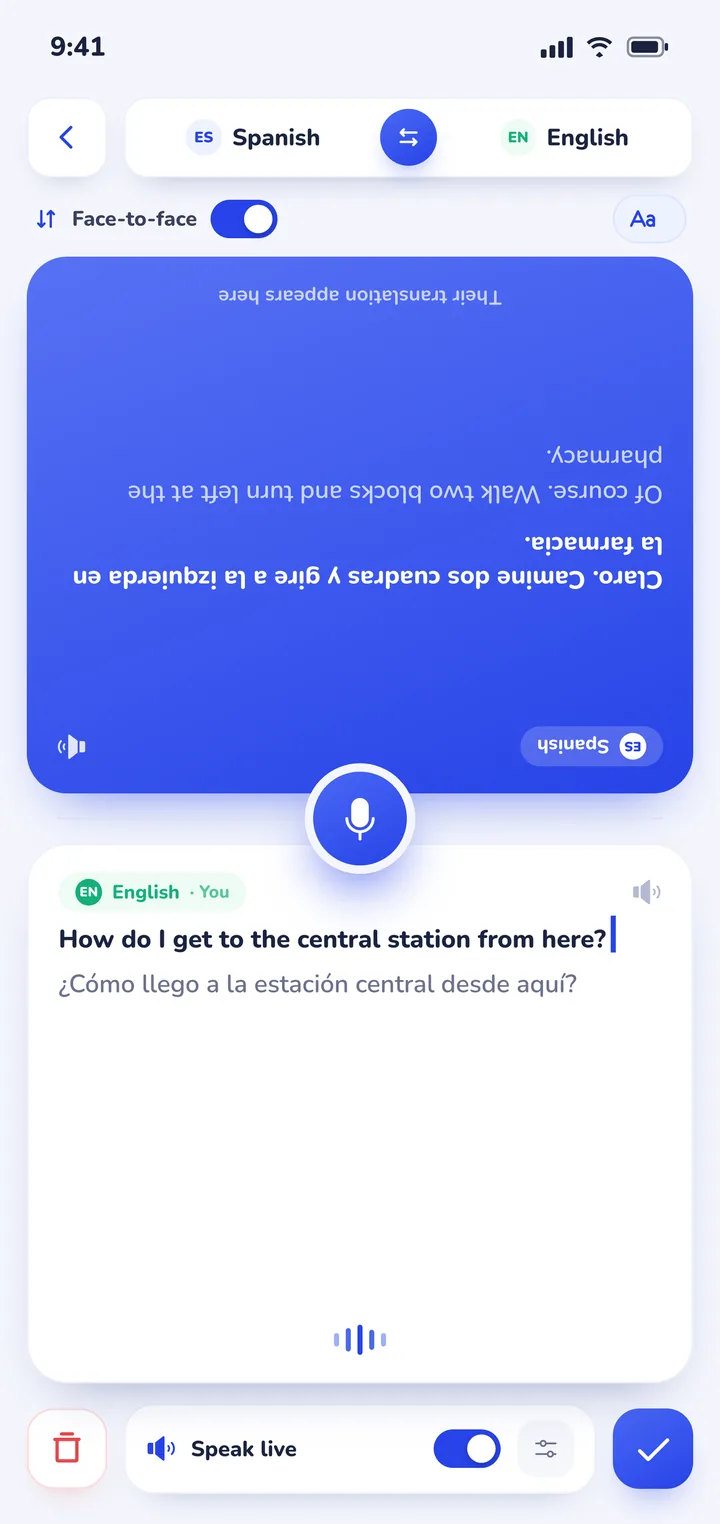
The app listens continuously and detects which of your two chosen languages is being spoken automatically. You don't need to press and hold physical buttons between sentences. Spoken translations play clearly through your device speaker, with distinct natural voices assigned to each speaker so conversations feel natural.
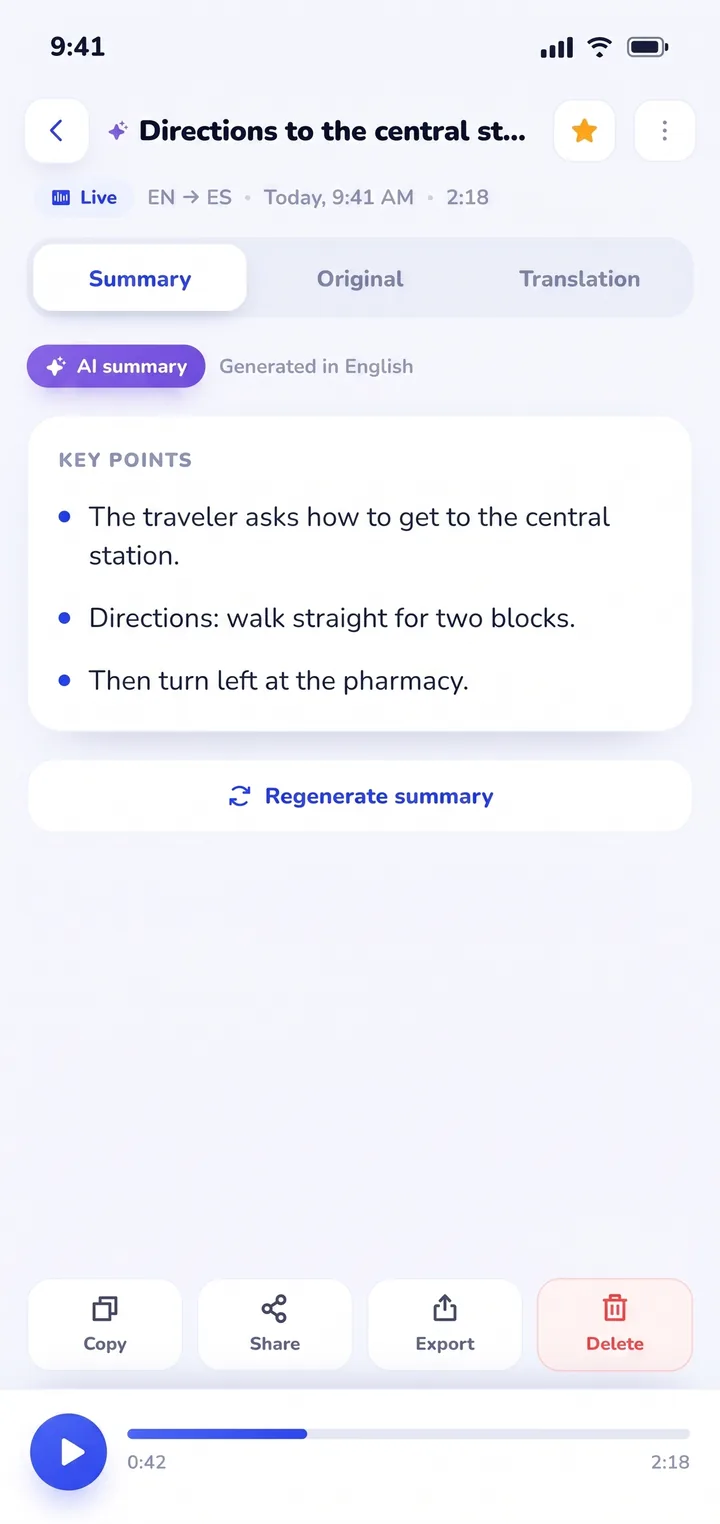
Where Clawmium Translate fundamentally outperforms dedicated hardware is session memory. Handheld devices discard conversations once you exit the screen. Clawmium Translate automatically archives every dialogue in History on your device. You receive a complete, dual-language transcript alongside an automated AI summary that highlights key decisions, agreed prices, appointment dates, and medication instructions.
There are clear boundaries to keep in mind. Clawmium Translate processes speech through cloud models to maintain high translation accuracy, meaning it requires an active cellular data or Wi-Fi connection. It does not offer an offline speech mode, and we do not manufacture physical hardware devices. The app is free to download with a daily allowance for live transcription and spoken output that resets every day, and it's completely ad-free. An optional Pro monthly subscription raises daily limits and adds every voice.
When to choose hardware vs. when to use a smartphone app
Choosing between dedicated hardware and a smartphone app comes down to how frequently you travel, your destination, and your budget:
Buy a dedicated two-way translator device if:
- You travel internationally every month for business and want zero roaming configuration or local SIM hassle.
- You work in field environments (construction sites, emergency relief, hospital intake) where handing a personal phone to strangers poses security, sanitation, or theft risks.
- You're buying a tool for an older relative who struggles with smartphone touchscreens and prefers physical, tactile push-to-talk buttons.
- You spend extended time in extreme environments where preserving smartphone battery is critical for survival.
Use a smartphone translation app if:
- You take occasional vacations or international holiday trips once or twice a year.
- You already carry a modern smartphone and prefer not to pack, charge, and manage an extra electronic gadget.
- You want to review what was said: saving transcripts and structured AI summaries of doctor advice, hotel bookings, or business meetings.
- You prefer spending your budget on travel experiences rather than dropping $300 on single-purpose hardware that depreciates rapidly.
- You want broader travel tools: pairing conversation mode with photo translation. Read our guide on how to translate a menu with your camera to see how visual scanning complements spoken dialogue.
For travelers planning trips abroad, compare our dedicated destination breakdowns for translator apps for Japan, translator apps for France, and translator apps for Spain to learn how mobile apps handle regional transit and dining challenges.
If you're evaluating mobile options on specific operating systems, explore our guides to finding a translator app for Android and our review of real-time translator apps for iPhone. For voice-specific comparisons, browse our guide to voice translator app choices.
Sources
- Pocketalk Official Specifications, Pocketalk Plus specifications and country coverage, checked 5 November 2026.
- Vasco Electronics, Vasco Translator V4 lifetime international data details, checked 5 November 2026.
- Google Translate Help, Hear live speech to speech translations with live translate, checked 3 November 2026.
- Apple Support, Translate in-person conversations with iPhone, checked 3 November 2026.
Frequently asked questions
Do two-way translator devices work without Wi-Fi or cellular service?
Most dedicated two-way translator devices require an active cellular or Wi-Fi connection to process accurate speech translation through cloud engines. While some premium models include basic offline language packs, their vocabulary is limited and speech accuracy drops significantly without internet connectivity.
Are handheld translator devices more accurate than smartphone apps?
No. Handheld translator devices like Pocketalk and Vasco rely on the same cloud translation APIs and neural speech models that power modern smartphone apps. In many cases, smartphone apps produce more natural phrasing because their software updates continuously without waiting for hardware firmware releases.
Can a two-way translator app replace a Pocketalk or Vasco?
Yes, for the vast majority of travelers. Smartphone apps like Clawmium Translate offer split-screen face-to-face modes that let two people talk naturally across a table without handing the device back and forth. Apps also provide larger screens, faster processing, and saved conversation transcripts with AI summaries for a fraction of the cost.
What happens when a Pocketalk device's two-year data plan expires?
When the included two-year global cellular plan on a Pocketalk expires, you must either purchase a service extension from Pocketalk (typically around $50 per year) or connect the device to a local Wi-Fi network or smartphone hotspot. Without an active data connection, cloud speech features stop working.
Why do cheap $60 translator devices on Amazon have poor reviews?
Inexpensive translator devices sold on online marketplaces are usually not standalone translators. They are essentially Bluetooth remote microphones that must remain connected to a companion phone app running on your smartphone. They suffer from cheap microphones, clumsy software pairing, and frequent server abandonment by manufacturers.
Try a two-way conversation on your phone
Free to start. 60+ languages. Put the phone between two people and talk naturally.