If you need live translation during an active cellular phone call, you must use native dialer features built by phone manufacturers, such as Samsung Galaxy Live Translate, Apple Intelligence on supported iPhones, or Google Pixel Live Translate. Third-party apps can't intercept cellular phone audio because mobile operating systems block apps from recording call streams. For in-person conversations where two people talk across a table, use dedicated split-screen tools like Clawmium Translate, which is ours.
Phone call translator tools fall into two separate categories: system dialers and external conversation apps. Operating system permissions prevent regular apps from accessing live phone audio on cellular networks, WhatsApp, or FaceTime. This sandbox prevents apps from silently wiretapping calls, which means third-party software can't provide real-time translation during a regular phone call without specialized hardware or expensive virtual VoIP numbers.
Samsung Galaxy smartphones running One UI 6.1 or later include native call translation inside the phone dialer, translating spoken audio in both directions using on-device models. Apple provides similar live call translation on devices supporting Apple Intelligence, and Google offers call translation on recent Pixel handsets. For conversations taking place in person, split-screen mobile apps place both languages on one display so two speakers can talk naturally without passing the handset back and forth.
Why third-party apps cannot translate regular phone calls
If you search app stores for a phone call translator, you'll encounter dozens of listings claiming to translate live telephone conversations. In reality, almost none of them work the way users expect, and many rely on misleading subscriptions.
Both Android and iOS enforce strict security sandboxes around the microphone and call audio stream. An operating system can't distinguish between a helpful translation utility and malicious spyware trying to record your private banking or personal calls. As a result, Apple and Google ban standard third-party apps from intercepting telephone audio in real time.
When third-party apps attempt to bypass this limitation, they rely on clumsy workarounds:
- The speakerphone workaround: Clumsy apps ask you to put your phone call on loud speakerphone without direct audio access, holding a second phone near the speaker to read translations off a separate screen. This introduces heavy acoustic feedback, background echo, and severe transcription errors.
- VoIP routing services: Some services require you to dial a third-party conference bridge or purchase paid virtual phone numbers. These services route your audio through cloud telecommunication servers, adding monthly fees, high latency, and serious privacy trade-offs.
- Disposable marketing listings: Many generic apps advertise call translation in their store screenshots, but once downloaded, only offer basic text translation or standard microphone dictation, trapping users in weekly recurring trials.
If you need to translate an incoming or outgoing cellular phone call, your only dependable option is using features built directly into your phone by the manufacturer.
Native phone call translation: Samsung, Apple, and Pixel
Because phone manufacturers control the operating system and baseband hardware, they can process call audio securely on the device without compromising sandbox rules. Three major smartphone ecosystems now offer built-in call translation.
| Manufacturer | Feature Name | Hardware Needed | Connection | Supported Languages |
|---|---|---|---|---|
| Samsung | Live Translate | Galaxy S24, S25, Z Fold 6 / Flip 6 | On-device (downloaded pack) | 20+ languages |
| Apple | Live Translation | iPhone 15 Pro, iPhone 16 series (iOS 26) | On-device Apple Intelligence | Select major languages |
| Live Translate | Google Pixel 8, 9, 10, 11 | On-device neural models | 10+ call languages | |
| Clawmium Translate (ours) | Conversation Mode | Any modern Android or iPhone | Cloud models (requires internet) | 60+ languages |
Samsung Galaxy Live Translate: the dialer benchmark
Samsung was the first manufacturer to integrate two-way voice call translation directly into its native Phone app, launching with Galaxy AI on the Galaxy S24 lineup. During an active cellular call, you tap the Call Assist button on the dialer screen and select Live Translate.
The system speaks translations directly to the person on the other end of the line while displaying a real-time text transcript on your screen. Because it relies on on-device language packs, your call audio never leaves your handset. You can also mute your own voice so the other person only hears the translated computer speech, reducing conversational confusion.
The limitation is hardware availability. Live Translate requires recent Galaxy hardware with dedicated neural processing units. Older Samsung phones, budget Galaxy A-series models, and non-Samsung handsets can't run it.
Apple Intelligence Live Translation in Phone calls
With iOS 26 and Apple Intelligence, Apple introduced live speech translation into its native Phone and FaceTime audio apps on supported devices. The feature transcribes incoming spoken speech in real time, converts it to your preferred language, and provides spoken responses or on-screen captions.
Like Samsung's solution, Apple processes call translation directly on the device using the Apple Neural Engine, preserving end-to-end privacy. However, Apple Intelligence is restricted to the iPhone 15 Pro and newer iPhone 16 models, leaving older iPhone models without call translation capability.
Google Pixel Live Translate for calls
Google Pixel smartphones powered by Tensor processors (Pixel 8 and newer) can translate spoken phone calls in select regions. When active, Google's speech recognition transcribes what the caller says and reads aloud your spoken replies in the caller's language.
Google's call translation is fluid, but its language support for live calls is smaller than Google Translate's standard text database. For regular in-person dialogue outside of phone calls, Google moved its conversation features into a separate split screen, which we analyze in our detailed walkthrough of Google Translate conversation mode.
Where Clawmium Translate fits: face-to-face dialogue
Clawmium Translate is our app, so evaluate this section with that context in mind. We want to be completely honest about what it does and what it doesn't do.
Clawmium Translate does not translate phone calls. We do not attempt to intercept cellular dialer audio, route calls through third-party conference bridges, or build fake call overlays. Mobile security restrictions make third-party call translation unreliable, and we refuse to promise features that operating systems block.
Instead, we built Clawmium Translate specifically for face-to-face spoken conversations between two people sharing a table, desk, or counter. When you meet an international colleague, talk to a foreign doctor, or order at a market abroad, phone call features do not help. You need an app that handles two people talking in the same room.
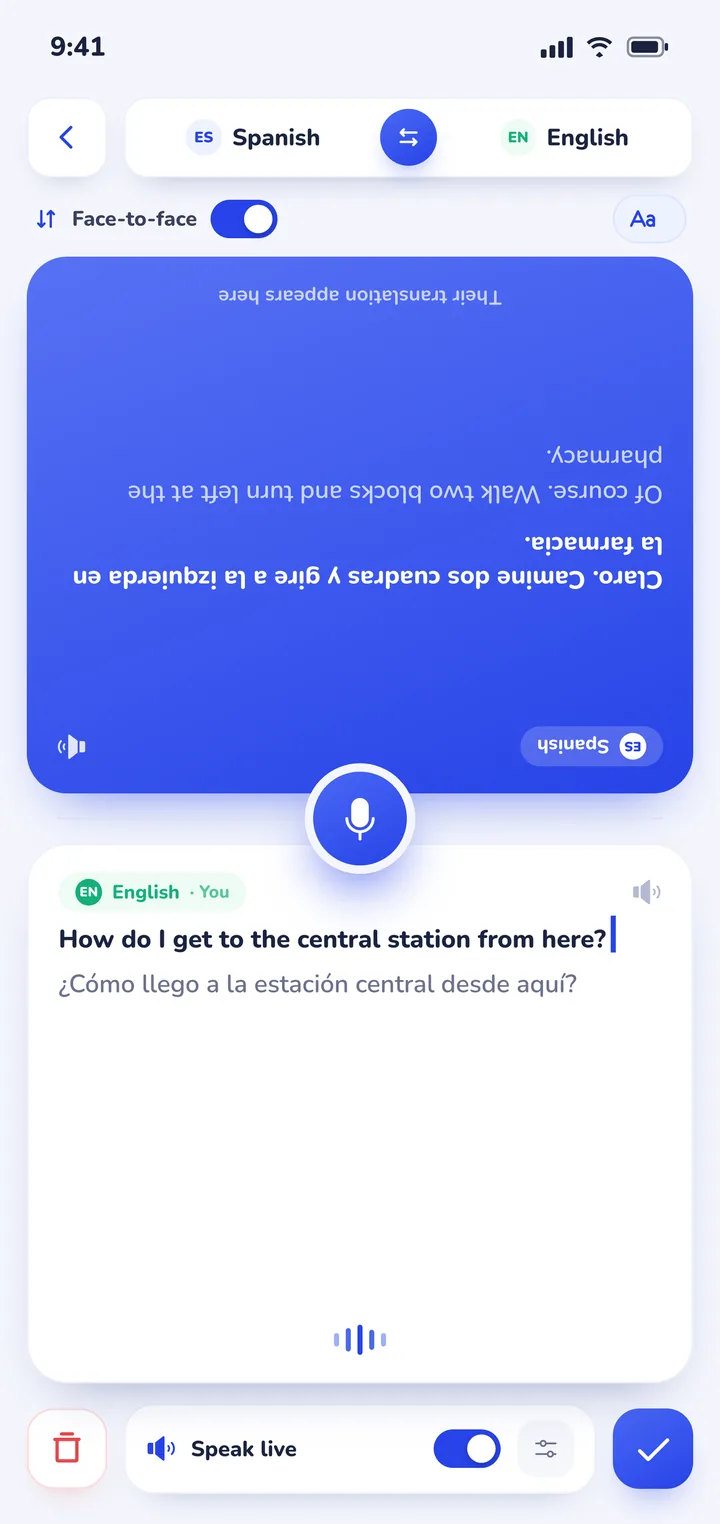
In conversation mode, Clawmium Translate divides your smartphone screen into two separate viewports. You set the phone flat between you. One half faces you in your language, while the opposite half inverts 180 degrees so the person sitting across from you reads their own translation without awkward phone passing. To understand how shared screen layouts compare to passing a handset back and forth, read our guide to using a conversation translator face to face.
The app automatically detects which person is speaking, transcribes speech continuously in rolling audio buffers, and displays translated text in fractions of a second. When you finish your conversation, Clawmium Translate saves the full two-way transcript locally and creates an automated AI summary highlighting key decisions, agreements, and directions.
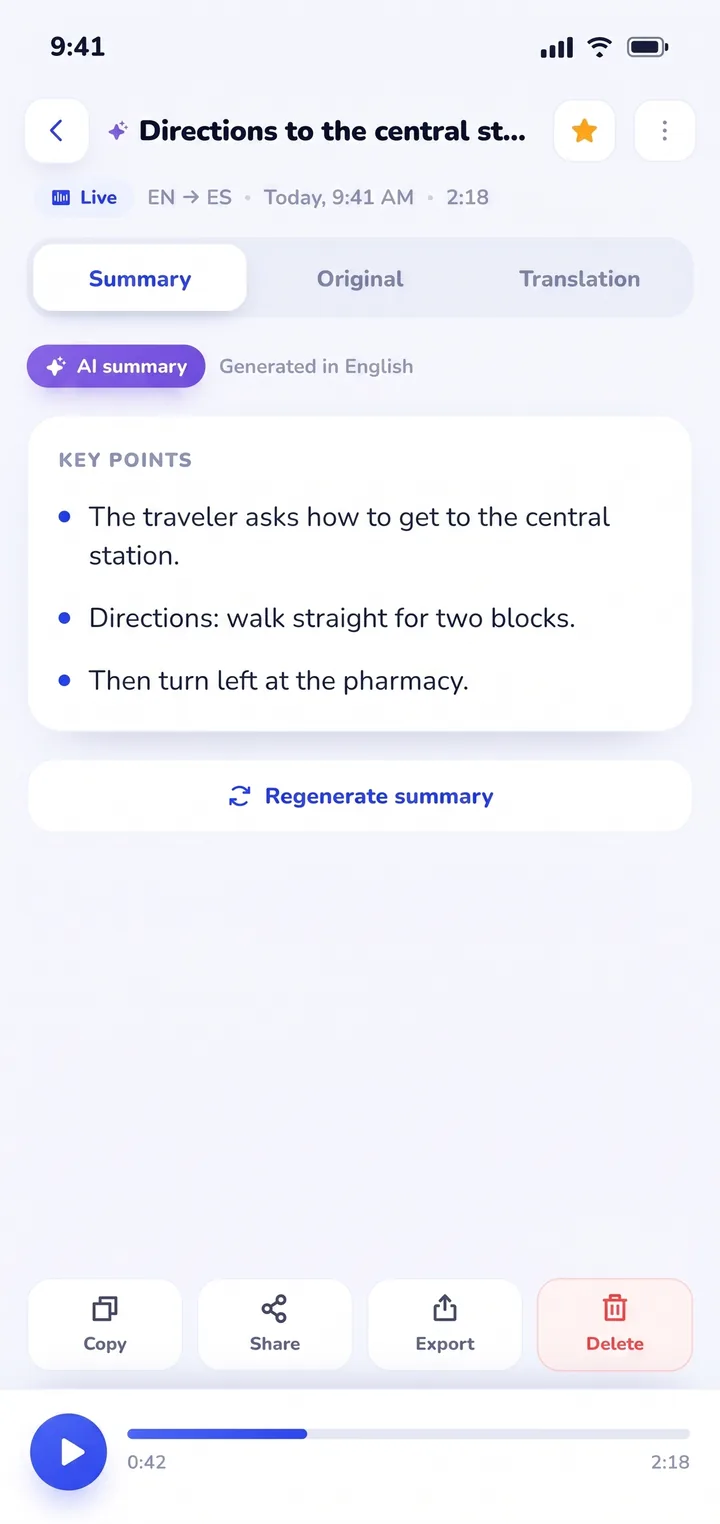
Clawmium Translate runs on both Android and iPhone, supports more than 60 languages, and is completely free of ads. It provides a daily allowance for live translation that resets every morning, with an optional Pro tier if you need higher conversation limits.
It requires an active internet connection to run its cloud neural models and doesn't offer an offline speech mode. To see how cloud speech translation compares with hardware gadgets, read our breakdown of two-way translator device vs phone app options, or explore our roundup of apps that translate in real time.


How to handle remote calls when you don't have a supported phone
If you need to communicate with someone abroad over the phone but neither participant owns a Samsung Galaxy S24, Google Pixel, or iPhone 15 Pro, these practical methods provide workable alternatives:
- Switch to text messaging with translation: Rather than struggling with poor call audio, use messaging platforms like WhatsApp, Telegram, or Apple Messages. Both iOS and Android let you translate incoming and outgoing text messages directly in the chat keyboard, eliminating speech recognition errors.
- Use live transcription captions on your computer: For business discussions, conduct your meeting over Zoom, Microsoft Teams, or Google Meet on a laptop. These desktop platforms provide live cloud captions and real-time translation built into their software, which bypasses mobile microphone restrictions entirely.
- Send voice notes: If live voice conversation is difficult, exchange voice memos on messaging apps. You can listen to the memo, paste the transcript into a translation tool, and respond with your own translated voice message.
- Meet in person with a face-to-face translator: Whenever communication happens in the same physical location, put your phone on the table and let a dedicated dual-view app handle the exchange.
Sources
- Samsung Support, How to use Live Translate on Samsung Galaxy phones, updated 15 July 2025, checked 23 November 2026.
- Apple Support, Use Apple Intelligence on iPhone, updated 20 September 2025, checked 23 November 2026.
- Google Pixel Help, Translate text and speech with Google Pixel Live Translate, updated 18 August 2025, checked 23 November 2026.
- Android Developers Documentation, Audio capture permissions and microphone sandboxing, checked 23 November 2026.
- Apple Developer Documentation, AVAudioSession security and background audio restrictions, checked 23 November 2026.
Frequently asked questions
Can I download an app to translate my phone calls?
No standard third-party app downloaded from Google Play or the App Store can translate live cellular phone calls. Android and iOS security policies prevent non-system apps from recording or listening to phone call audio. Only built-in manufacturer dialers on select Samsung Galaxy, Google Pixel, and Apple devices can translate live telephone calls.
How do I translate a phone call on a Samsung Galaxy?
On compatible Samsung devices (Galaxy S24, S25, Z Fold 6, and Z Flip 6), place a call using the native Phone app, tap Call Assist on the screen, and select Live Translate. The phone speaks your translations out loud to the other person and displays an on-screen transcript in real time.
Can WhatsApp calls be translated live?
WhatsApp calls cannot be translated live in real time by third-party apps. While some phone makers like Samsung support Galaxy AI translation in select VoIP apps, third-party store utilities cannot intercept WhatsApp voice streams. The most reliable solution for WhatsApp is translating text messages within the chat window.
Does Clawmium Translate work on phone calls?
No. Clawmium Translate does not translate phone calls. It's designed specifically for in-person, face-to-face spoken conversations between two people sharing a single smartphone. It splits the screen into two facing viewports, detects who is talking automatically, and saves a bilingual transcript with an automated AI summary.
Try face-to-face spoken translation
Free to start. 60+ languages. Put the phone between two people and talk.